
Block Silhouette
Turns the picture into a flat two-colour silhouette on a block grid, like a neon poster: blocks darker than Threshold take Ink, the rest Paper (Invert swaps them); Marks adds dots or crosses on their own grid in the opposite colour.
Group: Analog & Glitch · How to add an effect
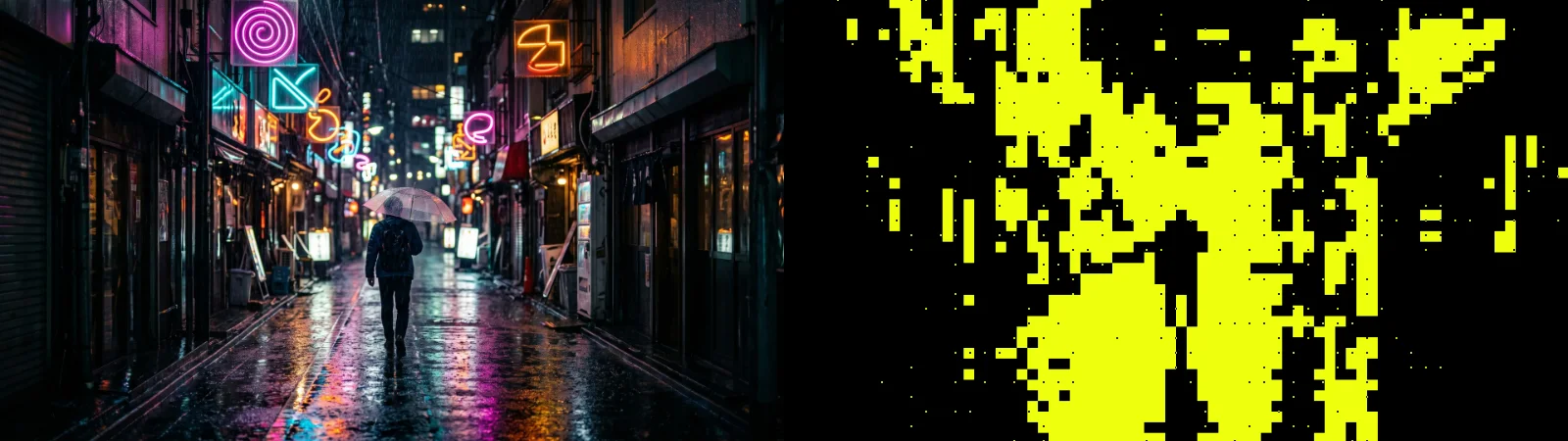
A short page made from the editor’s effect catalog: what the effect does and its controls. Tips and its node setup will follow.
Presets: Neon Yellow · White on Black · Big Pixels · Blueprint. Pick one in the Preset row of the effect card.
Controls
Section titled “Controls”| Control | Range | Default |
|---|---|---|
| Silhouette | ||
| Block Size | 4 to 120 px | 26 px |
| Measure | Brightness, Differs from edge | Brightness |
| Threshold | 0 to 1 | 0.2 |
| Invert | 0 to 1 | 0 |
| Marks | ||
| Marks | None, Dots, Crosses | Dots |
| Grid Size | 4 to 200 px | 36 px |
| Mark Size | 1 to 24 px | 4 px |
| Mark Area | Edges, Ink, Paper, Everywhere | Edges |
| Mark Amount | 0 to 1 | 0.5 |
| Mark Opacity | 0 to 1 | 1 |
| Color | ||
| Ink | a colour | #000000 |
| Paper | a colour | #eeff0d |
| Mix | ||
| Seed | 0 to 9999 | 0 |
| Amount | 0 to 1 | 1 |
Technical details
Section titled “Technical details”How effects are stored, rendered and exported: Effect system. Its building blocks: Node Catalog.