
Memory Leak
Shows bytes the editor’s video decoder left in memory as pixels: real data, not noise, for databending glitches.
Group: Analog & Glitch · How to add an effect
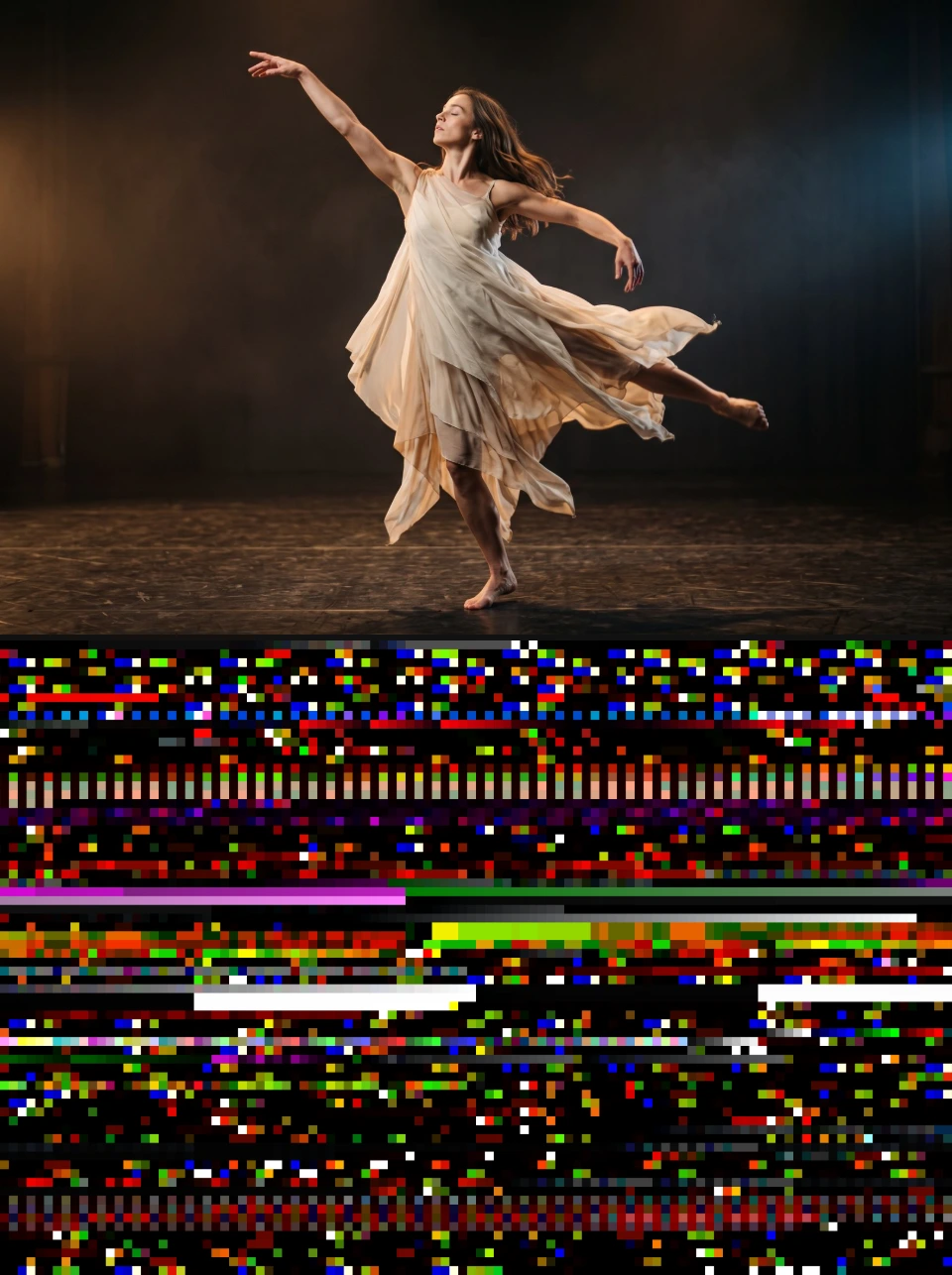
Use it for: databending and digital-decay glitches · a computer “looking inside itself” · short hard glitch cuts.
- Feed Clip (a button in the card) – decodes the first two seconds of the selected clip, so its frames end up in that memory. Nothing is written back; files above 512 MB are rejected.
- Block Width – how many memory pixels fit across; fewer gives bigger blocks.
- Bit Depth – how bytes become colour: Zesty (8-bit), Cloudy (16-bit) or Tripping (32-bit float).
- Per Frame – hold the block, advance through memory (the default), or jump each frame. Reshuffle picks a random Offset and Seed.
- Freeze – stores the current block with the project, so it looks the same in every session and in the export; Unfreeze returns to the live memory.
Tip: lower Mix to lay the glitch over the clip.
Controls
Section titled “Controls”| Control | Range | Default |
|---|---|---|
| Memory | ||
| Block Width | 8 to 1024 | 320 |
| Bit Depth | Zesty (8-bit), Cloudy (16-bit), Tripping (32-bit float) | Zesty (8-bit) |
| Offset (MB) | 0 to 4096 | 0 |
| Motion | ||
| Per Frame | Hold block, Advance, Shuffle | Advance |
| Advance (KB) | 1 to 65536 | 64 |
| Seed | 0 to 9999 | 1 |
| Style | ||
| Float Mapping | Clamp, Wrap, Absolute | Wrap |
| Float Gain | 0.001 to 1000 | 1 |
| Ignore Alpha | on or off | on |
| Mix | 0 to 1 | 1 |
The effect card also has controls of its own that this table does not list.
Node setup
Section titled “Node setup”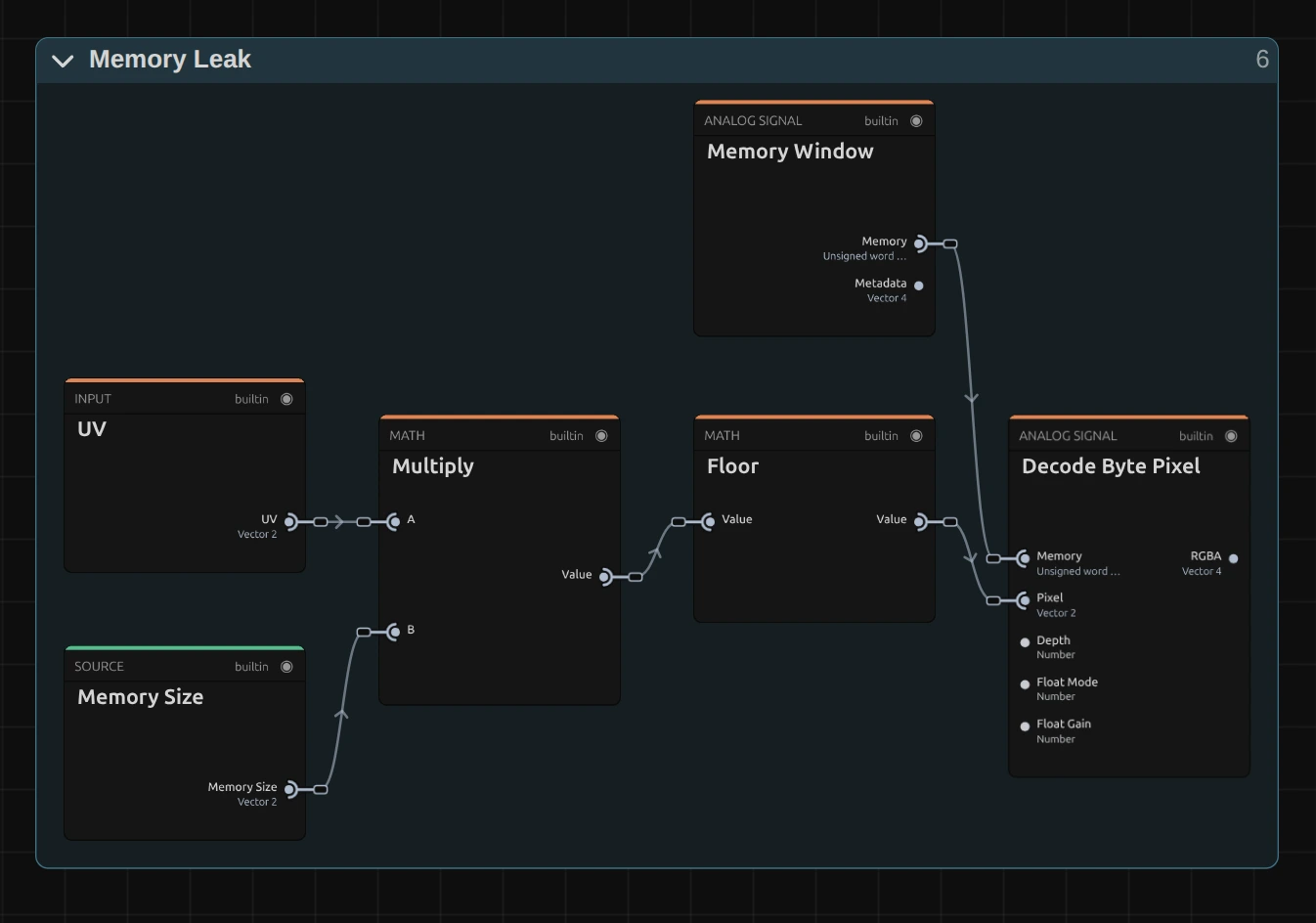
Memory Leak is a small image graph that turns bytes into pixels. Memory Window holds the block of memory that Block Width, Offset and Per Frame choose. Multiply (1) stretches the picture’s UV (0–1 across and down) to the size of that block in memory pixels, Floor snaps it to whole memory pixels, and Decode Byte Pixel (2) reads the bytes there as a colour, as the Bit Depth says. After that a Mix lays the result over the clip.
Remix: for vertical stripes, put a Split Vector on UV, build a new UV with a 2-part Combine Vector (X from the split, Y from a Value of 0) and plug it into input A of Multiply (1). Every row then shows the first row of memory, so the picture becomes vertical stripes.
Technical details
Section titled “Technical details”Where the bytes come from
Section titled “Where the bytes come from”Browsers clear every fresh piece of memory, so reading leftover memory like a native plug-in is impossible. The FFmpeg decoder that runs inside the editor (WebAssembly) is the exception: freed memory keeps its old contents until it is overwritten. After FFmpeg has read and decoded something, its memory still holds packet fragments, frame planes, tables and strings. The effect reads that memory directly and never writes to it.
- The picture depends on what ran before in this session, so it differs per session and machine, and after every FFmpeg export or Feed Clip.
- A fresh decoder has written only a few megabytes of its first 32 MB. The effect scans the memory once per FFmpeg run into a map of filled 64 KB pages (at least 2 % non-zero) and walks only those, so the block never scrolls into empty memory. Without a fed clip most of it is grey noise with a few structured regions; Offset picks them.
- Preview and export in the same session read the same bytes, so an export matches the preview as long as no FFmpeg command runs in between. Use Freeze for stability across sessions.
- The frame index for Advance and Shuffle comes from the effect’s timeline time and the composition frame rate, so scrubbing, playback and export show the same block for the same frame.
Values and warnings
Section titled “Values and warnings”Bit Depth Zesty reads 4 bytes per pixel as RGBA8, Cloudy 8 bytes as four 16-bit channels, Tripping
16 bytes as four floats (Float Mapping clamps, wraps or takes the absolute value; NaN and infinity
show as holes). Offset wraps around the memory length. Keyframes and tools can set values beyond the
ranges; the inspector and the tool results say what renders instead: Block Width outside 8–1024, a
negative Offset or Advance (read as 0), Float Gain below 0.001 (float pixels come out almost black),
Mix outside 0–1, an unknown Bit Depth (8-bit) or Per Frame (the block holds). Mix blends straight
colours, so Mix below 1 over transparency gets darker. FFmpeg loads by itself the first time the
effect renders or its card opens. The card’s status line names the memory in use, the FFmpeg run
and the fed clip (for example FFmpeg heap 4.2 MB used of 32.0 MB · run 3 · fed clip.mp4).
A frozen block is kept in the project folder, or in the browser when no folder is open. With a moving Per Frame mode the frozen block is walked within itself.
Key files
Section titled “Key files”src/effects/generate/memoryLeak/:index.ts(definition, uniforms),shader.wgsl,memoryWindow.ts(window and offset maths, tested intests/unit/memoryLeakWindow.test.ts),memorySource.ts(live memory or frozen block),heapSource.ts(load, feed, freeze),MemoryLeakControls.tsx(the card’s own controls).src/effects/_shared/byteTexture.ts: the byte-block upload for any effect that declaresbyteTexture.src/engine/ffmpeg/FFmpegBridge.ts:getHeapState()(a liveHEAPU8view and an epoch that counts FFmpeg runs) andsubscribeHeap().- A frozen block is a project artifact of type
application/x-masterselects-memory-window; its id sits in the hiddensnapshotparameter. - Debugging:
Logger.enable('MemoryLeak')andLogger.setLevel('DEBUG')log the resolved window per render.
More: Effect system (the byte-texture binding).