
Scanlines
Lays fine horizontal lines over the picture, like an old TV or computer monitor. They can roll slowly up the picture.
Group: Analog & Glitch · How to add an effect

Use it for: a retro screen or surveillance look · footage that should look filmed off a monitor · a texture behind titles.
- Density – how many lines: 5 gives about 80 lines from top to bottom.
- Opacity – how dark the lines are.
- Scroll Speed – lets the lines roll slowly up the picture.
Tip: lines too close to show at the current size blend into an even darkening instead of flickering, so a small preview can look smoother than the full-size export. Judge Density at full size.
Controls
Section titled “Controls”| Control | Range | Default |
|---|---|---|
| Density | 1 to 20 | 5 |
| Opacity | 0 to 1 | 0.3 |
| Scroll Speed | 0 to 5 | 0 |
The effect card also has controls of its own that this table does not list.
Node setup
Section titled “Node setup”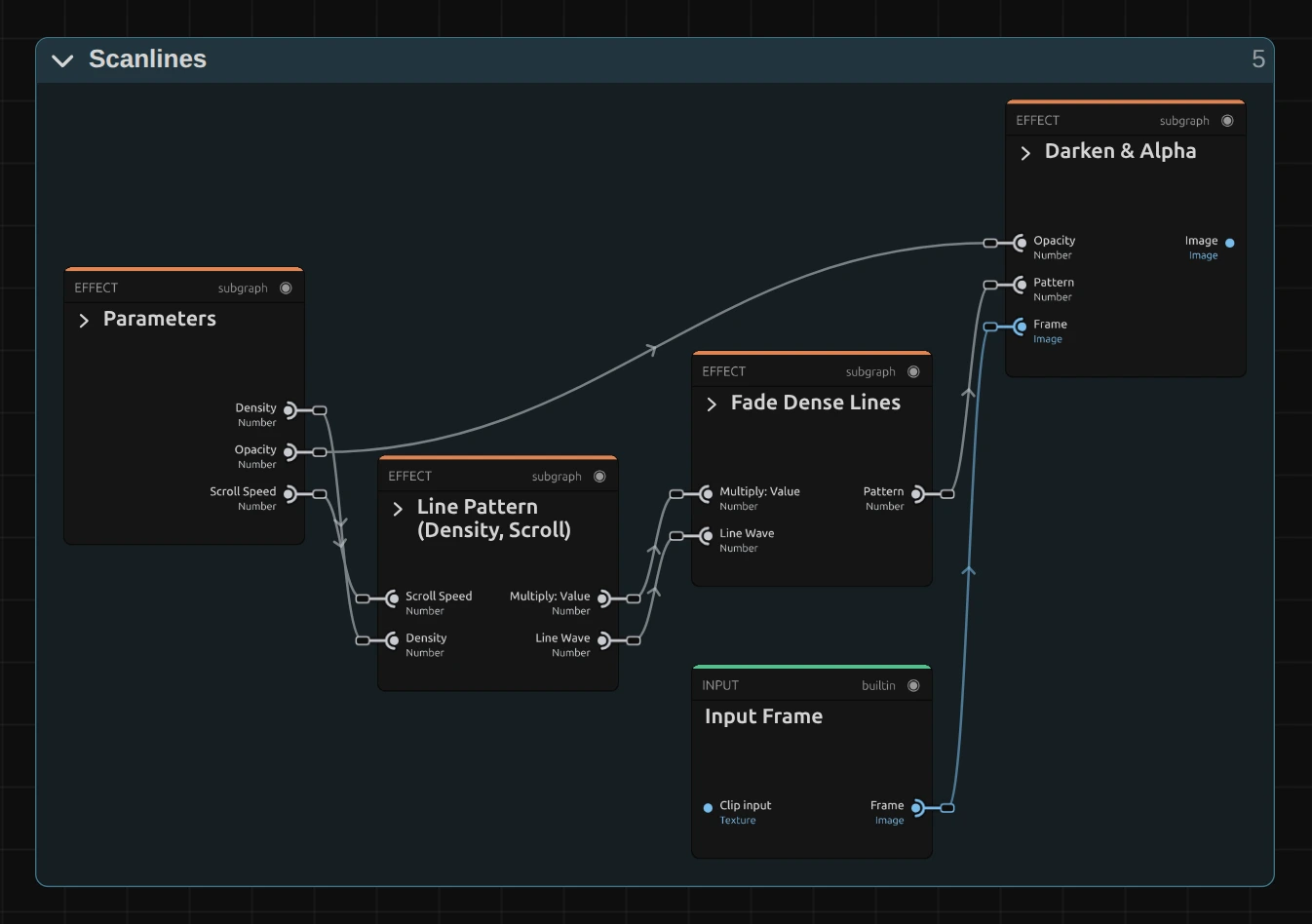
Line Pattern makes a sine wave down the frame height, its frequency from Density and its phase moving with time × Scroll Speed. Fade Dense Lines blends lines that are too close to show into their even average, and Darken & Alpha darkens the picture by the pattern times Opacity.
Remix: for vertical lines, open Line Pattern (Density, Scroll) and drag the cable from the X output of Split Vector into the Add, in place of Y. The lines now run from top to bottom, and Scroll Speed moves them sideways.
Technical details
Section titled “Technical details”- Pattern.
0.5 + 0.5 · sin((v + time · Scroll Speed · 0.1) · Density · 100)over the frame height v (0–1), so Density 5 gives about 80 lines at any resolution. - Dense lines fade into their even average below a 4 px line spacing (fully at 2 px), and the effect card says so. Opacity is limited to 0–1.
- Saved projects. A Scanlines saved before 2026-10-21 keeps its earlier look, which can flicker with very dense lines; its card offers Use the new Scanlines. The Scanline Glitch transition uses the current recipe.
- Software preview. The worker software preview fades too dense lines like the graph, but shows the Scanline Glitch transition’s lines without that fade.
- Shared notes on stylize recipes: Light & Stylize. Formulas: Effect system; blocks: Node Catalog.