
Weave
Draws threads of yarn in 3D: a net that weaves itself in, or a knitted jellyfish with pulsing ribbons. It draws its own picture above the clip, so put it on a black or transparent clip, or over footage as a veil.
Group: 3D & Particles · How to add an effect
Use it for: a net or a veil that weaves itself in front of a performer · a slow, breathing creature of yarn (the Qualle preset) · textile and handmade looks in a projection.
- Form – a woven net or a knitted jellyfish.
- Weave Speed – how fast the threads are pulled in.
- Reveal – how much of the net has grown, from the middle out.
- Color – the colour of the yarn.
Tip: the net starts weaving with the clip. To start it on a cue, move the clip there; to grow it from the middle instead, keyframe Reveal from 0 to 1.
Presets
Section titled “Presets”Pick one in the Preset row of the effect card. It sets all controls at once, in one undo step, and the row then shows its name until you change something. A control with keyframes keeps them, and the card says so.
Burlap – pale, coarse yarn in a crooked weave: the threads wander and bunch, leaving uneven gaps, and the corners have frayed away, so it reads as a rough, torn piece of sacking. It weaves itself in a little faster than the default and drifts in a light wind.
Red Sail – an even, deep red cloth in strong wind: it bows to one side and sways with each gust. It is woven in after two seconds; strong on a dark stage and under warm light.
Nest – only a round patch of brown wool grows, very uneven, with a swollen, frayed rim. It looks like a bird’s nest or a woven basket seen from above.
Qualle – a knitted bell of cream yarn with long ribbons below it. The bell pulses slowly and the ribbons curl at their ends, like a jellyfish drifting in place. It is the ribbon motion of the MasterSelects animation Qualle (German for jellyfish).
Controls
Section titled “Controls”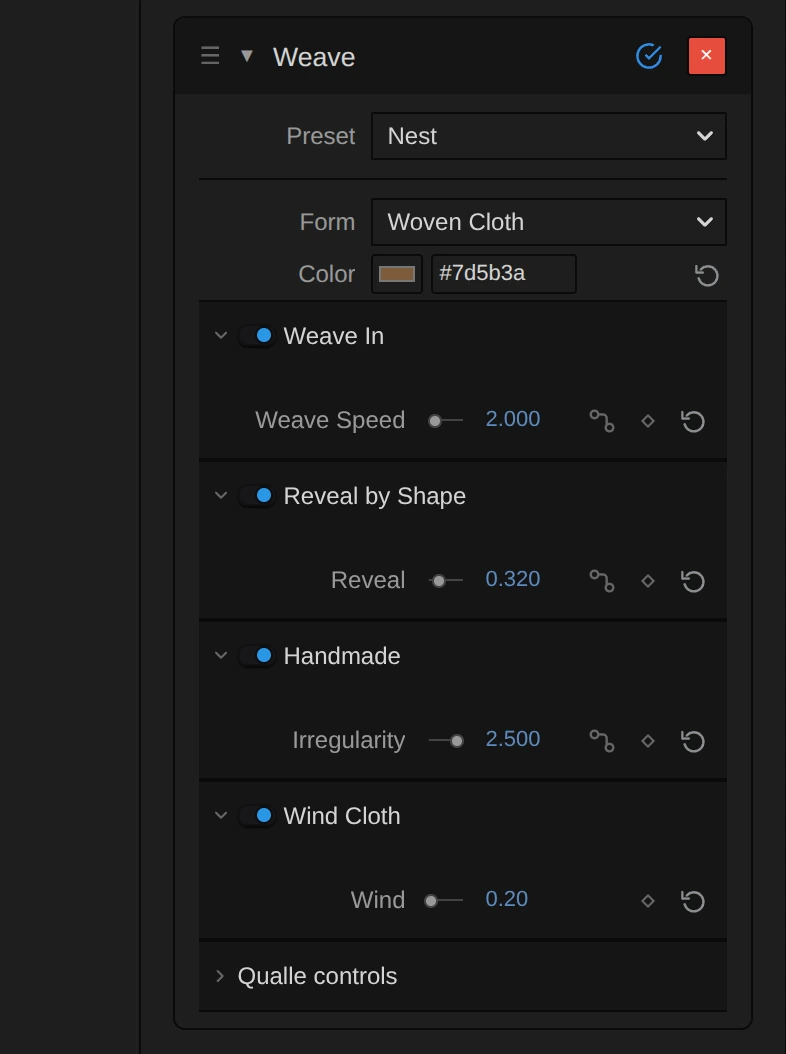
Preset – sets every control at once to one of the looks above.
Form and color
Section titled “Form and color”Form – which structure Weave draws. Woven Cloth is a sheet of plain-woven wool, about two thirds of the frame wide and turned three quarters to the camera, that weaves itself in over the first seconds of the clip and then hangs in a light wind. Qualle is a knitted jellyfish standing upright in the frame, whose bell pulses and whose ribbons curl. Each form has its own controls below; the controls of the other form wait folded in one closed section at the end of the card (Qualle controls or Woven Cloth controls). Once you change the node setup in the Nodes tab, Form leaves the card. Woven Cloth, Qualle, default Woven Cloth.
Color – the colour of the yarn. It is lit like wool, so the threads are darker in the shadows and catch a soft highlight; pale colours read best on black, a deep red or blue glows under stage light. Both forms use it: a colour, default #8a857c.
Weave In
Section titled “Weave In”Weave Speed – how fast the threads are pulled into the sheet, warps first, then the wefts row by row. At 1 the net is finished after four seconds, at 2.5 after about one and a half, at 0.5 after eight; at 0 the sheet stays empty. The weave runs with the playhead from the start of the clip, so scrubbing and the export show the same moment. Keyframe it to speed the weave up or slow it down: the net keeps the threads it already has and goes on at the new speed, without a jump, and a key at 0 pauses it. To start later, move the clip. 0 to 10, default 1.
Reveal by Shape
Section titled “Reveal by Shape”Reveal – how much of the net exists, as a sphere growing from its middle. Below 1 only a round patch is there, with a swollen, frayed rim where it grows; 0.3 gives a small disc, 0.6 rounds off the corners, 1 shows the whole sheet. Keyframe it from 0 to 1 for a net that grows out of nothing. 0 to 1, default 1.
Handmade
Section titled “Handmade”Irregularity – how hand-made the cloth looks. At 0 the threads run straight and evenly spaced, like machine linen; 1 lets them meander a little, pull with uneven tension and thicken in places. The wander grows with the square of the value: 2 is clearly uneven, and at 3 the threads bend and bunch so the gaps between them differ by more than half, a loose, crooked net. 0 to 3, default 1.
Wind Cloth
Section titled “Wind Cloth”Wind – how hard the wind blows into the sheet, which is held at its four corners. Because the sheet is turned three quarters to the camera, its bellying shows as a sideways bow of the threads, and the gusts make it breathe. At 0 it hangs flat and still; 0.5 bows it gently; at 2 it bellies out hard and its free edges sway with every gust. The bow grows quickly at first and then slowly, because the corners hold the cloth: above 1 it mostly gusts harder. The sheet’s motion is simulated from the start of the clip, and keyframes on Wind act inside that simulation: a gust you key in builds up, the cloth swings out and settles again, as in real air. Dragging Wind with the playhead far into the clip takes a moment per step, because the cloth is simulated again from the start. Values beyond the slider (from tools) are drawn and named in the card. 0 to 2, default 0.35.
Jellyfish Pulse
Section titled “Jellyfish Pulse”Pulse Rate – how often the bell contracts, in pulses per second. 0.4 is a slow, calm breath, about one pulse every two and a half seconds; 1.2 and more looks hurried. At 0 the jellyfish holds still and only its ribbons drift. Like Weave Speed, it can be keyframed: the pulse speeds up or slows down from where it is, without a jump. 0 to 2 Hz, default 0.4 Hz.
Pulse Size – how strongly the bell contracts and the body stretches with each pulse. At 0 the bell stays round; 0.3 is a gentle breath, 0.54 the full swimming stroke of the Qualle. 0 to 0.6, default 0.54.
Return Curls
Section titled “Return Curls”Curl Strength – how far the ribbons curl and swirl as they hang. At 0 they fall in smooth, calm loops; the default 0.063 gives a slow, organic drift; 0.15 throws them into wide loops on both sides, and 0.25, the end of the slider, is the widest swirl that still stays in the frame. The knitted bell stays untouched. 0 to 0.25, default 0.063.
Node setup
Section titled “Node setup”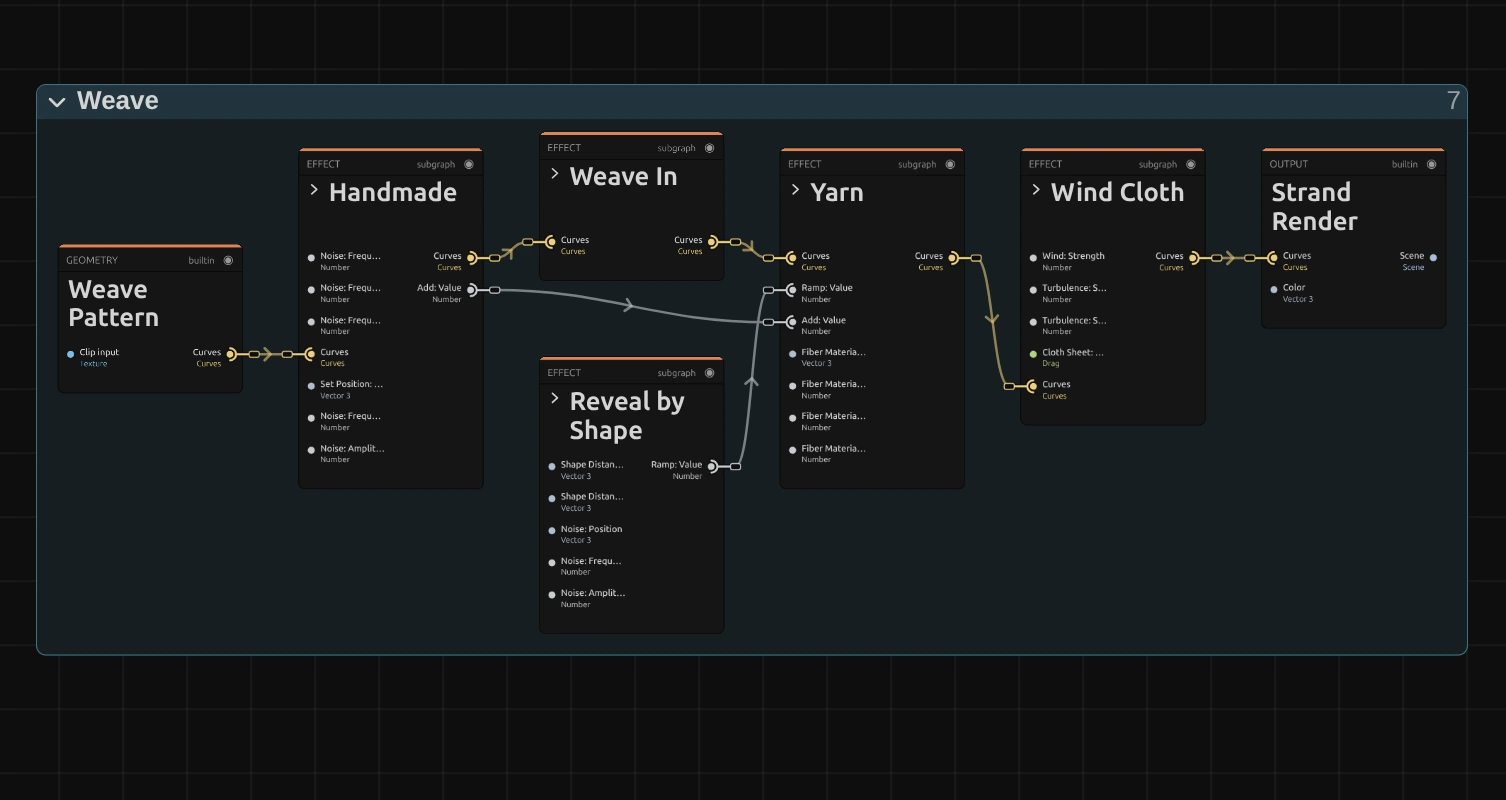
Weave works in five stages, one folder each in the Nodes tab. Weave Pattern lays out the threads of a plain weave as curves; Handmade makes them uneven, Weave In pulls them in over the first seconds, Yarn twists fibres around them, and Wind Cloth hangs them on a sheet in the wind, turned three quarters to the camera. Reveal by Shape sets how thick the yarn is, so it decides how much of the net exists. Strand Render draws the result as lit fibres. Click a folder’s header to open it; the sections below show what is inside. The Qualle form is a larger graph of its own, described at the end.
Inside Weave In
Section titled “Inside Weave In”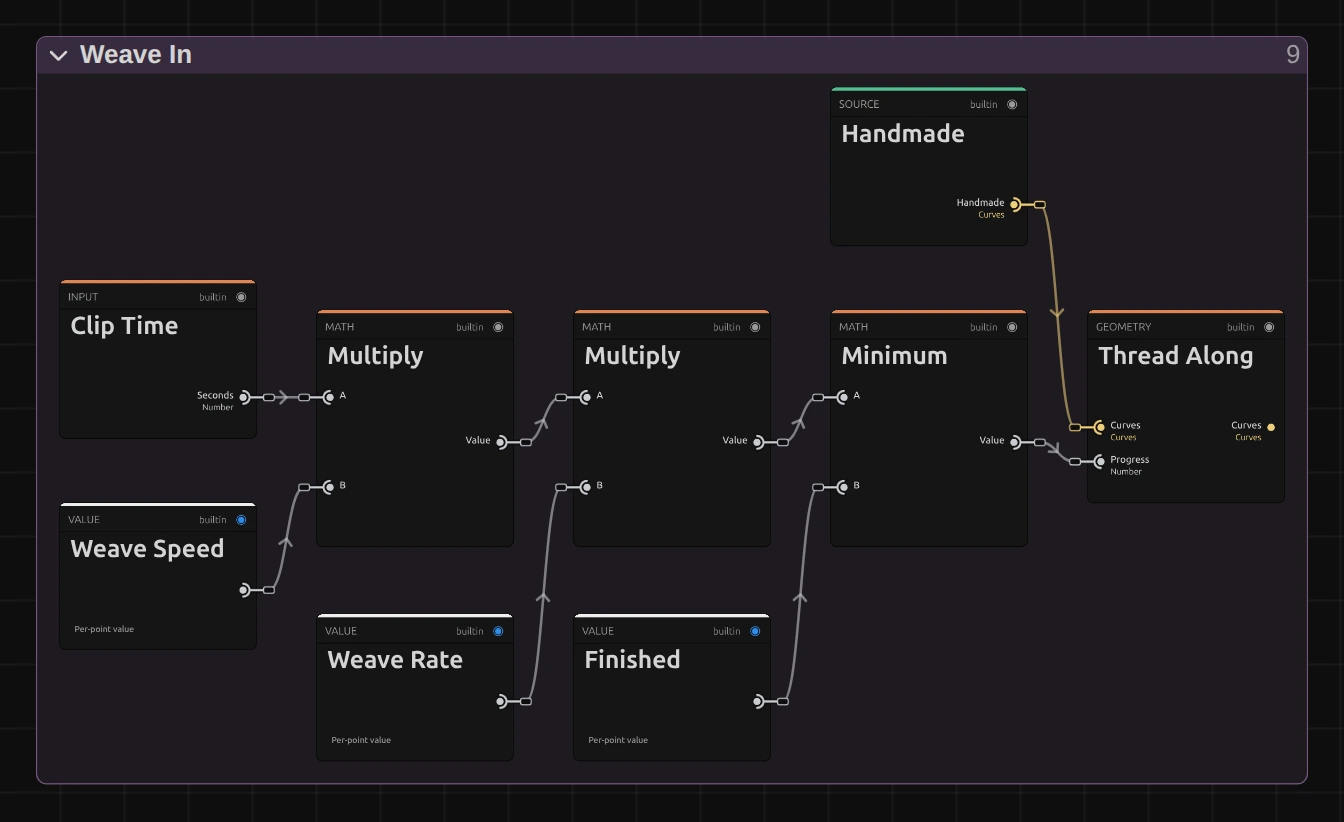
Multiply – the seconds since the clip started, times Weave Speed. The next Multiply scales it by Weave Rate 0.25, so at Weave Speed 1 the weave needs four seconds.
Minimum – keeps that progress at 1 (Finished) at most: once the net is done, it stays done, and the graph gives the same picture every frame after.
Thread Along – pulls every thread in along its path behind a tip that lifts off the sheet and settles with a soft swing: the upright warps first, then the wefts row by row. At progress 0 nothing is there, at 1 every thread lies in place.
Remix: set Weave Rate to 0.1: at Weave Speed 1 the net now takes ten seconds and you can watch every thread arrive.
Inside Reveal by Shape
Section titled “Inside Reveal by Shape”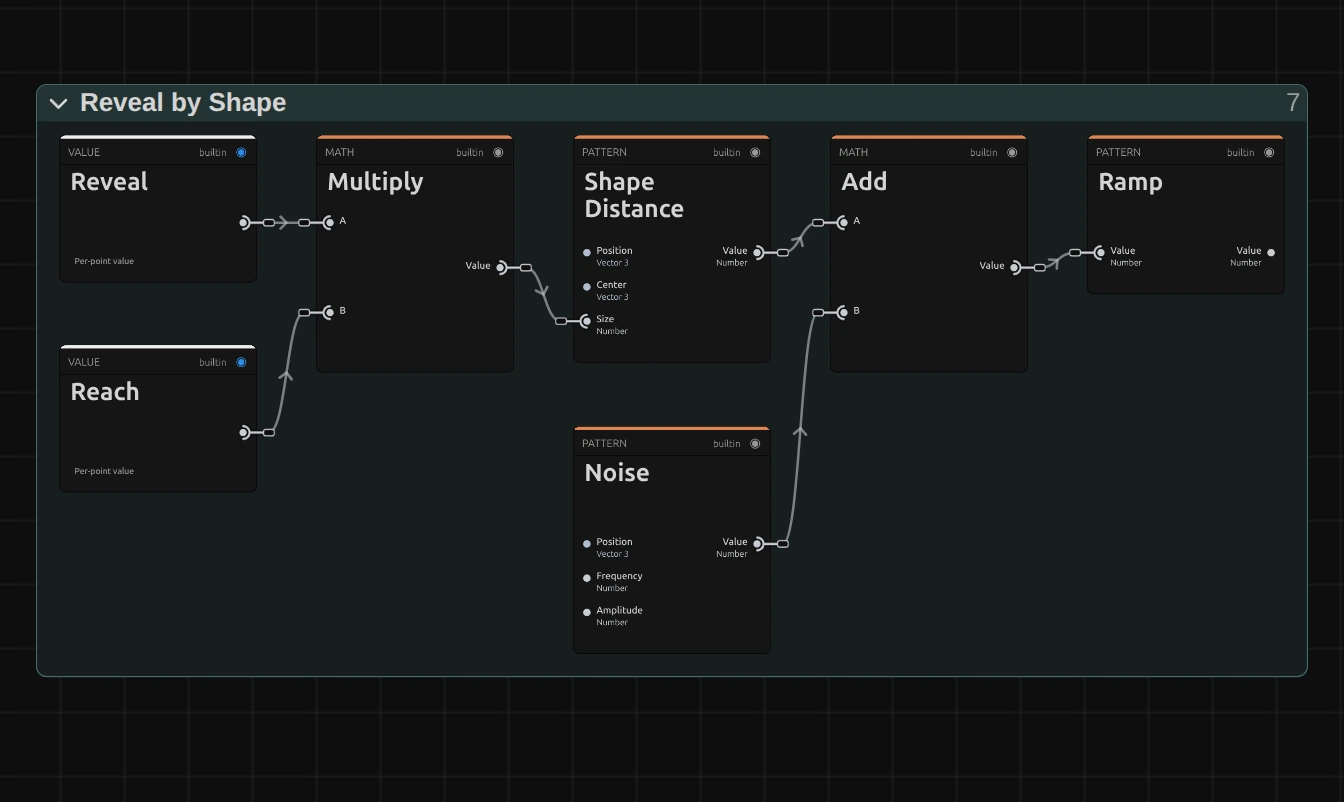
Multiply – Reveal times Reach 1.15, the radius of the sphere at Reveal 1: just past the corners of the sheet, so the whole range of Reveal grows the net.
Shape Distance – how far each point of the threads lies from the surface of a sphere in the middle of the sheet: negative inside, positive outside.
Noise – added to that distance, so the edge of the growing patch is ragged instead of a perfect circle.
Ramp – turns the distance into a thickness for the yarn: 1 well inside, 1.6 right at the edge (the swollen, frayed rim), 0 outside, where the yarn disappears.
Inside Handmade
Section titled “Inside Handmade”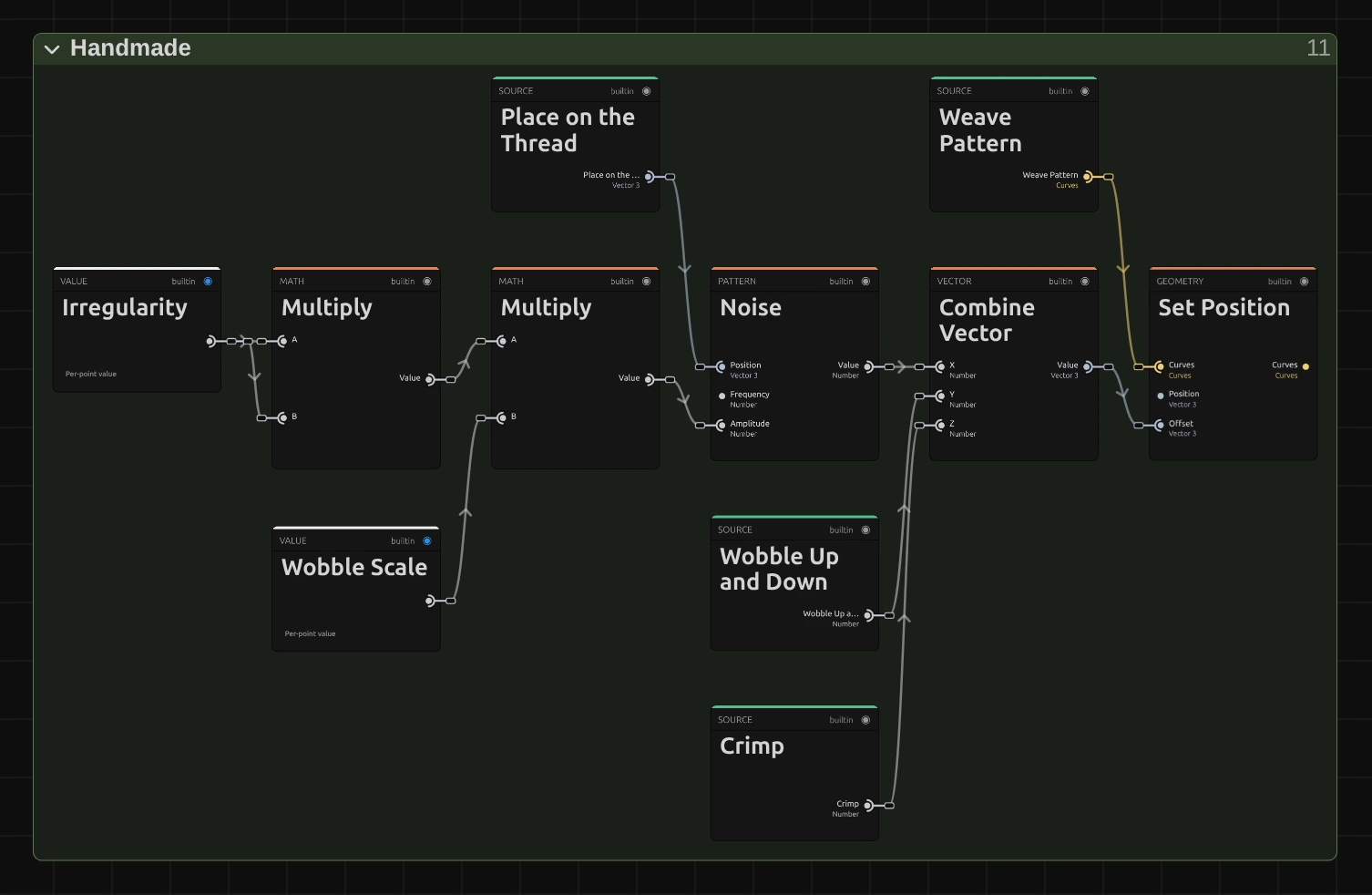
Multiply – Irregularity times itself, then the second Multiply times Wobble Scale 0.008: how far, in scene units, a thread may wander from its straight path. Squaring keeps 1 at the familiar look and makes 3 nine times as uneven.
Noise – a smooth, slow noise read at each place along the thread, different for every thread, so neighbouring threads wander apart and the spacing turns uneven.
Combine Vector – joins that sideways wander with the same wander up and down and with the Crimp: a per-thread tension, also scaled by Irregularity squared, that makes some threads arch more over and under than others.
Set Position – moves every point of the woven curves by that offset. A third path, not shown, swells the yarn in places (Slubs) and goes to Yarn.
Inside Yarn
Section titled “Inside Yarn”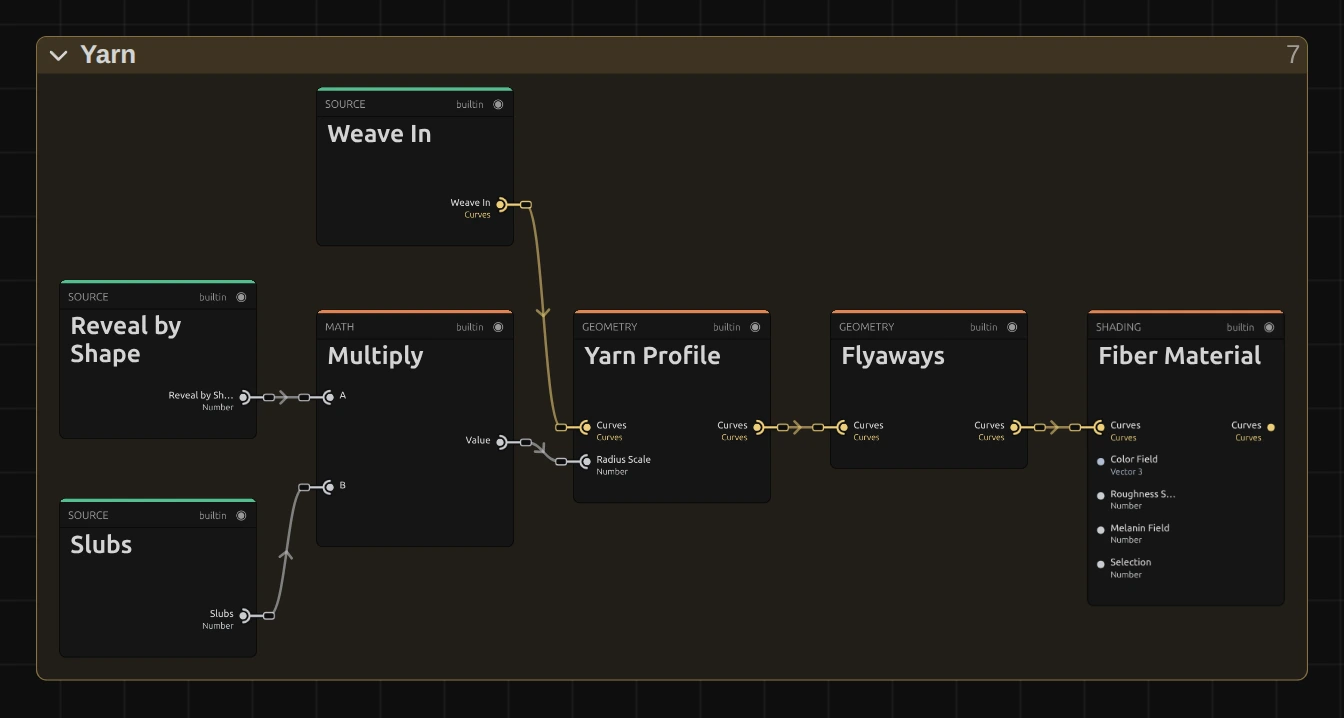
Multiply – the thickness from Reveal by Shape times the Slubs from Handmade: where the net is hidden the yarn has no thickness, at the edge it swells.
Yarn Profile – turns every thread into three plies of five twisted fibres, 0.028 scene units thick, so it reads as spun yarn rather than a line.
Flyaways – stray hairs and small loops that stand off the yarn, the fuzz that makes it look like wool.
Fiber Material – lights the fibres like wool, in the card’s Color.
Remix: in Yarn Profile, set Plies to 1 and Fibers to 1: the net turns into smooth, plastic-looking cord.
Inside Wind Cloth
Section titled “Inside Wind Cloth”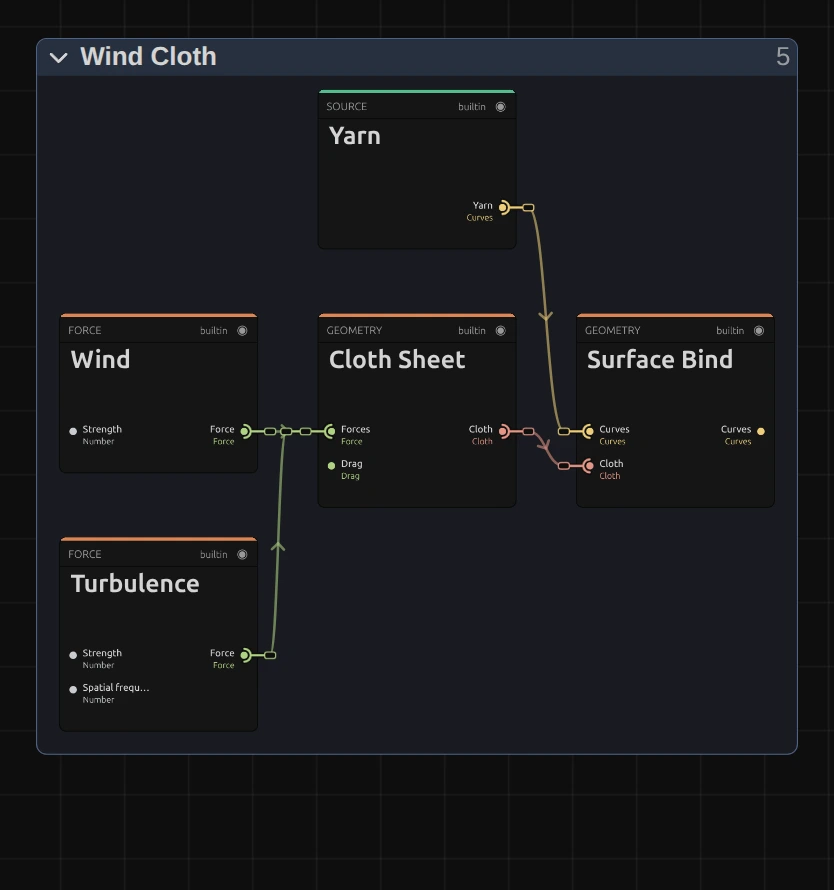
Wind – a steady wind with gusts, blowing into the sheet; its strength is the card’s Wind.
Turbulence – a swirling force that makes the sheet ripple unevenly.
Cloth Sheet – a simulated sail of 40 × 24 cells, held at its four corners. It is simulated from the start of the clip, so every frame shows the shape the wind has given it by then. Its Turn of 32° turns the finished sheet about its upright axis: head-on, the bellying would run straight at the camera and hardly show; turned, it bows the threads sideways. Turn does not change the motion itself.
Surface Bind – places the woven curves on the moving sheet, so the net bellies out and sways with it.
Remix: select Cloth Sheet and set Turn to 70: the sheet stands almost edge-on and the wind makes it ripple like a flag; 0 shows it head-on, as Weaves saved before Turn existed do.
Qualle form
Section titled “Qualle form”The Qualle form is a graph of about 160 nodes in nine folders: Closed Knit Body knits the bell and the closed courses of yarn, Tail Shape draws the loose loops in behind it, Loose Returns, Return Length and Return Curls let the ribbons wander and curl on both sides, Jellyfish Pulse contracts the bell and sends the wave down the body, Soft Head & Yarn Motion keeps it breathing, Cream Yarn gives it its fibres, and Upright Pose stands it up in the frame. Its folders share many values, so even with every folder closed its overview in the Nodes tab is a dense web of cables; the three folders that hold the card controls and the pose follow, each on its own. It is the ribbon motion of the animation Qualle, and only the ribbon values were taken over (the piece’s metamorphosis, scan overlay and particle wake were left out).
Inside Jellyfish Pulse
Section titled “Inside Jellyfish Pulse”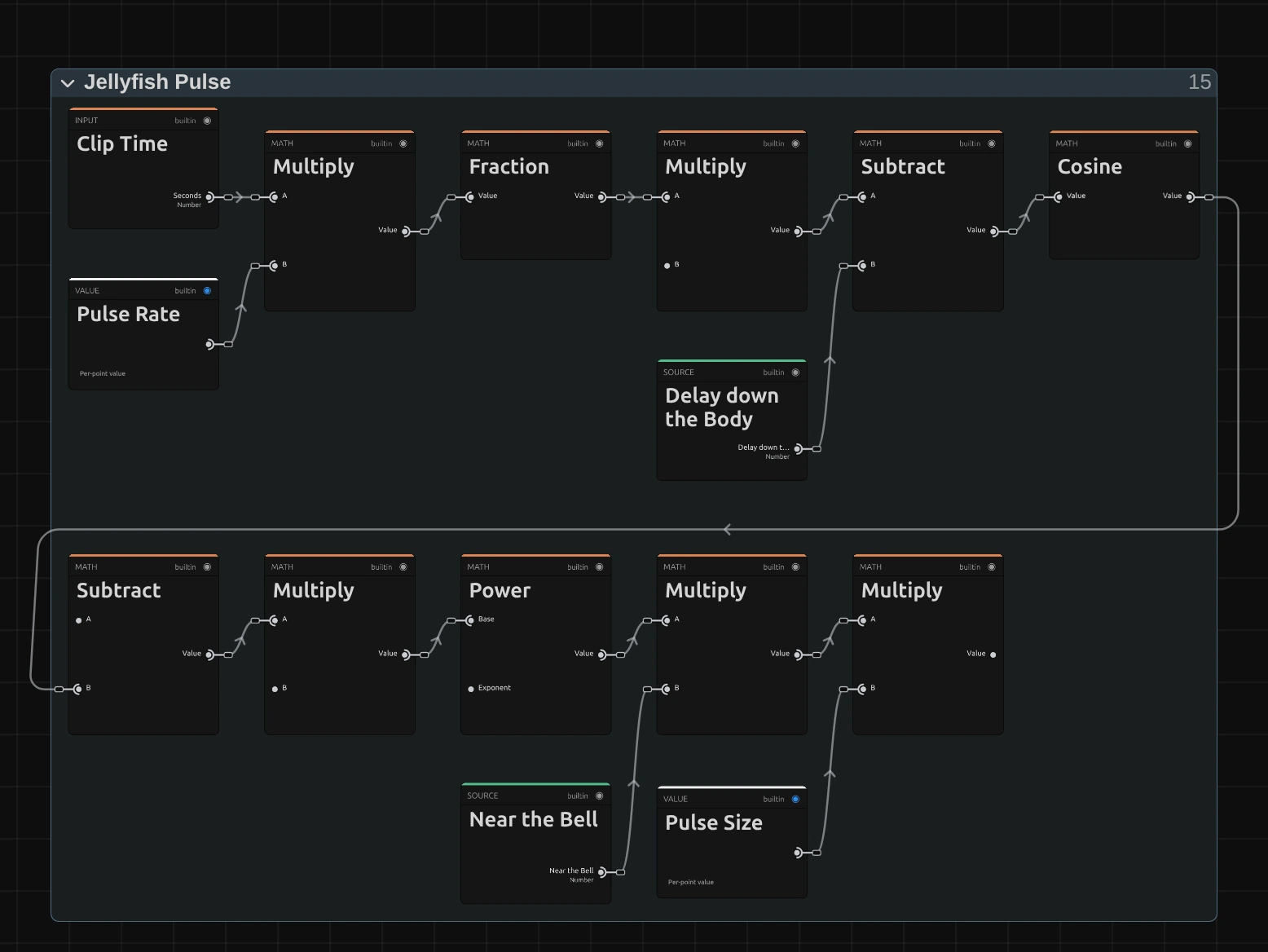
Fraction – the pulses counted so far (Clip Time times Pulse Rate) without their whole part: where the bell is within the current pulse, from 0 to 1. Further down the body the phase starts a little later (Delay down the Body), so the contraction runs down the ribbons as a wave.
Cosine – turns that phase into a smooth rise and fall.
Power – sharpens the wave into a short contraction followed by a long, slow release, the rhythm of a swimming jellyfish. Its exponent lies outside this picture.
Multiply – the beat from Power, weighted by how close a point is to the bell (Near the Bell, in the Multiply before it), times Pulse Size: how far each point is pulled in. Outside this picture that amount pulls the bell in and stretches the body.
Inside Return Curls
Section titled “Inside Return Curls”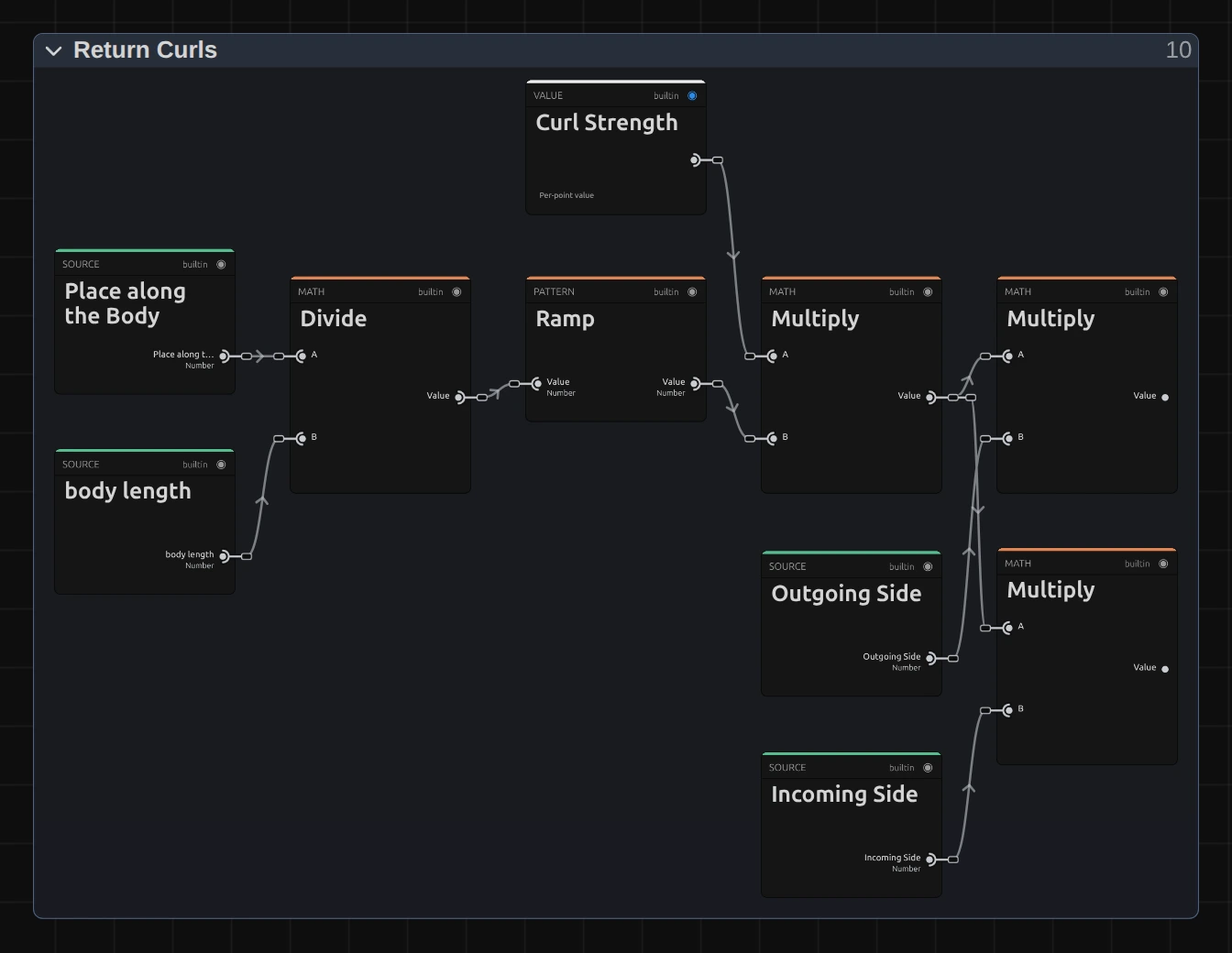
Divide – the place of each point along the body, divided by the body length: 0 at the bell, 1 at the end of the ribbons.
Ramp – keeps the bell free of curls and fades them in below it, so the knitted bell stays still while the ribbons swirl.
Curl Strength – the card’s control (0.063 in the piece).
Multiply – Curl Strength times the Ramp: how far an evolving curl noise may push each point. Two more Multiply cards split it between the outgoing and the incoming side of the ribbons, so they curl on both sides.
Inside Upright Pose
Section titled “Inside Upright Pose”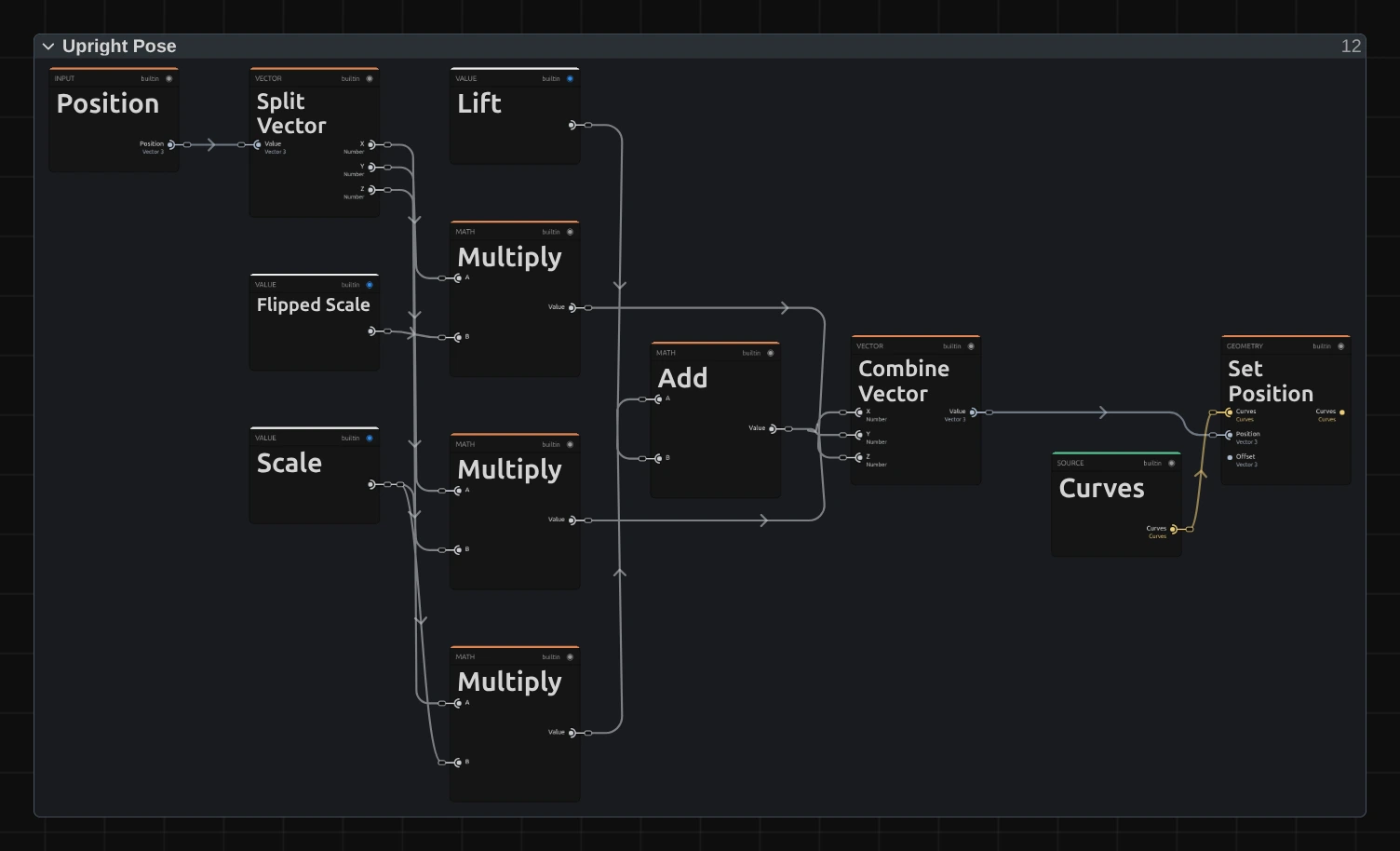
Split Vector – takes each point of the jellyfish body apart into X, Y and Z. The piece lies along its length; the Qualle form stands it up itself, because a preset cannot carry a clip transform.
Multiply – the body’s length becomes its height, scaled by Scale 0.42 so the jellyfish is about three quarters of the frame tall; the other two Multiply cards scale its width by the same Scale and turn its height into depth with Flipped Scale −0.42.
Combine Vector – puts the point back together, raised by Lift 0.22 (the Add card before it), so the bell sits near the top of the frame and the ribbons hang below it.
Set Position – moves every point of the body there, before the yarn is twisted around it.
Technical details
Section titled “Technical details”- Size. The sheet is 1.6 × 0.96 scene units, about two thirds of the frame wide with the default camera; the Qualle stands about three quarters of the frame tall. Scale and move them with the clip’s Transform.
- Time. Weave runs in the time of its clip: the weave-in, the wind and the pulse start at the clip’s start, and trimming or splitting the clip continues the motion instead of restarting it. Preview, scrubbing and export show the same frame for the same moment.
- Keyframed speeds. With keyframes, Weave Speed and Pulse Rate count the threads and pulses already made, so a ramp eases from where the weave or the pulse is instead of jumping. While a node or the Constant mode drives one of them, it runs at that value times the clip time, and the log says so.
- Transparency. The threads are drawn as an extra 3D layer above the clip with the clip’s transform and blend mode; around them the clip shows through. On a transparent clip only the threads remain.
- Saved projects. A Weave keeps the graph it was saved with. While that graph is one of the two forms as they are now, Form keeps working, and moving cards, renaming or folding folders in the Nodes tab is kept until you switch Form. Once you change the node setup in the Nodes tab, or switch a folder off with the switch in its card section, the graph is the Weave’s own: Form leaves the card and only the controls that graph uses stay. Weaves saved before Form existed keep their look this way, with their Reveal, Weave Speed and Irregularity. Such a Weave, or one built from another built-in graph such as Jellyfish, has no Form, so the presets can change little or nothing on it; the card says so. Its Preset row may still name a preset (often Burlap) when none of that preset’s controls is on the card. Its own exposed values keep the graph’s names and ranges.
- 3D scene. After adding the effect the preview can show “Preparing 3D scene” for a few seconds.
- More: Weave (all nodes, knots, ropes and the other built-in Weave graphs) · Node Catalog · Styles and presets.