
Data Hatching
Mixes cycling characters with diagonal hatching that thickens in darker areas; Cell Size sets character size, Speed the cycling.
Group: Text & Glyph · How to add an effect
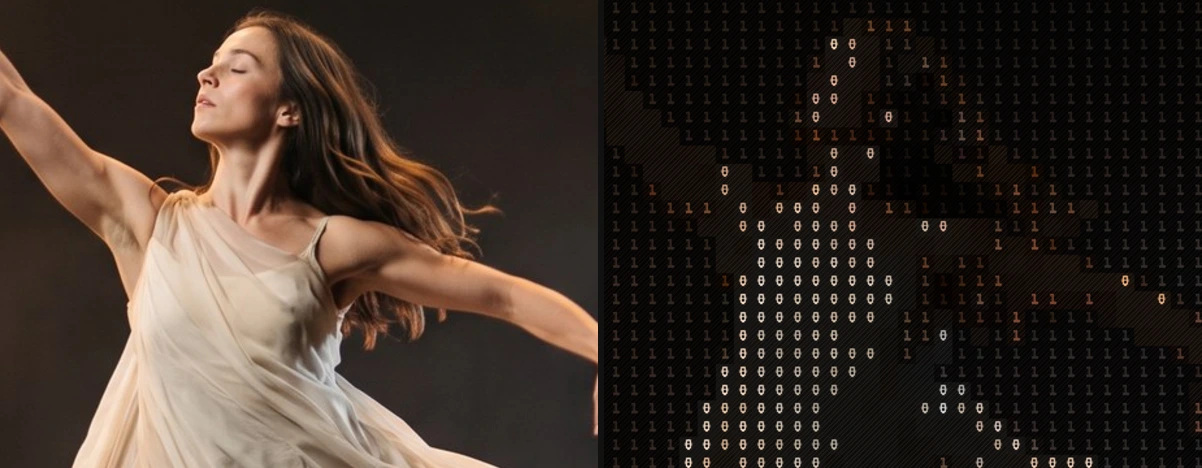
A short page made from the editor’s effect catalog: what the effect does and its controls. Tips and its node setup will follow.
Controls
Section titled “Controls”| Control | Range | Default |
|---|---|---|
| Grid | ||
| Cell Size | 4 to 72 px | 14 px |
| Style | ||
| Amount | 0 to 1 | 1 |
| Background | 0 to 1 | 0.2 |
| Black Level | 0 to 0.9 | 0 |
| Invert Ramp | on or off | off |
| Glyphs | ||
| Ramp (Used while Custom Ramp is empty) | Standard, Detailed, Blocks, Bars, Binary and 2 more | Binary |
| Custom Ramp | text | empty |
| Font | Monospace, Serif, Sans Serif | Monospace |
| Weight | 200 to 900 | 600 |
| Color | ||
| Color Source | Source, Duotone | Source |
| Dark (Used with Color Source Duotone) | a colour | #081018 |
| Light (Used with Color Source Duotone) | a colour | #e8fff5 |
| Motion | ||
| Speed | 0 to 5 | 1 |
| Roll | 0 to 1 | 1 |
Styles: the Style menu in the effect card switches to another look of the same engine. Controls you changed keep their values and keyframes when the new look has the same control, also under another name; the others start at the new look’s defaults. Looks of Text & Glyph: ASCII, Brand Generator, Contour Type, Creative UI Collage, Dither Glow, Dither Text, Glyph Matrix, Grid Glyph, Inscribe, Matrix Rain, Number Field, Pixel Code, Retro Matrix, Symbol Matrix, Tag Pills, Word Mosaic. Also: Stitch Poster (Textile & Craft).
Technical details
Section titled “Technical details”Data Hatching is one look of the glyph engine; its looks share one node setup. It changes over time: its picture depends on the playback time or on earlier frames. How effects are stored, rendered and exported: Effect system. Its building blocks: Node Catalog.