
Motion Trails
Leaves fading light streaks behind everything that moves, like a dancer turning under a spotlight. The streaks can take on a colour of their own.
Group: Keying & Time · How to add an effect
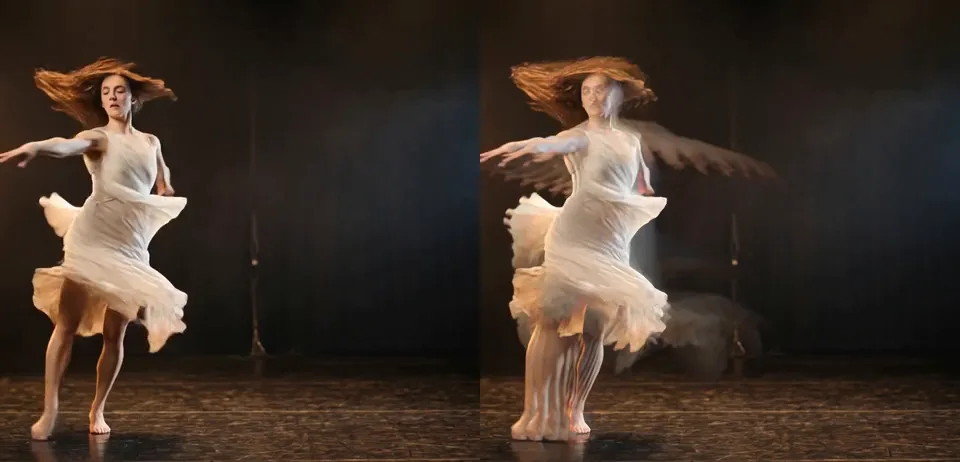
Use it for: streaks behind a dancer’s arms and skirt · light painting with a performer · a coloured wake behind every movement.
- Length – how long the streaks last.
- Softness – how much the older parts melt into one streak.
- Tint – how much they take on the Overlay colour.
Tip: the streaks are light over dark: they show on a dark stage and disappear in front of a bright wall. Lower the clip’s background with a colour correction before Motion Trails when the trails get lost.
Presets
Section titled “Presets”Pick one in the Preset row of the effect card. It sets Length, Softness, Tint and Overlay in one undo step, and the row shows its name until you change one of them. A preset also sets Amount back to 1 and History Loop back to Reset.
Light Trails – short pale streaks that fade within about a second. The default; good for most dance.
Light Painting – the streaks hardly fade (Length 0.995): every light movement stays on the stage for many seconds, so a turn paints a fan of arms and skirts that slowly fills the picture. Best for a slow solo; start it on a cue with the playhead before the move.
Neon Trace – the streaks turn cyan as they fade, like a neon sign switched off. Strong on dark costumes and for clubby, electronic music.
Embers – warm orange streaks with a soft, smoky edge that glow out slowly, like sparks from a fire.
Afterimage – a soft lavender haze of the poses of the last two seconds, melted together by a high Softness. Dreamlike; best for slow, wide movements.
Controls
Section titled “Controls”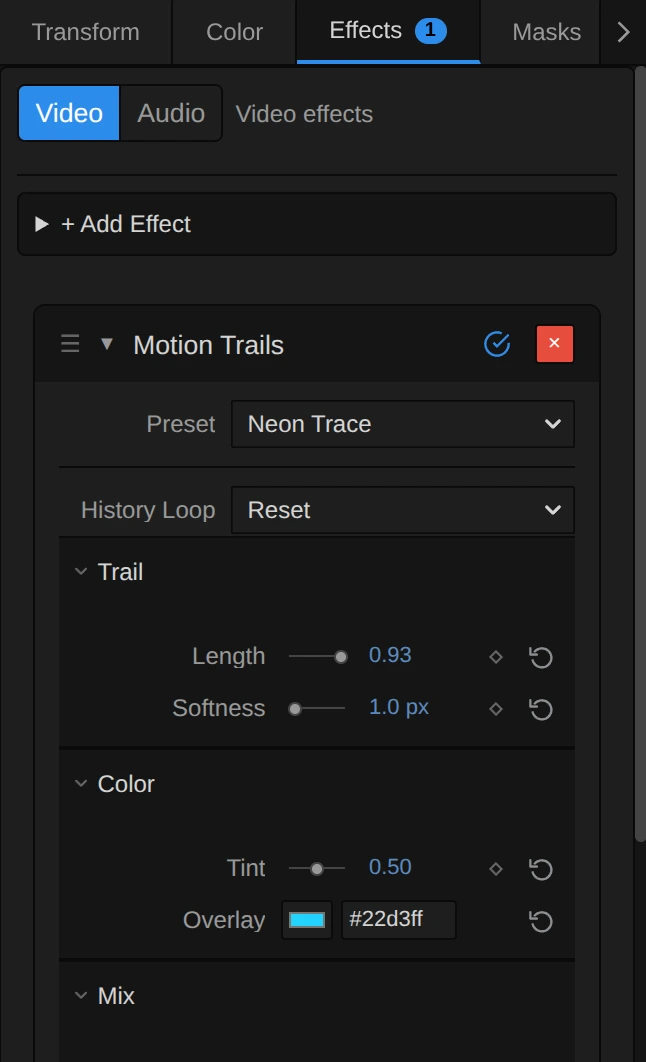
Motion Trails builds every frame on its own last trail, so the trails grow while the clip plays. Jumping to another time starts them again from nothing.
Preset – picks one of the five starting points above. Change any control afterwards; the row then shows no name.
General
Section titled “General”History Loop – what happens to the trails when looped playback jumps back to the loop start. Reset starts them again from nothing, so every pass looks the same. Continuous carries them across the jump: the end of the loop still trails into its start. Reset, Continuous, default Reset.
Length – how long the streaks last: the share of the trail each new frame keeps. At 24 frames per second 0.5 leaves only a short smear, 0.9 fades within about a second, 0.96 within two to three seconds and 0.985 lingers for about six. At 1 nothing fades: everything light the clip has shown stays, a light painting that fills up over time. The trail fades per frame, so at 50 frames per second the same Length gives half as long a trail in seconds. Keyframe it to let the trails grow on a cue. 0 to 1, default 0.9.
Softness – spreads the trail a little every frame, so the older parts, which have been spread most often, melt into one continuous streak instead of a comb of separate copies of fingers, feet and hems. The fresh picture stays sharp. 1 px is just enough to soften the comb; 3–6 px turn the trail into smoke. In pixels of a 1080-line frame, so a 4K export and a smaller preview look the same. At 0 it costs nothing. 0 to 8 px, default 1 px.
Tint – how strongly the streaks take on the Overlay colour. It colours the trail where it is lighter than the picture now, never the stage. Where an older, brighter pose lies over the performer, the colour falls on her too. The colouring repeats every frame, so at 0.2–0.5 the fresh streaks stay close to the original and the older ends turn to the colour; at 1 the whole trail is the colour. The streaks keep their brightness. 0 to 1, default 0.
Overlay – the colour of the trail. It acts once Tint is above 0; at Tint 0 a changed colour only colours the glow around a tracked subject (see Technical details), and the card says so. It holds a colour, default #7fd8ff (a light blue).
Amount – how strongly the trails show, from the plain clip at 0 to the full trails at 1. It changes only their strength, never their length: the trail keeps building at full strength underneath, so animating Amount from 0 fades in faint trails of full length. 0 to 1, default 1.
Node setup
Section titled “Node setup”Motion Trails is one GPU pass, not a node setup: it has no inside to open in the Nodes tab. Its trail is a feedback loop: each frame reads its own last trail, spreads it by Softness, keeps Length of it and lets the clip through wherever that is lighter.
Remix: for an organic, breathing trail, keyframe Length from 0.85 at the quiet moments to 0.97 on the big movements and Softness from 1 to 4 px with it: the big movements leave soft smoke, the quiet ones crisp light.
Technical details
Section titled “Technical details”- Trail. Every frame keeps Length of the last trail and takes each channel’s lighter value of it and the clip. The engine renders that trail at Amount 1 and keeps it as the feedback state (one extra pass,
feedbackStateParams), then renders the visible picture with Amount, so Amount is a plain opacity. Softness averages the last trail at the centre and four diagonal points Softness px away before it is kept. The feedback texture has 8 bits per channel: each frame takes 0.6 of a step more off the trail, or a faint ghost would stay for ever (below 0.5 ÷ (1 − Length) steps a plain product rounds back to the same value). Tint mixes in the trail recoloured to the Overlay colour at the same brightness, chosen by brightness instead of per channel: a per-channel lighter value of two different colours is brighter than either, so a tinted trail over the stage used to feed on itself and never faded. The fading is per frame, not per second. - Transparency. The trail is computed premultiplied, so over transparent areas (after a key) it fades with its alpha instead of turning dark.
- Values. Length, Tint and Amount outside 0 to 1 render at the nearest limit, a value that is not a number at its default, and an Overlay that is not a
#rrggbbcolour as#36f59a; the card and tool results say so, as they do for a changed Overlay at Tint 0. Softness outside 0 to 8 renders at the nearest limit, and the card says so. - Tracking. After Track Landmarks in Properties → Effects (hands, face and pose of the clip), the trails drift with the tracked movement and a faint Overlay glow surrounds the tracked subject; with the clip’s motion analysis they drift with its mean motion. Without tracking data the trails stay in place and there is no glow. Up to version 3.2.7 that glow sat as a fixed disc in the middle of the frame when the clip had no tracking: a bug, now gone.
- Saved projects. A Motion Trails saved before Length and Tint existed keeps its trail exactly: it renders as before, where each frame kept 0.9 of the mixed output (the card shows Length 0.72, the visible share at the old default Amount 0.8), without Tint. Its Amount still shortens its trail, and the card says so; setting Length switches it to the new trail. It renders without Softness and keeps its Overlay
#36f59a. Two changes reach it as bug fixes: the centre disc of untracked clips is gone, and its trail now fades out completely instead of stopping as a faint ghost. New effects start at Amount 1. Its old Speed control was retired earlier and is still ignored. The presets are not stored in projects. - More: Effect system: landmark tracking effects · Effect system · Styles and presets.