
Ribbon Scan
Rolls soft horizontal ribbons down the picture that push it sideways, like a wobbling video signal. At low values a face stays readable; at the top of the range the picture tears apart.
Group: Analog & Glitch · How to add an effect

Use it for: a wavering signal or heat haze · a dreamlike wobble on a performer · a transition (animate Displacement up and back).
- Ribbons – how many ribbons fit in the picture height (at least 3).
- Displacement – how far the ribbons push the picture. It grows gently: at the default 0.3 a face stays readable, at 1 the picture tears apart.
- Edges – whether reads past the frame edge mirror back (Mirror) or wrap around to the other side (Wrap).
- Speed – how many ribbons roll past per second; 0 holds them still.
Tip: for a few slow, large waves, set Ribbons to 3 and Speed to 0.2.
Controls
Section titled “Controls”| Control | Range | Default |
|---|---|---|
| Pattern | ||
| Ribbons | 3 to 80 | 14 |
| Style | ||
| Displacement | 0 to 1 | 0.3 |
| Edges | Mirror, Wrap | Mirror |
| Motion | ||
| Speed | 0 to 5 | 1 |
Node setup
Section titled “Node setup”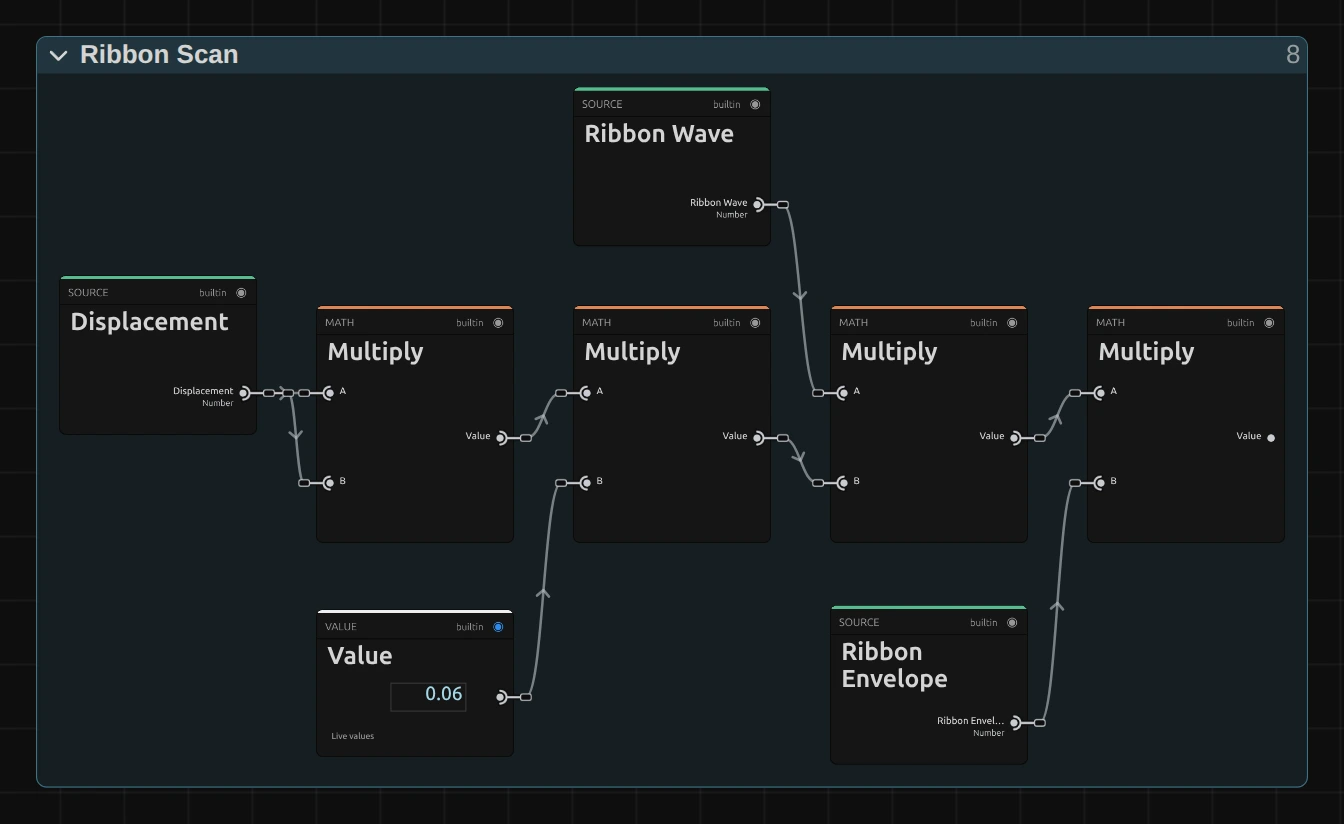
Ribbon Scan is one flat node graph. Each ribbon has a phase that runs from top to bottom and scrolls with time; Ribbon Wave is the sine of that phase, and Ribbon Envelope fades the ribbon in over its first 18 % and out over its last 38 %. The first Multiply squares Displacement, so the low half of the control stays subtle, and the Value of 0.06 sets the largest shift: 6 % of the frame width. How to open it: The node setup.
Remix: for a shift that grows evenly with the slider, unplug input B of the first Multiply and plug a Value of 1 into it. Then 0.3 pushes 1.8 % of the width instead of 0.54 %.
Technical details
Section titled “Technical details”- Units. The shift is sin(2π × phase) × Displacement² × 6 % of the frame width: at most 0.54 % at the default 0.3. Ribbons below 3 render as 3, and the inspector says so.
- Transparency. Both reads come from a premultiplied cache and blend premultiplied, so cut-out edges keep their colour. Reads past the frame edge mirror or wrap instead of smearing the edge pixel.
- Time. The ribbons scroll by Speed ribbons per second of timeline time; the preview, scrubbing and the export match. Displacement 0 leaves every pixel unchanged.
- Saved projects. A Ribbon Scan saved before the 2026-10 rebuild keeps its earlier look (a shift of up to 8 %, clamped edges) and has no Edges control; add the effect again for the current version.
The recipe: Effect system: Ribbon Scan. Nodes: Node Catalog.