
Tracking & Overlays
Graphics that follow a person: target boxes, security-camera looks, sparkles around hands and ropes hanging from a face. Add one in Properties → Effects → + Add Effect → Tracking & Overlays (Using effects).
- Face CablesRopes that hang between points of a face and swing with gravity, wind and every head movement, like cables plugged into the performer.
- Hand ParticlesAdds drifting glowing particles around tracked hands in the Overlay color.
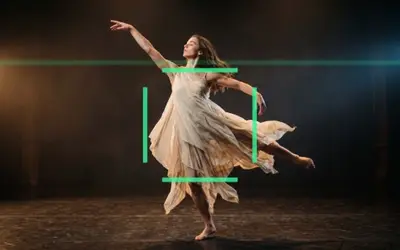 HUD TrackerOverlays a sci-fi HUD with a corner-bracket target box around the tracked subject.
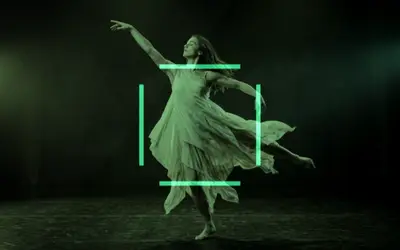 CCTVTurns footage into greenish monochrome security-camera video with scanlines, noise and a target box around the tracked subject.
- Subject HighlightSpotlights the tracked subject by keeping areas around face, body and hand landmarks bright while dimming the rest.
- Tracked SceneDraws tracked face landmarks as dots connected by lines in the Overlay color, like a motion-capture mesh.
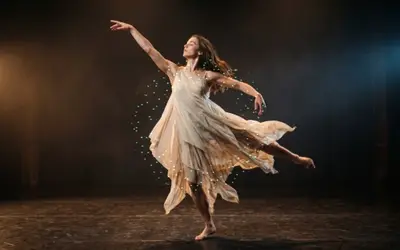 StardustScatters sparkling star particles in the Overlay color around the tracked landmarks, or a ring around the subject.
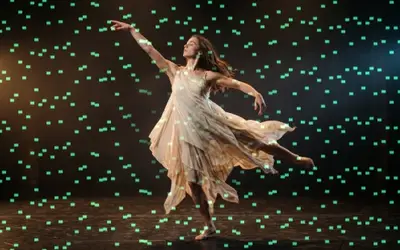 Rain RevealPours falling streaks of the Overlay color over the scene.
Which one?
Section titled “Which one?”| Look | Use |
|---|---|
| ropes that hang from points of a face and swing | Face Cables |
| glowing particles around the hands | Hand Particles |
| a sci-fi target box around the subject | HUD Tracker |
| greenish security-camera video with a target box | CCTV |
| the subject bright, the rest dimmed | Subject Highlight |
| tracked points joined by lines, like motion capture | Tracked Scene |
| sparkles around the tracked points | Stardust |
| coloured rain over a darkened scene, the subject left clear | Rain Reveal |
The shared idea
Section titled “The shared idea”These effects need to know where the person is. Select the video clip and click Track Landmarks in its Effects tab: the editor finds hands, face and body in the clip, and the overlays follow those points. Until a clip is tracked, the overlays sit in the middle of the frame (the still images on these pages show that).
- Overlay is the colour of the box, lines or particles, Amount how strongly they show and Speed how fast they move.
- Face Cables needs the more precise face pass instead: Properties → Tracking → Track face, then Bake cables in the effect card.
HUD Tracker, CCTV, Stardust, Rain Reveal and Tracked Scene are styles of one overlay engine: the Style menu in their card switches between them.
Technical details
Section titled “Technical details”Tracking runs in the browser and stays on this computer. More: Effect system: landmark tracking effects.