
Face Cables
Ropes that hang between points of a face and swing with gravity, wind and every head movement, like cables plugged into the performer. Each effect holds 1 to 32 cables.
Group: Tracking & Overlays · How to add an effect
Use it for: cables or tubes attached to a face · threads that swing with a dancer’s head · ropes that fall away when an end is released.
- Select the video clip and track the face: Properties → Tracking → Track face.
- Add Face Cables (+ Add Effect → Tracking & Overlays).
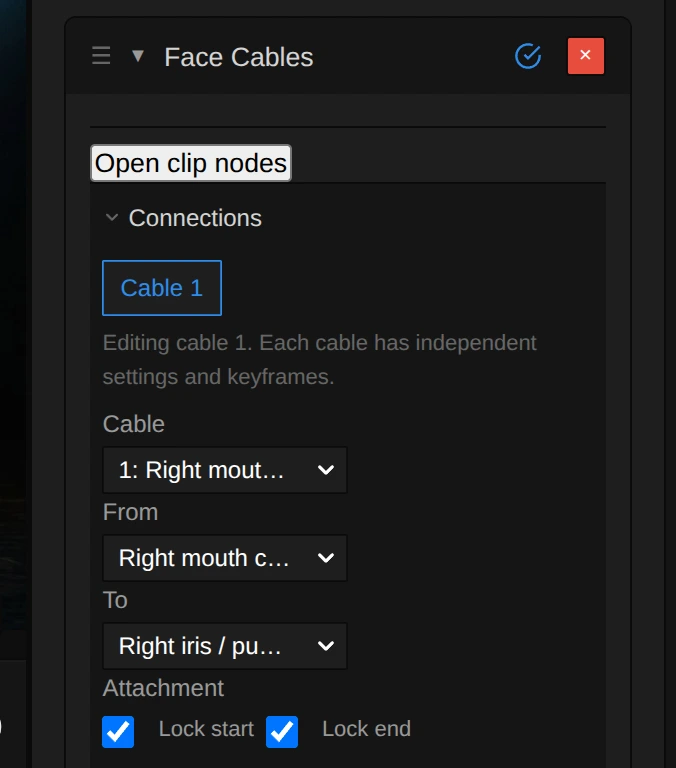
- Choose the two points of each cable in From and To; Add cable adds another one.
- Click Bake cables. The bake computes the swinging once, so playback and the export show the same motion.
- Length factor – how much longer than the straight line the cable is: 1.05 is taut, 3 hangs low.
- Gravity and Damping – how far it sags and how quickly the swinging calms down.
- Wind – Toward camera pushes free cable towards the viewer (negative values: away), Gusts makes it uneven over time.
- Style – a shaded cable or a flat line; Thickness and Color change the look.
Tip: left and right always mean the performer’s own left and right, not the screen’s. Bake again after you change the tracking, trim or timing of the clip; until then the old bake plays.
Controls
Section titled “Controls”The card’s sections in order: Connections, Shared wind & face collision, Light & face shadows, Physics, Wind and Appearance. The cable rows apply to the cable chosen in Cable.
| Control | Range | Default |
|---|---|---|
| Connections | ||
| Cable | 1 to 32 cables (Add cable, Branch, Remove cable) | 1 cable |
| From | a face landmark or another cable’s midpoint | Right mouth corner |
| To | a face landmark | Right iris / pupil center |
| Attachment: Lock start, Lock end | on or off | on |
| Shared wind & face collision | ||
| Shared wind | on or off | off |
| Shared wind strength | 0 to 30 | 5 |
| Shared wind direction | −180 to 180 | 0 |
| Shared wind elevation | −90 to 90 | 0 |
| Shared wind gusts | 0 to 1 | 0.25 |
| Face collision | on or off | off |
| Light & face shadows | ||
| Scene depth | on or off | off |
| Scene depth strength | 0.1 to 2 | 1 |
| Face shadows | on or off | off |
| Light horizontal | −75 to 75 | −30 |
| Light vertical | −75 to 75 | −35 |
| Shadow strength | 0 to 1 | 0.65 |
| Shadow softness | 0 to 0.3 | 0.04 |
| Physics | ||
| Segments | 4 to 96 | 24 |
| Length factor | 1.05 to 3 | 1.6 |
| Stiffness | 0 to 1 | 0 |
| Gravity | 0 to 3 | 0.6 |
| Damping | 0.2 to 10 | 2.2 |
| Viscosity | 0 to 1 | 0 |
| Wind | ||
| Toward camera | −30 to 30 | 0 |
| Gusts | 0 to 1 | 0 |
| Appearance | ||
| Style | Shaded cable, Flat line | Shaded cable |
| Thickness | 1 to 20 | 6 |
| Color | a colour | #ff873d |
| Attachments: Show rings | on or off | on |
| Bake | ||
| Bake cables · Rebake physics | buttons | – |
Node setup
Section titled “Node setup”Open clip nodes shows the effect as a group on the clip’s node canvas, with nested Tracking, Surface & depth, Cable physics and Cable rendering groups. Node values and the card share the same settings and keyframes. More: Effect system: Face Cables nodes.
Remix: add a Wind node to the Cable physics group and drive its strength with an Oscillator, for a breeze that comes and goes.
Technical details
Section titled “Technical details”- The bake is stored with the project, so playback, scrubbing and the export use the same frames without running the physics again. Cancel keeps the previous bake.
- A cable has 4 to 96 segments (24 by default). A frame without a detected face hides the cable; when the face is found again the cable starts fresh.
- Works on 2D video clips without crop or 3D tilt; one bake covers up to 18,001 frames.
Go deeper: Effect system: Face Cables · Landmark tracking effects