Skip to content

Effects

Back to Index

MasterSelects has a modular GPU effect system built around registered effect modules, shared WGSL utilities, and a compositor pipeline that can run inline color ops without extra passes.

  • 37 blend modes are implemented in src/shaders/composite.wgsl.
  • 98 GPU effects are registered in src/effects/, including fullscreen fragment effects, compute effects, glyph effects, tracking effects, and specialized render effects.
  • The populated clip-effect categories are color, blur, distort, stylize, generate, keying, halftone, analog, pixel, glyph, geometry, and tracking.
  • generate holds the Memory Leak generator, which reinterprets leftover bytes of the FFmpeg wasm heap as pixels through the byte-texture binding described below.
  • time and transition have no registered clip-stack effects and are hidden from the add-effect UI. Timeline transitions are implemented separately in src/transitions/ because they own two clips, source handles, hold-frame policy, and export participants.

The effect registry is built from category exports in src/effects/index.ts. Render-only definitions such as surface-overlay and terrain-overlay live in an internal runtime lookup: getEffect(...) can resolve them for compositing, while the public EFFECT_REGISTRY, category lists, effect picker, AI catalog, and property templates contain only effects users can add to clip stacks. Fullscreen effect definitions provide:

  • id, name, and category
  • WGSL shader source
  • fragment entryPoint
  • uniformSize
  • parameter definitions
  • packUniforms(...)
  • optional passes, customControls, and lazily loaded extraControls rendered below the generic parameter groups
  • optional byteTexture provider: a CPU byte block uploaded as a texture_2d<u32> on binding 5 and re-uploaded only when its version string changes (src/effects/_shared/byteTexture.ts)

Parameters flagged hidden: true stay in project data and undo but are omitted from the generic controls and property/keyframe lists; effects use them for internal state such as a frozen artifact reference.

Parameter definitions may also declare a named group. The generic controls render those groups as focused sections and keep quality parameters in their own collapsible section.

Specialized render and compute effects use an explicit pipelineKind discriminator. They are registered for UI/project data, but are skipped by the fullscreen fragment path. Compute definitions are dispatched by ComputeEffectRuntime; specialized render definitions are rendered by their dedicated compositor pass.

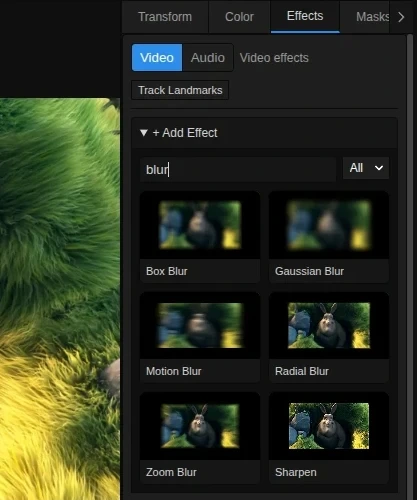
The production editor UI is src/components/panels/properties/EffectsTab.tsx. src/effects/EffectControls.tsx is a generic fallback renderer. The add-effect control opens a searchable, categorized catalog instead of a plain dropdown. Visible tiles are rendered from the current user frame and use a deterministic color/initials placeholder until their GPU result is ready. For motion-adjustment clips, the production tab limits the picker to Brightness, Contrast, Saturation, Invert, and Gaussian Blur.

  • color (9): Brightness, Contrast, Saturation, Vibrance, Hue Shift, Temperature, Exposure, Levels, Invert
  • blur (5): Box Blur, Gaussian Blur, Radial Blur, Zoom Blur, Motion Blur
  • distort (8): Pixelate, Kaleidoscope, Mirror, RGB Split, Twirl, Wave, Bulge, Fisheye Lens
  • stylize (12): Vignette, Grain, Sharpen, Posterize, Glow, Edge Detect, Scanlines, Threshold, Acuarela, Rom1, Voxel Relief, Pixel Particle Disintegrate
  • keying (1): Chroma Key
  • halftone (13): dithering, halftone, Riso, print, poster, stitch, and animated mosaic treatments
  • analog (10): glitch, crystal/glass, ribbon, CRT, prism, wave, hologram, compute Pixel Sort, and Analog Signal Lab
  • pixel (2): Blockify and Block Mosaic
  • glyph (18): ASCII, word/number/symbol matrices, code, collage, brand, and stitch treatments
  • geometry (11): compute Voronoi, Quadtree, and Contour plus engraving, textile, outline, and brick treatments
  • tracking (8): subject, motion/HUD/CCTV, kinetic trace, rain, stardust, and hand-particle treatments

Fisheye Lens provides positive fisheye distortion and negative defisheye correction with equidistant, equisolid-angle, stereographic, and orthographic projection models. Lens strength, field of view, curve bias, radius, center, zoom, anamorphic squeeze, rotation, edge behavior, feathering, chromatic aberration, vignette, and 1/4/8-sample quality are configurable and keyframeable where applicable. The WebGPU shader and worker-software export path implement the same parameter contract.

Live Catalog Previews And Looks Foundation

Section titled “Live Catalog Previews And Looks Foundation”

A Look is a serializable named stack of effect IDs, enabled flags, and primitive parameters. The standalone Looks panel is currently disabled in both development and production: it is absent from the dock contract and panel pickers, and persisted layouts are normalized without it. The internal Look types and HMR-safe thumbnail runtime remain in use by the live effect catalog; GPU textures, ImageBitmaps, and other runtime handles stay outside durable state.

Effect and Look tiles use a single captured frame at the current playhead as a shared source. The runtime renders 256x144 offscreen targets, caches by effect or stack parameters plus source-frame ID, schedules at most one queued preview job per animation frame, and only renders tiles within the viewport. This works for both main-thread and worker-presenting render hosts. Animated entries run at up to 12 fps for two seconds only while hovered or focused, with at most one animated tile active globally.

Clicking or touching an effect thumbnail adds that effect to the selected clip; the thumbnail is a keyboard-focusable button as well. Curated and custom Look stack application is unavailable while the standalone panel is disabled.

Glyph effects share one exact cell-grid model, curated ASCII ramps, and a generated glyph atlas cached beside the effect runtime. The same grid contract drives rendering and artifact export, so the exported rows match the visible cell selection instead of approximating it independently.

ComputeEffectRuntime adds storage-texture compute passes to the normal ping-pong effect stack. Pixel Sort uses bounded segments, Voronoi uses a jump-flood sequence, Quadtree Zoom evaluates hierarchical block variance, and Contour uses marching-squares cases with interpolated edge crossings. Compute and fragment effects can be mixed in one clip stack and use the same preview, worker, and export paths.

Analog Signal Lab is a dedicated six-pass compute effect rather than a screen-space RGB glitch. It encodes the source as a 13.5 MHz PAL composite field, applies a complex-equivalent terrestrial channel, passes the recovered signal through an optional VHS transport, measures horizontal sync and color burst per line, decodes PAL, and resolves an optional CRT display stage.

The exposed modules cover signal strength, band-limited RF/impulse noise, co-channel interference, two-path delayed ghosts with carrier phase and drift, receiver tuning and sync/color lock, PAL simple/delay-line/comb decoder modes, VHS tracking/dropouts/time-base error/tape wear/chroma bleed/head switching and SP/LP/EP speed, plus CRT scanlines, phosphor mask, bloom, curvature, and field flicker. Noise is seeded and driven by timeline time, so preview and export are repeatable.

The realtime path models one 313-line PAL field with a 360x288 decoded working raster while retaining the 864-sample line timing. When the effect is attached to a video/image plane switched to 3D, the analog stack is evaluated into a per-layer texture before native scene projection. The disturbance therefore foreshortens, rotates, and scales with the plane instead of being applied to the flattened synthetic scene texture afterward. The same routing is used for nested 3D compositions.

Select a video clip and use Properties → Tracking → Track face precisely. This single-face pass decodes every source frame in the clip’s trimmed source range with an independent decoder, retaining original timestamps and durations (including variable frame rates). Detection: Independent frames (default) uses MediaPipe Face Landmarker in IMAGE mode, avoiding the VIDEO graph’s temporal landmark filtering for fast expressions. Smooth video retains the previous VIDEO mode when temporal steadiness is preferred; independent detection can jitter more. The current track’s mode is shown separately from the next-pass selection. Switching modes requires Retrack face precisely, then Bake cables to update existing cable motion; existing stabilization keyframes are not overwritten. Both modes store all 478 points, 52 expression coefficients, and the facial transformation matrix when a face is detected. Inference runs locally on the CPU and yields between frames; analysis images are bounded to 1280 pixels on the longest side. The limit is 18,000 source frames per pass; larger ranges fail visibly instead of being downsampled.

The Show face control net checkbox enables a preview-only inspection layer on the selected clip: pink lips, cyan eyes, white irises, amber brows, green outline, and all points. It follows the clip’s ordinary 2D transform and source timing. Source-frame lookup never borrows a future detection or holds a missing face. Optional Extra smoothing reduces small jitter using adjacent detected frames, preserves larger motions, and never bridges a missing detection. This is a model estimate: occlusion and extreme expressions may still produce incorrect points even when a face is detected; no per-point confidence is implied.

Full results are stored separately from the older hand/pose tracking pass in a compressed, browser-local cache and can be restored when the Effects panel is opened after reload. They are not yet portable project assets. Cancellation or failure retains the previous valid result. The control net does not render into exports and does not yet drive the existing 64-point effects buffer; it is the inspection foundation for subsequent face-driven effects. A second clip using the same source and a covered source range can reuse an already loaded face analysis; its own cache entry is saved without running inference again.

Stabilize face and Stabilize lips bake ordinary position X/Y and rotation Z keyframes at the composition frame rate. Face mode levels the outer eye corners and anchors the nose; lip mode levels the mouth corners and anchors their midpoint. Lock tracked center to image center holds that anchor in the center; disabling it preserves the anchor’s original translation while leveling rotation. Scale is retained, so mouth opening and facial expressions are not normalized away. The current Extra smoothing setting is baked in.

Baking replaces those three keyframe channels in one undo batch, preserves other animation, and persists/renders through the normal project and export paths. Changing the trim, retiming, scale or anchor afterward may require rebaking. Missing detections hold the last valid transform; sudden orientation flips are rejected briefly before reacquiring. Only unparented 2D clips without source crop or X/Y rotation are supported in this first pass. This corrects in-plane tilt, not perspective, head yaw/pitch, or non-rigid lip deformation. Translation and rotation can reveal image edges; no automatic zoom is applied.

The Effects tab can lazily track hand, face, or pose landmarks for a selected video clip with the official @mediapipe/tasks-vision package and Apache-2.0 Google model files. Models/WASM load only on demand, Cache Storage retains the downloaded runtime data, VIDEO-mode inference is CPU-backed and bounded to 8 fps / 300 frames, and cancellation restores the previous valid result.

Durable project/timeline data stores only serializable summaries. Full samples are kept in the runtime and in a gzip sidecar cache that can be restored after a page reload. Tracking effects receive a bounded 64-point storage buffer; Kinetic Trace can additionally consume the existing optical-flow analysis metadata without introducing a second motion-analysis pipeline.

The main preview has an optional GPU split-compare pass. It binds the untreated and effected textures, composites them at an adjustable divider, and exposes a draggable/keyboard-accessible overlay. The setting is runtime UI state and does not alter project media or the exported result.

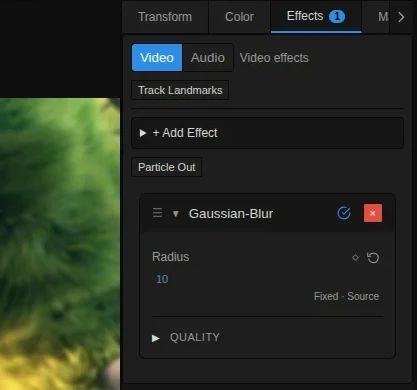
EffectsTab renders effect parameters directly from the registry.

  • Number parameters use a slider plus DraggableNumber.
  • Boolean parameters use a checkbox.
  • Select parameters use a dropdown.
  • Parameters marked quality: true are grouped in a collapsible Quality section.
  • Quality values can be dragged past the visible slider max in the editor.
  • Parameters marked animatable: false are shown as static controls.
  • Numeric parameters supplied by catalog, compute, and glyph effect factories default to animatable unless the effect explicitly opts out. This keeps the stopwatch/keyframe behavior consistent for registry-provided controls.

The registered quality parameters are:

  • Gaussian Blur: samples
  • Motion Blur: samples
  • Radial Blur: samples
  • Zoom Blur: samples
  • Glow: rings, samplesPerRing
  • Voxel Relief: maxSteps
  • Pixel Particle Disintegrate: maxPreviewParticles, maxExportParticles, maxInstances

Right-click on a numeric control resets that parameter to its default. The performanceMonitor service can also reset quality parameters to defaults when rendering becomes too slow.

These effects are applied directly in the composite shader instead of running as separate effect passes:

  • Brightness
  • Contrast
  • Saturation
  • Invert

That keeps them zero-overhead relative to the full ping-pong effect chain.

Pixel Particle Disintegrate is a particle-render clip effect. It samples the live source texture into deterministic instanced quads and resolves a straight-alpha texture back into the normal layer compositor. At progress 0 the source is already represented by particle cells at their origin positions; progress moves, curls, and fades those cells rather than crossfading from a normal full-frame video plane. Particle release is driven by a deterministic gust field: coherent noise pockets, a wind-front delay, and the clip seed decide which regions separate first, so the breakup starts in scattered islands and then grows without relying on accumulated simulation state. Each particle carries UVs from its original source cell, so moving particles keep their assigned image patch instead of sampling from their new screen position. Preview and export use explicit render/media time instead of wall-clock time.

This effect is terminal in the clip effect stack. Effects before it are pre-rendered into the particle source texture; effects after it are ignored with a renderer warning instead of being silently reordered. The Effects tab includes a Particle Out preset button that adds the effect and creates progress keyframes near the end of the selected clip.

The worker-GPU compositor also runs the dedicated particle pass for preview and export, using the frame stack’s preview/export particle-quality setting.

The Transition Suite is timeline-native rather than a normal one-clip effect stack. Transition definitions live in src/transitions/ as serializable primitive recipes (opacity, generated solid, mask, procedural/pattern mask, blend, transform, generated overlay, UV distortion primitives, and transition-scoped registered effect primitives) and are interpreted by shared preview/export transition layer assembly. Analog/glitch transitions that can be represented honestly as existing primitives, such as seeded deterministic block masks, transform-based CRT collapse, or transition-scoped registered effects for RGB split, pixelation, and static scanlines, stay on that same preview/export path. Procedural noise/block masks carry their normalized seed through preview, export, and the compositor shader ABI so repeated renders are stable while non-default seeds can produce alternate reveal orders. Water Drop and Swirl use the same seed path with per-participant compositor UV remapping and are grouped under the Stylize transition family. Blur Dissolve and Zoom Blur use the same assembly path to append temporary registered GPU effects to the incoming and outgoing participant layers while preserving each clip’s existing effect stack. Directional Blur and Whip Pan use the same registered-effect path with motion-blur; the Motion Blur shader mirrors edge samples for out-of-range UVs so fast horizontal transition blurs do not expose transparent borders. Projector Flicker uses deterministic generated-solid exposure pulses, Film Roll combines vertical transform overscan with transition-scoped Motion Blur, and Vignette Bloom uses registered glow and vignette effects on both transition participants. Light Sweep uses a cached transparent generated overlay canvas with a screen-blended diagonal highlight band, while Light Leak uses the same deterministic overlay primitive for warm edge streaks and analog wash. Those overlay canvases are generated per output size and cached by dimensions plus rounded overlay parameters, so preview and export do not upscale a fixed thumbnail texture. Chroma Leak, Lens Flare, and Film Burn use that same overlay/cache model with deterministic generated color-split, flare-ghost, and burn-edge overlays. They stay deterministic without bundled overlay video. Additive Dissolve and Non-Additive Dissolve use temporary transition blend windows on the incoming participant, so they stay in the same layer assembly path instead of adding one-off shaders.

The current user-facing suite is grouped by family in the Transitions panel and the transition-scoped Properties tab. It includes dissolve/dip, directional wipe, iris/shape, push/slide, dedicated 2D rotate, whole-card 3D flip/tumble/roll/spin, stylize, glitch, light, zoom, and pattern-mask families. Family cards show their variant count in the Transitions panel; a click expands the draggable leaf variants until the pointer leaves the panel, while dragging a collapsed family card uses that family’s default variant. The current 3D families opt eligible participants into scene-3d-panel rendering so video frames, video elements, images, and text canvases can render as native shared-scene textured planes with camera projection and depth; unsupported source states fall back to the compositor transform path. Kaleidoscope is an exotic pattern-lab transition by reusing transition-scoped registered effect primitives rather than adding a one-off compositor path. Puzzle Push, Magnetic Tiles, and Shatter Glass are visible multi-panel transitions: the layer contract supports normalized sourceRect sampling, and transition assembly clones transition participants into deterministic staggered panels, center-magnetic tiles, or rectangular outgoing tile-shatter.

The default placement is virtual center: the edit point remains stable, neither clip is moved, and missing source handles render as first/last-frame hold fallback when the policy allows it. Compositor-driven transitions pass typed transition metadata through existing compositor uniform padding slots, so normal layers pay no extra bind-group cost when transitionRender is absent.

Non-inline fullscreen effects are compiled from shared WGSL utilities plus the effect shader itself. The pipeline creates one GPU render pipeline per non-inline fullscreen effect and filters out disabled effects and audio- effects during application.

Effects with uniformSize 0 use no uniform buffer. Most effects use a 16-byte-aligned uniform block; a few multi-parameter effects use larger blocks.

Effects can opt into temporal feedback through usesFeedback. Feedback effects sample their own previous output frame on binding 3 and the pipeline maintains a per-effect-instance feedback texture. Acuarela and the frozen Rom1 snapshot use this path to build a watery smoke trail from animated fractal UV offsets. The worker software renderer mirrors standalone Acuarela/Rom1 feedback with a per-target/effect software feedback cache for preview and export readback; Voxel Relief uses the same binding to smooth a raymarched block-heightfield between video frames and remains a complex raymarch/feedback effect.

Voxel Relief raymarches a perspective camera pointed at the source plane. The source image is sampled as a grid of rectangular prisms, with luminance driving each prism height and dark gaps between cells instead of a second flat video layer behind the relief. New instances use the iPad-tuned relief defaults: 107.4 columns, 1.2 height, 3.0 height contrast, and Limit to Video enabled. With Limit to Video enabled, the raymarcher discards voxel cells outside the source rectangle and uses a finite source-sized floor, so orbit views show only the actual video footprint instead of repeating its edge pixels around the subject. Existing project instances retain their stored parameters.

Glow also starts from the iPad-tuned preset: amount 5, threshold 0.7935, radius 1, softness 0.496, 6.85 rings, and 17.95 samples per ring. Existing Glow instances likewise retain their stored parameters.

The effect’s virtual camera is fully parameterized: tilt, yaw (±180°, full orbit), perspective (FOV), distance (dolly multiplier, 1 = classic framing), centerX/centerY (focus point), roll, and lightFollow (light azimuth rotates with yaw so the far side never falls fully into shadow). The raymarch budget scales with camera distance and skips empty space above the relief, so far zoom-outs stay intact. Params are grouped in the Effects tab (Relief / Camera / Light / Look; Camera is collapsed by default).

Effects that declare cameraInteraction (currently voxel-relief) get an Orbit button on their effect header. While active, dragging in the Preview orbits tilt/yaw freely in both directions (0.25°/px, same drag direction as the 3D scene orbit), Shift+drag pans the focus point, and the wheel dollies distance with a smoothed target. Yaw and tilt wrap continuously instead of stopping at a pole, and drag/dolly directions match the native 3D viewport. The eye orbits at constant radius (distance 0.2–6), and the horizon stays level at every yaw. Writes go through setPropertyValue, so history batching (one undo step per drag) and keyframing behave exactly like slider edits. The mode is ephemeral (engineStore.effectOrbitTarget), clears on deselect, and hides for 3D clips.

Voxel traversal uses exact cell-boundary stepping with 2×2 supersampling, so tall columns remain solid in profile views instead of breaking into dashed segments or strong moiré patterns. Its Y-up orbit space is converted back to the source texture’s Y-down coordinates when sampling, keeping text and video upright at every camera angle. Rays that miss the relief remain transparent instead of revealing a dim flat copy of the source behind the voxels; the finite source floor remains available through Limit to Video.

For WebCodecs Fast export, display rotation from decoded VideoFrame sources is materialized before multi-pass effects. The compositor then suppresses the already-applied downstream rotation, keeping portrait Voxel Relief framing, orientation, and camera animation identical between Preview and export. The effect is still rendered at the active Preview/export target resolution; columns controls voxel density, not output raster size.

A clip with an enabled voxel-relief effect that is switched to 3D renders as a scene object of kind voxel (instanced cubes with real depth) instead of a flat plane — the scene camera replaces the effect’s virtual camera, and the effect’s camera params plus temporalBlend/maxSteps/reset are ignored in 3D. The 2D post-effect is excluded for consumed voxel layers so it is not applied twice. Voxel objects render in every scene view — the composite preview (scene camera from an active Camera clip), the Edit view, and the 3D-edit viewports — and video-backed voxel fields sample the source through the 2D-canvas copy, so real video frames drive the height field. Synthetic scene layers use the viewport dimensions plus source-pixel scale compensation, preventing portrait media from becoming a stretched, window-like slab in the 3D editor. Remaining notes are tracked in docs/ongoing/Voxel-Relief-Orbit-3D.md.

Wall-clock animated effects can also set requiresContinuousRender. The engine keeps rendering live frames for active continuous effects while the playhead is parked, and it bypasses RAM Preview frame reuse so the animated output does not freeze.

Numeric effect parameters can be keyframed through the timeline using the property path format:

effect.{effectId}.{paramName}

EffectsTab reads interpolated values from the timeline store and writes animated numbers back through setPropertyValue.

The clip context menu supports Copy Effects and Paste Effects. This copies the full effect stack plus matching effect.* keyframes and pastes them onto the selected clip set.

  • The empty time and transition categories are present in the type system without changing the registry shape.

Look thumbnails reacquire cached bitmaps immediately before drawing because a source change can release the previous cache. Closed frames are skipped and replacement rendering is retried up to three times. Static jobs and hover frames completed after a source change no longer overwrite the current thumbnail.

Catalog tile borders follow hover or keyboard-visible focus rather than any focused descendant. Pointer activation does not leave a focus border or native outline behind; thumbnail keyboard navigation retains its inset accent outline. Touch activation suppresses the native tap highlight.

Add Effects > Add Effect > Tracking > Face Cables to a video clip. Its tracking source is the same clip’s precise face result, restored independently of the open inspector. Create/retrack that result in Properties > Tracking; face stabilization and the preview control net live there too.

Each effect manages 1-32 cables. Choose both anchors, length factor, gravity, damping, thickness, and color, then Bake cables. The default connects the subject’s right mouth corner to the right iris/pupil center. Iris anchors use landmarks 468/473 and follow eye movement; eye-contour centers remain separate choices. Left/right always refers to the subject, not the screen.

Ropes with 4-96 segments (24 by default) use gravity, inertia, damping, fixed endpoints, and iterative length constraints, simulated at at least 120 Hz in composition coordinates. The shader adds rounded shading, shadow, and connector rings. Multiple cables share one effect pass, with per-cable bounds. There are no face or cable collisions yet. Missing detections hide the cable; reacquisition or large jumps reset it to avoid explosive motion.

Baked geometry is compressed into ordinary effect parameters, so saved projects, random scrubbing, playback, and export use the same frames without rerunning physics. Cancel leaves the previous bake intact; baking is one undo step and preserves other effect instances. Re-bake after tracking, trimming, retiming, transform, or composition changes. Currently supports unparented 2D video without crop or 3D tilt, with an 8-million-float budget and a 18,001-frame limit per bake. Tracking caches remain local; an already baked effect plays without the cache, but new bakes require the precise tracking data.

Face Cables also exposes Lock start/end to landmark, Show attachment rings, Segments, Stiffness, Viscosity, and Appearance per cable. Free ends start at the chosen landmark and then simulate independently; releasing both ends lets the entire rope fall. Free ropes skip the pre-roll used to settle pinned ropes, so they do not begin already fallen. Stiffness adds bending resistance; viscosity adds fluid-like velocity drag independently of gravity and damping. Flat line removes body shading, outline, decorative drop shadows, and connector rings. Optional face-received shadows remain available. Shaded mode can hide rings separately without releasing attachments. All changes apply on Bake cables. Higher segment counts increase bake cost and stored data; the existing bake budget still applies. The source video remains a 2D layer, without face collision or depth occlusion. Version-1 bakes remain readable; new variable-resolution bakes use version 2 with per-cable offsets.

Wind toward camera adds a uniform force along the simulated Z axis: positive values push free segments toward the viewer; negative values push them back; zero disables the force. Wind gusts varies that force deterministically over time. Anchors remain on the tracked image plane, while distance and bending constraints operate in XYZ. Viscosity damps all three axes. A fixed virtual camera projects displaced points and their thickness back onto the video, in both flat and shaded modes. Beyond Z=1, perspective smoothly approaches a 4x magnification limit, so strong wind cannot hide a whole rope or its branches at the camera plane. Segment constraints apply tension only: slack segments do not push each other apart into artificial zigzags during length animation. This is a cable depth effect, not a reconstructed face mesh or an independently editable scene camera; cables do not occlude each other by depth or pass behind the face. Re-bake to apply changes. Version-3 bakes retain per-point perspective thickness, while versions 1 and 2 remain supported.

Shared wind & face collision controls the entire network. Enable Shared wind to replace individual cable wind with one keyframeable strength, direction, elevation, and gust envelope. Direction 0° blows toward the camera, 90° to the right, and 180° back into the face. Elevation tilts the force up/down. Existing per-cable wind settings and animation are retained for when shared wind is off. The numeric rows and diamonds use the same Transform inspector controls.

Collide with tracked face derives relative depth from the existing MediaPipe landmarks, scales it with the clip, and builds a 96×96 front-surface contact map from its triangle mesh each simulated frame. Attachments stay on their original landmark pixels through inverse perspective. Free nodes are kept in front of the surface, with inward velocity removed and tangential friction applied. This is an approximate 2.5D face-front collider, not metric head geometry: it does not collide with the back of the head or other cables, and sparse segments can still cross small surface details. It does not use the AI Depth Map video and does not add shadows. Both options default off for older projects. Bake persists their motion for playback/export; paused draft preview uses them too. Additional anchors include forehead, nose bridge, both cheeks and brows. Baked cables receive clip-local frame time through the shared effect evaluator, including export and nested compositions; exporting does not require live tracking or an open Effects panel.

Light & face shadows adds a directional light with horizontal/vertical angles, shadow strength and distance-dependent softness. Enable Cast shadows on face to project simulated cable points onto a 128×128 light-space depth map of the tracked face mesh. Rays missing the mesh or starting behind its front surface produce no shadow. Shadows darken the source image before all cables are drawn, including Flat line cables. This first receiver uses relative landmark depth, not the separate AI Depth Map video: it covers the front face, not hair, neck, background or other cables. The bounded 25-point shadow path per cable and mesh silhouette are approximate; small features and penumbrae near the edge can differ from a full 3D renderer. Light settings currently have no animation diamonds. Paused parameter changes refresh the draft; Bake cables stores source-UV shadow hits in portable version-4 cable data for playback, export and nested compositions. Older version-1/2/3 bakes remain readable and unchanged until rebaked.

Native 3D scene replaces the screen-space cable renderer after Bake cables. It stores raw XYZ motion plus a textured 468-vertex face receiver in a separate, compressed project artifact and promotes the video clip into the shared native scene. Camera clips and scene navigation change the perspective of the face, video background and eight-sided cable tubes together. Point and panel light clips illuminate shaded cables and update 2048-pixel shadow maps every rendered frame; enable Cast shadows on the light itself. Up to four direct lights are supported by the cable pass. Flat line style uses unlit tubes that still cast shadows. Clip transforms and light/camera keyframes are evaluated by the shared scene path in preview and export; changing lighting does not rebake physics. Bake from a frontal, unparented video without crop or 3D tilt. The captured face is a front-surface estimate, not a reconstructed head; the rest of the video stays a flat sheet with the face region cut out. There is no reconstructed head back, hair or neck depth. Cable/face geometry shares scene depth with other objects; shadow maps currently contain cable casters only, not unrelated meshes or splats. The approximate face receives shadows without casting scan-triangle self-shadows; eye and mouth openings are capped with the captured video. The inspector can add normal scene light and camera clips directly, with a camera matched to the bake. Panel diameter controls bounded shadow filtering rather than a physical area-light integral. Environment-map illumination and other video effects are not sampled by this receiver pass. Physics edits still need Bake; camera/light movement is live.

The Face Cables inspector uses the same collapsible sections and aligned rows as Transform, grouped into Connections, Physics, Wind and Appearance. Numeric rows combine a handle-only slider, bordered editable field and reset button through reusable ResolveInspectorNumberRow. Section disclosure and sliders support keyboard navigation; pointer activation clears transient focus.

Cable numeric parameters reuse the same LabeledValue / EditableDraggableNumber controls as Transform: horizontal drag, double-click to type, right-click reset, and middle-click range preferences. Segment counts snap to whole numbers. The initial Z-wind slider range is -30 to +30 and can be customized; positive strength pushes toward the camera.

With Live frame preview enabled (default), editing cable settings while paused updates the current frame after an 80 ms input debounce. This is a bounded one-second simulation at the current tracked pose, using the current anchor distance for rope length. It approximates the shape; it does not reproduce prior motion, the full-clip maximum rope length, or the eventual bake exactly. Free endpoints show one second of motion from their initial anchors.

Draft geometry exists only in a temporary runtime map for this clip, effect and frame. Playback and export use saved baked geometry. Disabling preview, leaving the controls, starting a bake or changing frames clears the temporary override. Scrubbing while paused calculates a new approximation. Missing tracking yields no cable at that frame. Bake cables still commits the complete motion and settings to the project; preview edits alone are not saved.

The inspector does not subscribe to playhead ticks when preview is inactive or playback/export is running. Draft updates invalidate only layer/composite render caches; media, RAM-preview and video-bake caches remain intact. Clearing a draft requests a render only when an override actually existed.

Face Cables range settings are shared by the numeric field, slider and reset action. Middle-click a number to change its minimum, maximum and default. Length factor, wind strength, gravity, damping and thickness have editable upper ranges, including values above their initial slider maximum; these values are accepted by preview, saved bakes and project reload. Positive physical minima, 4-96 segments and normalized 0-1 stiffness/viscosity/gusts remain constrained. Very long cables can extend outside the frame or cross the virtual camera near plane (in which case the rope is hidden); lowering camera-directed wind can help.

Branch to right ear creates another cable starting at the selected cable’s simulated material midpoint and ending at Right ear area (approx.). The From dropdown can also select another cable’s midpoint. Branches can themselves have branches; cycles, missing parents and duplicate IDs are rejected. A cable with children cannot be removed until those children are removed or reconnected.

Simulation runs parent-first, retaining XYZ movement at the attachment in both draft preview and baked frames. The branch follows the parent without applying reaction forces back to it. Its rest length is initialized from its first valid attachment distance times Length factor; the usual constraints allow stretching when both anchors become farther apart. Unlock start releases the branch from the parent. Missing or hidden parent geometry hides its branches as well.

Ear-area anchors use face-edge landmarks 234 (right) and 454 (left), not an independent ear detector. Right/left refers to the subject’s own side.

The visible Cable 1, Cable 2 (branch) buttons select independent cable settings. Selection remains on that cable after baking. Each cable supports native timeline keyframes for length factor, stiffness, gravity, damping, viscosity, wind toward camera, gusts and thickness. Click the diamond beside a parameter to add a key at the playhead; subsequent edits to an animated parameter add or update its key there. Right-click its diamond to remove that parameter’s animation and retain its current value. Timeline labels identify the cable.

The paused frame preview samples these keys at the playhead. Bake cables evaluates them throughout the simulation for playback and export. Segment count, connections, attachment locks, color and rendering style remain static settings.