
Film Prism
Film shot through a cheap lens or a glass prism: edges gain soft rainbow fringes under a fine, living grain. The picture itself stays sharp; only the colours spread.
Group: Lens & Distort · How to add an effect
Use it for: a vintage film look · dreamlike memories and flashbacks · softening clean digital footage without blurring it.
- Fringe – how far the colours split at edges.
- Shape – Lens: the fringes grow towards the corners. Prism: the same everywhere, in the direction of Prism Angle.
- Grain and Grain Size – how strong and how coarse the grain is.
Tip: Grain Speed 0 freezes the grain, for still images. Fringe 0 with Grain above 0 gives plain film grain, strongest in the mid-tones.
Controls
Section titled “Controls”| Control | Range | Default |
|---|---|---|
| General | ||
| Fringe | 0 to 1 | 0.5 |
| Fringe | ||
| Prism Angle | −180 to 180 | 0 |
| Shape | Lens (radial), Prism (one direction) | Lens (radial) |
| Grain | ||
| Grain | 0 to 1 | 0.3 |
| Grain Size | 0.5 to 6 | 1.2 |
| Grain Speed | 0 to 5 | 1 |
Node setup
Section titled “Node setup”Film Prism opens as stage folders. Fringe Spread & Direction and Tap Positions spread one read into seven along a rainbow, Spectrum Reads & Sum adds them up as red, green and blue, Sharp Brightness puts the sharp brightness of the pixel back, and Grain Noise and Grain Strength add the grain. How to open it: The node setup.
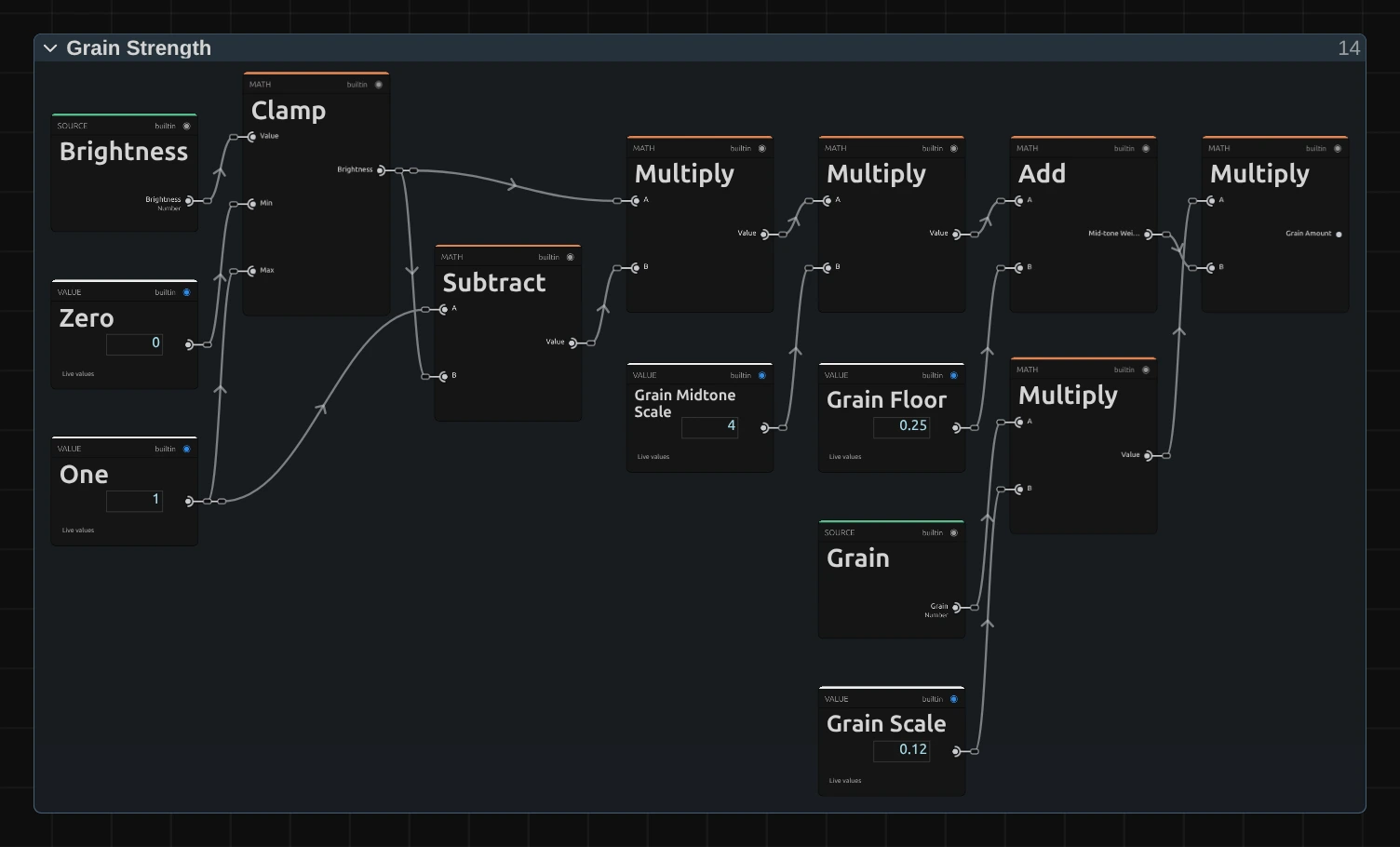
Real film grain shows most in the mid-tones. Grain Strength takes the brightness of the pixel (Brightness from Sharp Brightness, Clamp), forms 4 × l × (1 − l) with Subtract and two Multiply nodes (1 in the mid-tones, 0 in pure black and white), adds Grain Floor and scales the result by Grain × Grain Scale. The fringe works the same way in Spectrum Reads & Sum: each of the seven reads adds to red, green and blue with its own weight value (Fringe Tap… Weight), so changing those weights changes the colours of the rainbow.
Remix: for grain that is equally strong in shadows and highlights, set Grain Midtone Scale from 4 to 0 and Grain Floor from 0.25 to 1.
Technical details
Section titled “Technical details”- Units. At Fringe 1 the fringe reaches ±1.5 %: Lens scales about the frame centre, Prism shifts along Prism Angle (degrees, counter-clockwise from the right) in frame heights. Prism Angle has no effect in the Lens shape; the inspector says so. Grain Size is in pixels at 1080 lines and scales with the frame height.
- Sharpness. The seven reads come from a premultiplied cache, so cut-out edges keep their colour. Where the layer has coverage, the brightness of the spread is replaced with that of the pixel itself (Rec. 709), so only colour spreads and a hard edge stays within 2 px in brightness.
- Time. The grain changes 24 × Grain Speed times per timeline second and cycles after 997 patterns (about 41 s); Grain Speed 0 freezes it. Every frame looks the same when you play or scrub back to it, in the preview and the export.
- Values. Fringe 0 with Grain 0 leaves every pixel unchanged. Values outside a control’s range are clamped and reported.
- Saved projects. A Film Prism saved before the 2026-10 rebuild keeps its earlier look and controls; add the effect again for the current version.
The integer hash behind the grain: Node Catalog: random nodes. More analog effects: Analog & Glitch.