
CRT Screen
Turns the picture into an old tube TV: glowing lines, fine red, green and blue stripes and a curved screen. Bright parts glow over the gaps between the lines, dark parts show them.
Group: Analog & Glitch · How to add an effect
Use it for: archive footage that should look broadcast · a TV screen inside the scene · a show about old media.
- Line Count – how many lines run down the picture (16 to 1080). 240 is a classic TV; fewer lines look coarser.
- Line Depth – how dark the gaps between the lines are.
- Curvature – how much the screen bulges. Outside the curved tube the layer is transparent, so the layer below shows through. 0 keeps the picture flat and fills the frame.
- Mask and Mask Strength – the stripe pattern of the screen: Aperture Grille (straight stripes) or Slot Mask (stripes with small breaks).
Tip: put a black solid below the layer for a TV frame, and add Glow after CRT Screen for the soft bloom of a real tube. If the lines vanish in the preview, raise the Preview Quality: at ¼ they are too fine to draw, and the export still shows them.
Controls
Section titled “Controls”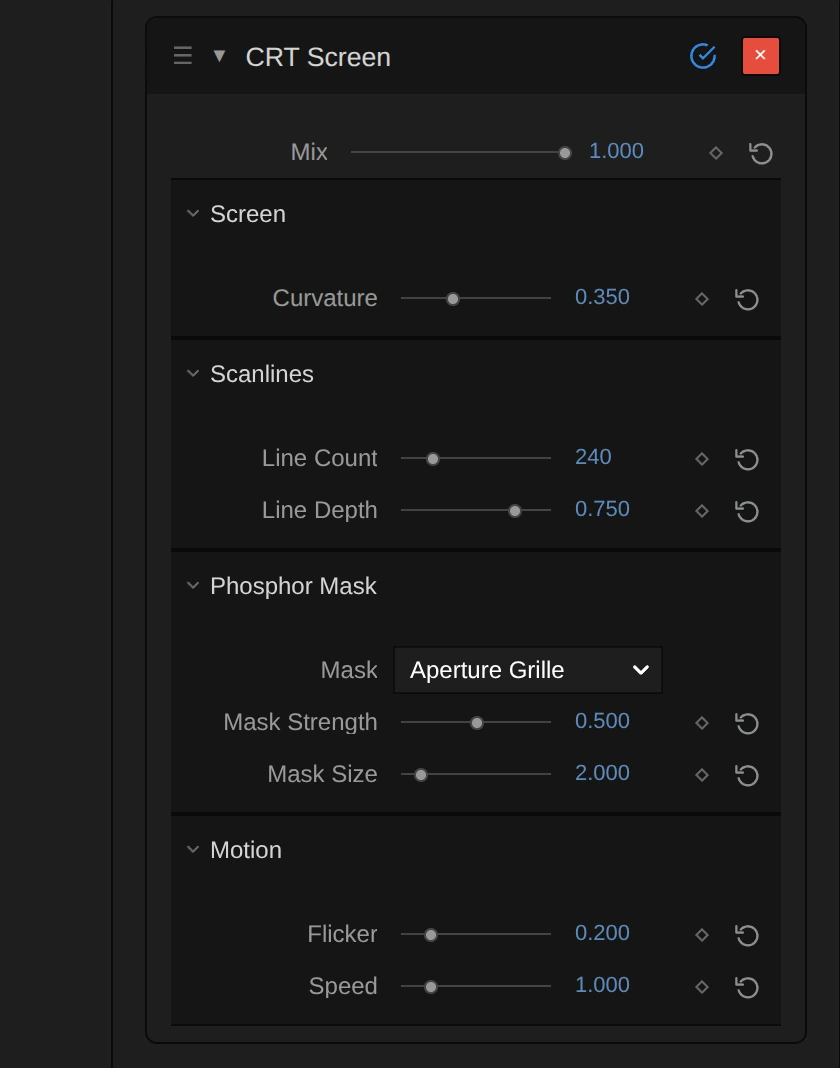
| Control | Range | Default |
|---|---|---|
| General | ||
| Mix | 0 to 1 | 1 |
| Screen | ||
| Curvature | 0 to 1 | 0.35 |
| Scanlines | ||
| Line Count | 16 to 1080 | 240 |
| Line Depth | 0 to 1 | 0.75 |
| Phosphor Mask | ||
| Mask | Aperture Grille, Slot Mask | Aperture Grille |
| Mask Strength | 0 to 1 | 0.5 |
| Mask Size | 0.5 to 12 | 2 |
| Motion | ||
| Flicker | 0 to 1 | 0.2 |
| Speed | 0 to 5 | 1 |
Node setup
Section titled “Node setup”CRT Screen opens as six stage folders: Linear Light Source caches the frame, Tube Shape & Rim bends the read position into a tube, Scanline Beams draws the lines, Phosphor Mask the stripes, Hum Bar & Flutter the flicker, and Light Out & Alpha hands the picture back. How to open it: The node setup.
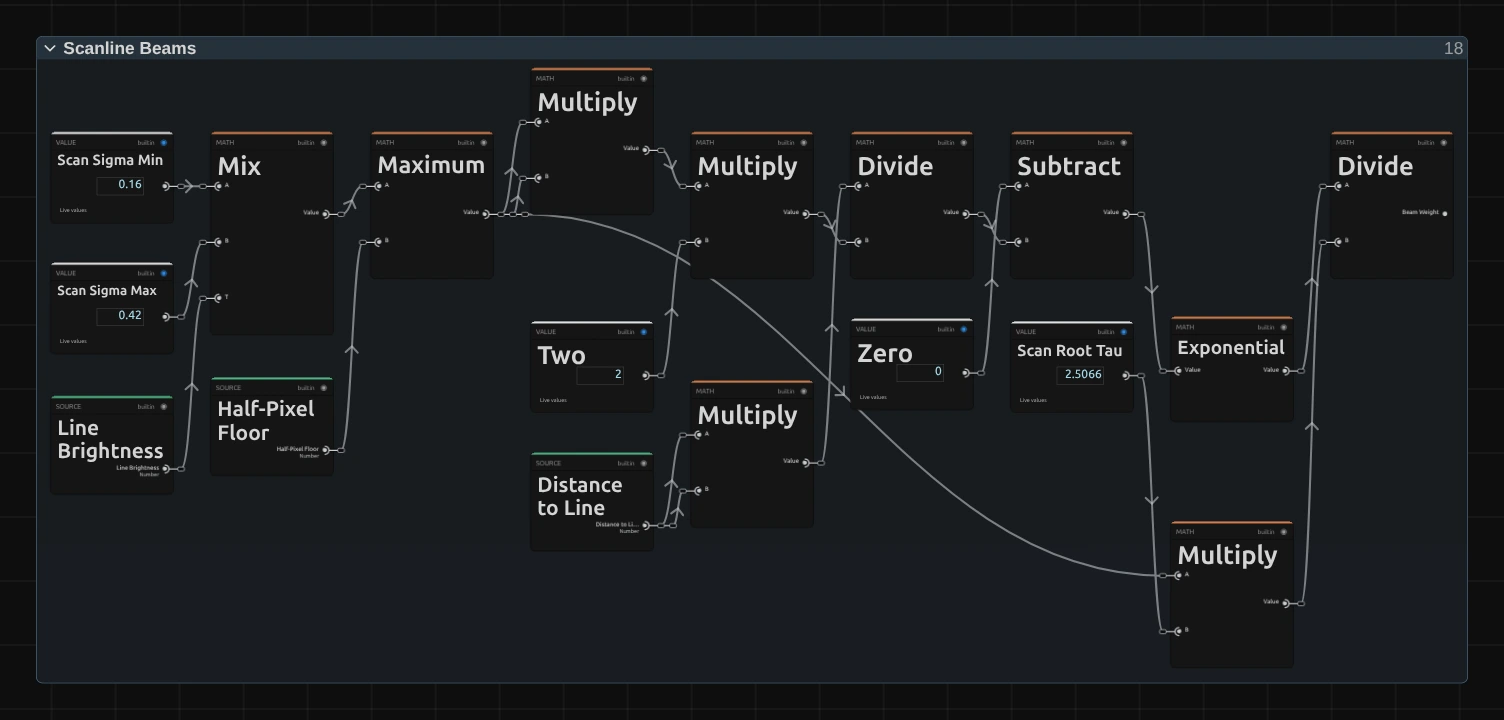
Each pixel adds the light of the two nearest lines; this is the weight of one of them. The line’s brightness picks a beam width between Scan Sigma Min (dark lines) and Scan Sigma Max (bright lines) in a Mix node, and Maximum keeps it at least half a pixel wide (Half-Pixel Floor). Exponential of −distance² ÷ (2 × width²) turns the distance to the line into a soft beam, and the last Divide by Scan Root Tau (√(2π) ≈ 2.5066) × width gives every beam the light of its line, wide or narrow, so the picture keeps its brightness.
Remix: for thin, hard lines even in the highlights, select Scan Sigma Max and set it from 0.42 to 0.25 in the node inspector. For soft lines that almost close, raise Scan Sigma Min from 0.16 to 0.3. Both lines read the same two values.
Technical details
Section titled “Technical details”- Units. Line Count is lines per frame height. Mask Size is the stripe width in pixels at 1080 lines and scales with the frame height, so the export, 4K and a full-quality preview look the same.
- Light. The frame is cached once as premultiplied linear light, and a second cache averages it over an eighth of a line height, so a line averages every one of its rows at any line height. Each beam is divided by its area and both masks keep the average light: dark, mid and bright tones keep their exposure. Bright areas can clip where a beam or a stripe peaks.
- Limits. Lines closer than 2.25 px and mask stripes below 1 px fade out instead of flickering, and the inspector says so. The size of the frame being rendered counts: at Preview Quality ¼ a 1080p composition renders 270 rows, so the default 240 lines fade in the preview only. CRT Screen has no bloom of its own.
- Transparency. Outside the curved tube the layer is transparent (Curvature 0 fills the frame). Cut-out edges keep their colour.
- Time. Flicker is a slow rolling hum bar plus a brightness flutter on timeline time; the preview, scrubbing and the export match. Mix 0 leaves every pixel unchanged.
- Saved projects. A CRT Screen saved before the 2026-10 rebuild keeps its earlier look and controls (2 px lines, per-pixel stripes); add the effect again for the current version.
Formulas, caches and the earlier graph: Effect system: CRT Screen. Nodes: Node Catalog.