
Wave Lines
Redraws the picture as wavy lines on a plain background, a graphic line-art look. The waves bend with the brightness of the picture and drift over time.
Group: Lines & Engraving · How to add an effect
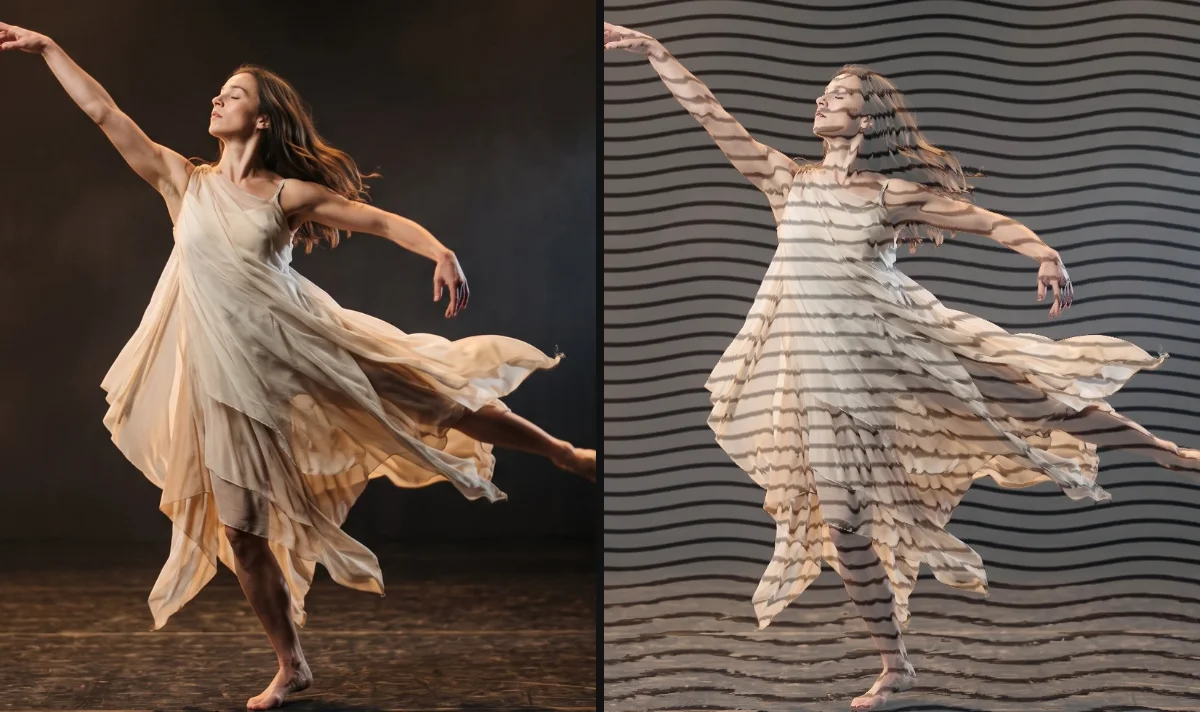
Use it for: a graphic, printed look · a background that turns into line art · titles and posters with a moving texture.
- Amount – how strongly the drawing covers the picture and how far the lines bend. From about 0.5 the drawing covers most of the picture; at 1 only the bending of the lines shows the picture.
- Line Density – how many lines run down the picture (three per step).
- Lines and Background – the two colours of the drawing.
- Speed – how fast the waves drift; 0 holds them still.
Tip: for a dark stage, swap the colours: white Lines on a black Background give a line drawing of light.
Controls
Section titled “Controls”| Control | Range | Default |
|---|---|---|
| Pattern | ||
| Line Density | 3 to 80 | 14 |
| Style | ||
| Amount | 0 to 1 | 0.3 |
| Color | ||
| Lines | a colour | #111827 |
| Background | a colour | #f8fafc |
| Motion | ||
| Speed | 0 to 5 | 1 |
Node setup
Section titled “Node setup”Wave Lines is one look of the pattern engine: its card has a Style menu that switches to other looks with the same controls, such as Glitch Grid and Drift Lines (Styles and presets). Its own graph is small: the line height follows a Sine across the frame whose phase moves with time and with the brightness of the pixel, a Smoothstep from 0.05 to 0.2 draws each line, and a last Mix lays the drawing over the picture by Amount.
Remix: for thicker lines, select the two Value cards of the Smoothstep and raise them from 0.05 and 0.2 to 0.15 and 0.3.
Technical details
Section titled “Technical details”- Units. Line Density × 3 lines run over the frame height (Line Density 14: 42 lines); values below 3 render as 3, and the inspector says so.
- Transparency. The source alpha is kept: transparent parts stay transparent.
- Time. The waves follow timeline time, so the preview, scrubbing and the export match.
- Saved projects. New Wave Lines start at Amount 0.3; saved ones keep their value (the default was 0.75 before 2026-10).
More: Effect system: Wave Lines. Nodes: Node Catalog.