
Symbol Matrix
Rebuilds the picture from small signs that twinkle: each cell swaps its sign at its own moment and breathes. For starry skies, sparks and restless data: the figure stays readable while its surface never settles.
Group: Text & Glyph · How to add an effect
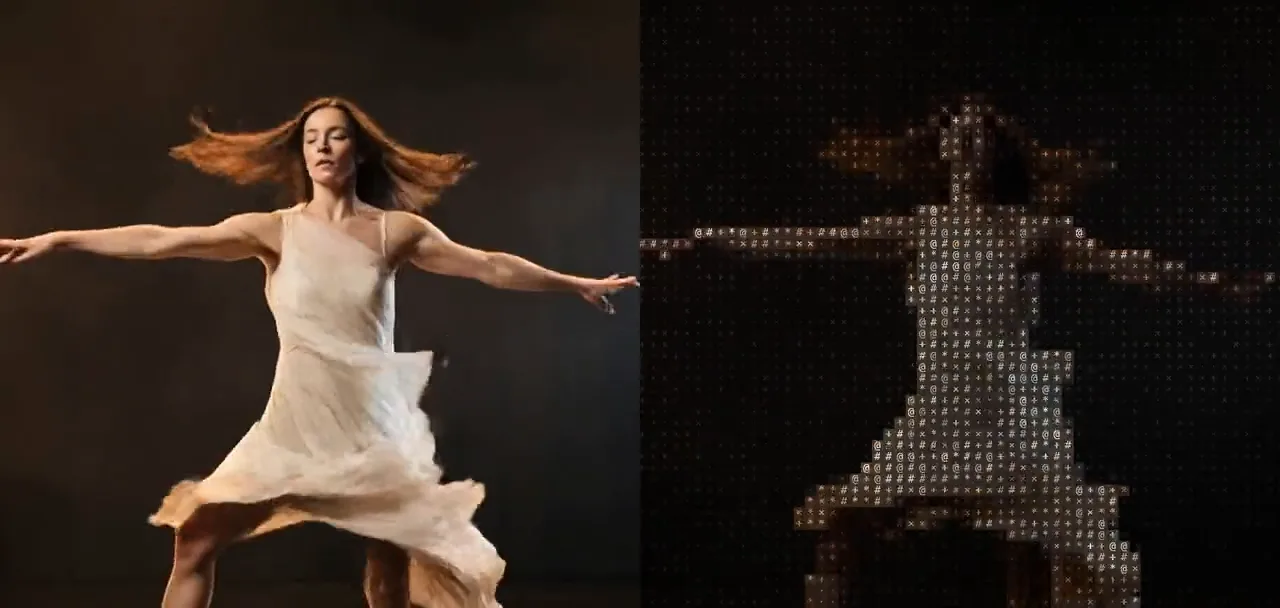
Use it for: a night sky or a field of stars on stage · a figure that glitters or smoulders · a picture alive with restless data.
- Cell Size – how big the signs are.
- Roll – how far a sign may swap: a quiet twinkle among its neighbours, or any sign at random.
- Speed – how often the signs swap and how fast they breathe.
Tip: on a dark stage set Background to 0: only the signs stay, the dark parts turn into a quiet field of dots and crosses, and the figure sparkles in front of it.
Presets
Section titled “Presets”Pick one in the Preset row of the effect card. It sets all controls at once, in one undo step, and the row then shows its name until you change something. A control with keyframes keeps them, and the card says so.
Night Sky – the figure becomes a constellation of warm white stars on a night-blue ground of faint dots, twinkling slowly. Calm and quiet; for night scenes, dreams and wonder.
Shape Shift – large circles, diamonds, triangles and squares in the picture’s colours that keep turning into one another. Playful and graphic, and it reads from far away on a projection.
Number Storm – digits and gaps that change quickly, drawn at random; the figure shows in their colours, and Black Level 0.2 empties the dark stage, so the storm stays on her. Restless, like a counter running wild: data, chance, pressure.
Embers – glowing yellow-orange signs on a dark red ground that flare up and fade slowly, like sparks over a fire; Black Level 0.2 keeps the dark stage free of sparks. Warm and dramatic.
Controls
Section titled “Controls”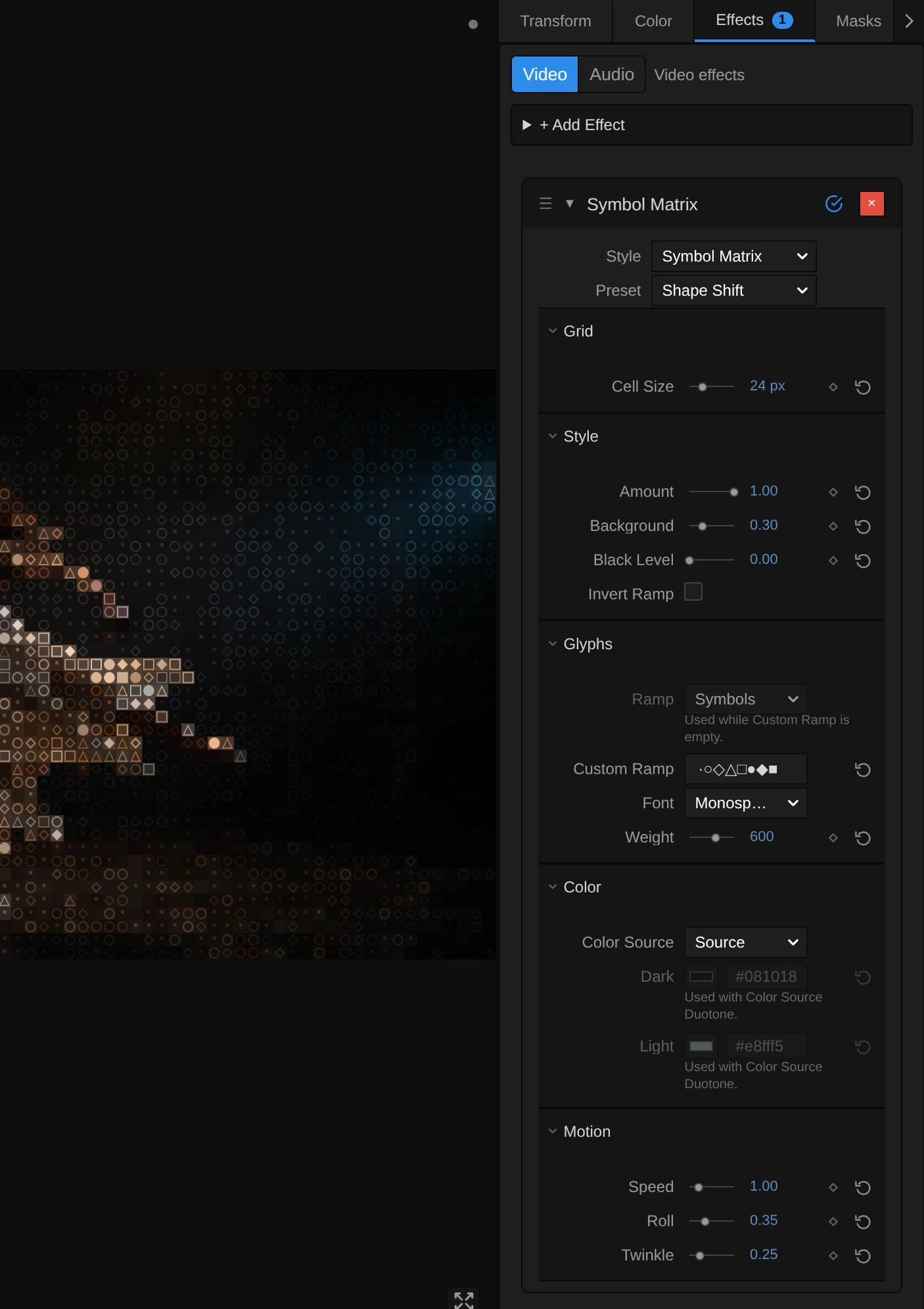
The Style menu at the top of the card switches to another look of the same engine and keeps your values and keyframes, for example Glyph Matrix, Matrix Rain or Retro Matrix. Twinkle belongs to Symbol Matrix: the other looks keep its value for when you switch back.
Cell Size – how big one sign is. 8–10 gives fine glitter, 14 small but clear signs, 24 and more large signs that read on a projection; at 72 the frame holds only 15 rows of large signs. It counts pixels of a 1080p picture, so the preview, the thumbnails and a 4K export show the same grid. 4 to 72 px, default 14 px.
Amount – how much of the effect you see. At 0 the original picture, unchanged; in between, the twinkling signs fade in over it. Keyframe it to let a picture dissolve into stars on a cue. 0 to 1, default 1.
Background – how much of the picture fills each cell behind its sign. At 0 the signs stand on a near-black ground and only they glitter; 0.2–0.4 lets the picture glow through, so the figure stays readable; towards 1 the cells take the full colour and the signs disappear into a mosaic. The more Background, the less the breathing shows, because a sign fades towards its ground. 0 to 1, default 0.2.
Black Level – the brightness up to which the picture counts as black. Everything darker gets the first sign of the ramp, the space in most ramps (with Invert Ramp the last, densest one, a still carpet of it), and stops swapping, even at Roll 1, so a grey stage drops out and only the lit figure sparkles; the rest of the picture spreads over the whole ramp. Try 0.15–0.25 on stage footage, above all with Duotone. 0 to 0.9, default 0.
Invert Ramp – swaps the ends of the ramp: dark parts get the dense signs and bright parts the light ones, like a negative. The colours stay. The higher Roll, the less it shows, because every cell swaps through more of the ramp anyway. Either on or off, default off.
Glyphs
Section titled “Glyphs”Ramp – the row of signs the picture is built from, from the darkest to the brightest part; each cell swaps among the neighbours of its own sign in this row (see Roll). Symbols ( ·×+*#@ after a space) gives dots and crosses in the dark and dense # and @ in the light; Standard and Detailed use punctuation and letters; Blocks turns the twinkle into shimmering dots of shade; Bars into bars that jump up and down; Binary and Numeric into flickering 0 and 1 or digits. While a Custom Ramp is typed, the row rests and the card dims it. In the menu: Standard, Detailed, Blocks, Bars, Binary and 2 more, default Symbols.
Custom Ramp – your own signs, from dark to bright, instead of the Ramp: shapes such as ·○◇△□●◆■ (Shape Shift) or stars such as ·+*✦ (Night Sky). A single sign never swaps, but it still breathes. Spaces at the end are ignored, and a ramp longer than 256 characters is thinned to 256, spread from its first to its last (the card says so). Clear it to use the Ramp again. Any text, default empty.
Font – the lettering. Monospace draws the even signs of a terminal; Serif and Sans Serif give rounder ones, each narrowed to fit its cell. Monospace, Serif, Sans Serif, default Monospace.
Weight – how heavy the strokes are. Heavier signs carry more colour, so the picture gets brighter. How many steps you see depends on the font: the built-in monospace font of many systems only has regular (up to 500) and bold (600 and more). Keyframes step from one weight to the next. 200 to 900, default 600.
Color Source – where the colour of the signs comes from. Source takes the colour of the picture under each cell; Duotone colours them between Dark for the dark parts and Light for the bright parts, as Night Sky and Embers do. Source, Duotone, default Source.
Dark – the colour of the darkest signs in Duotone; the ground behind them is a deep shade of it. With Source it rests, and the card dims it. Pick a colour, default #081018.
Light – the colour of the brightest signs in Duotone. With Source it rests, and the card dims it. Pick a colour, default #e8fff5.
Motion
Section titled “Motion”Speed – how often the signs swap and how fast they breathe. At 1 each cell swaps four times a second, each at its own moment, so the picture twinkles evenly instead of jumping all at once, and its brightness rises and falls about every three seconds; at 0 both stop, and signs change only where the picture changes; 3 and more flickers. It follows the playhead, so a paused picture stands still and the export matches the preview; a keyframed Speed speeds up smoothly. 0 to 5, default 1.
Roll – how far a sign may swap from the sign of its own brightness. At 0 each cell keeps its sign and only breathes; 0.4 lets it swap among its nearest neighbours in the ramp (four of the seven Symbols), so the dark parts twinkle with dots and crosses and the bright parts with # and @; at 1 any sign of the ramp can appear in any cell, and the figure shows only in the colours. Any value above 0 swaps among at least two signs. 0 to 1, default 0.4.
Twinkle – how far each sign dims as it breathes, each on its own beat. At 0 the signs shine steadily and only swap; 0.35 lets them breathe gently, so the figure keeps its brightness; at 1 a sign fades out completely at the low point of its breath, and the picture flickers like a starry sky. The breath follows Speed, so at Speed 0 it stops too. Effects saved before Twinkle existed keep their deeper breath (0.7). 0 to 1, default 0.35.
Node setup
Section titled “Node setup”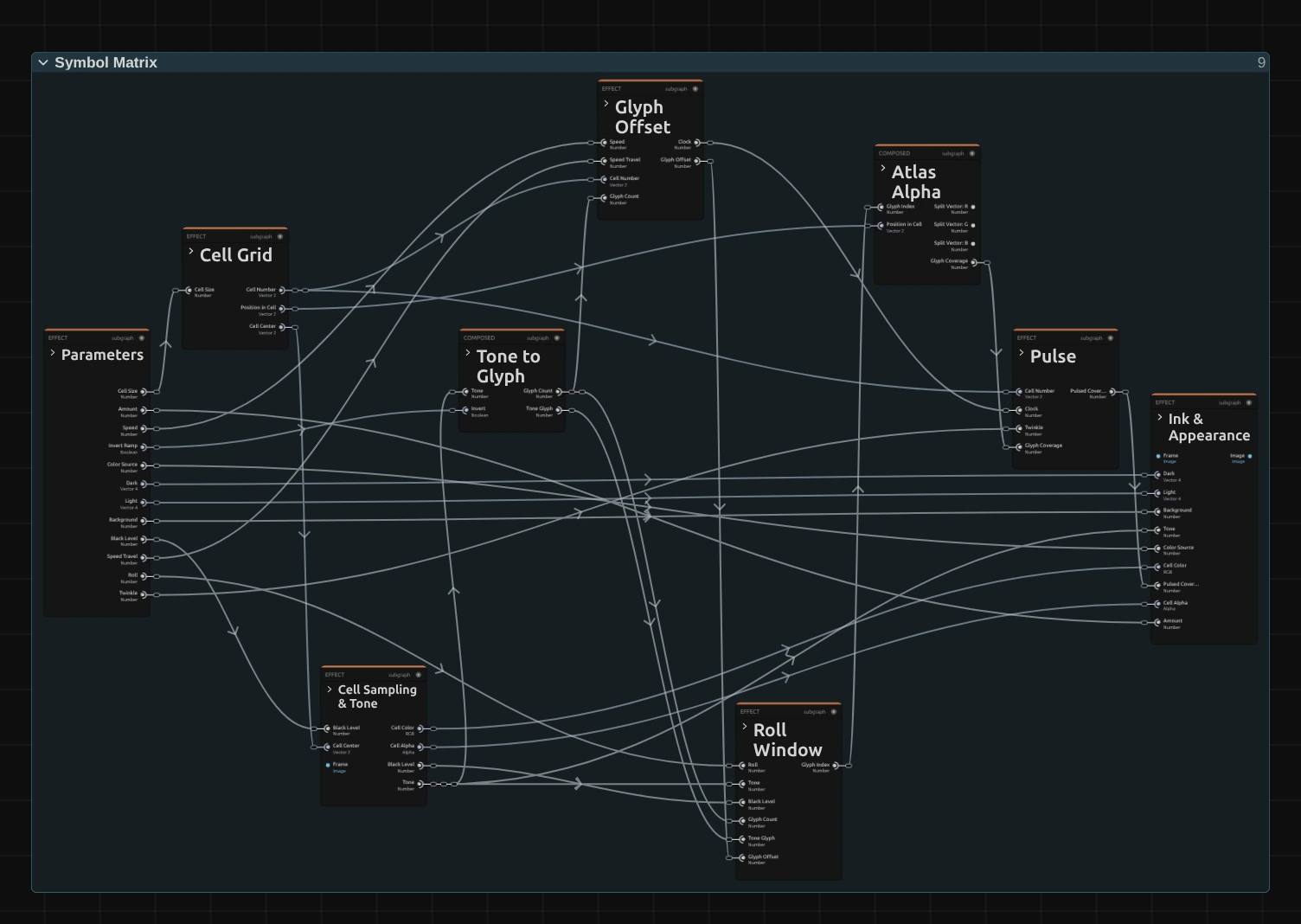
Symbol Matrix works in eight stages, one folder each in the Nodes tab: Cell Grid cuts the frame into square cells, Cell Sampling & Tone reads the colour and brightness in the middle of each cell, Tone to Glyph picks the sign of that brightness, Glyph Offset draws each cell’s random swaps at moments of its own, Roll Window keeps a swap inside a part of the ramp around the cell’s own sign, Atlas Alpha looks up where the sign covers the cell, Pulse lets that coverage breathe, and Ink & Appearance colours the sign and its ground. Click a folder’s header to open it. Glyph Offset and Pulse make it twinkle; Roll Window works as in Glyph Matrix, the other five as in ASCII. Symbol Matrix is one look of the glyph engine that the Text & Glyph looks share; its Style menu switches between them.
Cell Grid
Section titled “Cell Grid”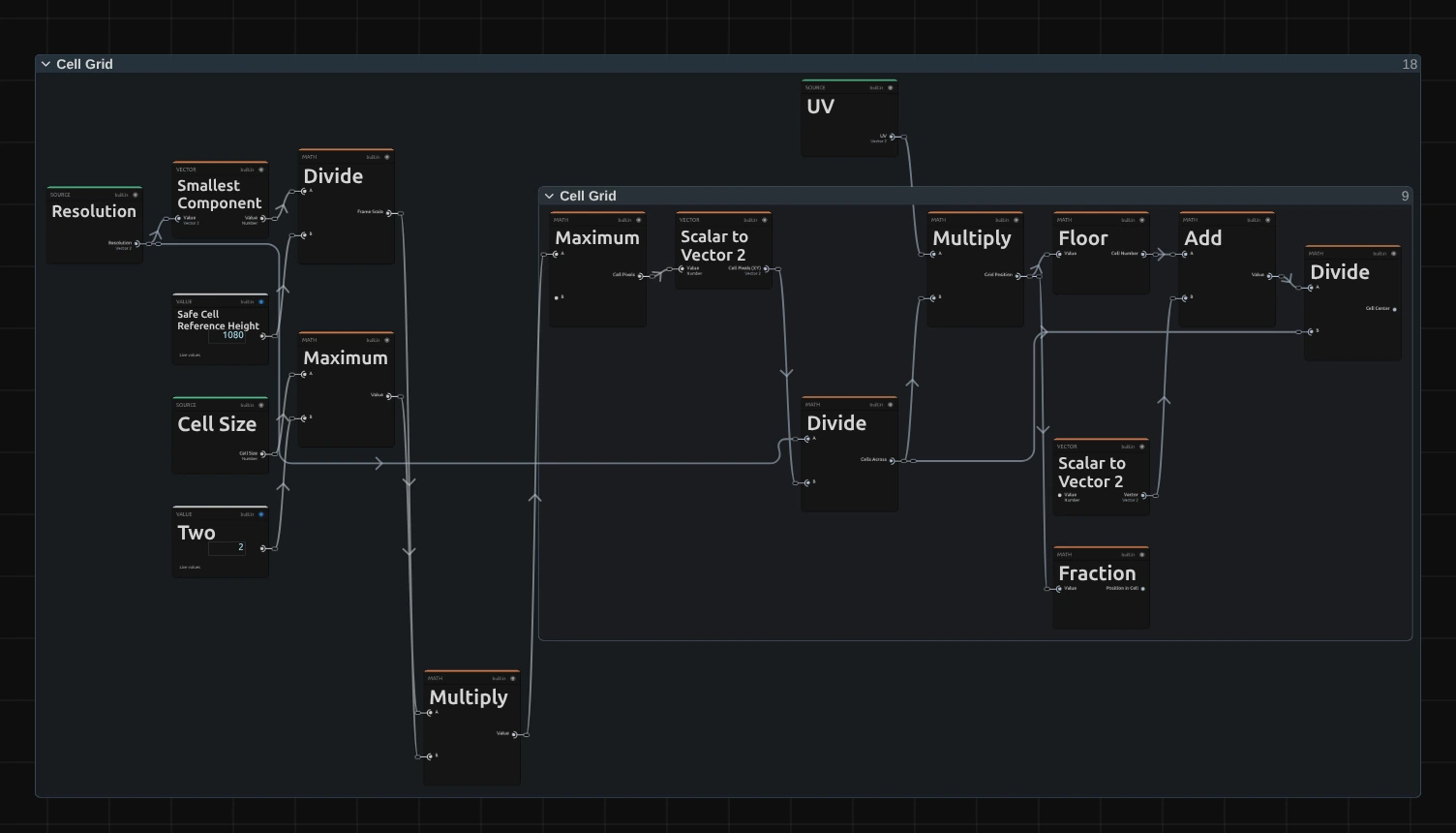
Smallest Component – the shorter side of the frame; divided by 1080 it scales Cell Size, so a 4K export, a portrait frame and a thumbnail show the same grid.
Maximum – the cell size in pixels of this frame, never smaller than 2.
Floor – which cell the pixel lies in. Glyph Offset and Pulse give each cell its own random numbers from this cell number.
Fraction – where the pixel lies inside its cell, from 0 to 1; Atlas Alpha draws the sign with it.
Divide – the middle of the cell, where the whole cell reads the picture.
Cell Sampling & Tone
Section titled “Cell Sampling & Tone”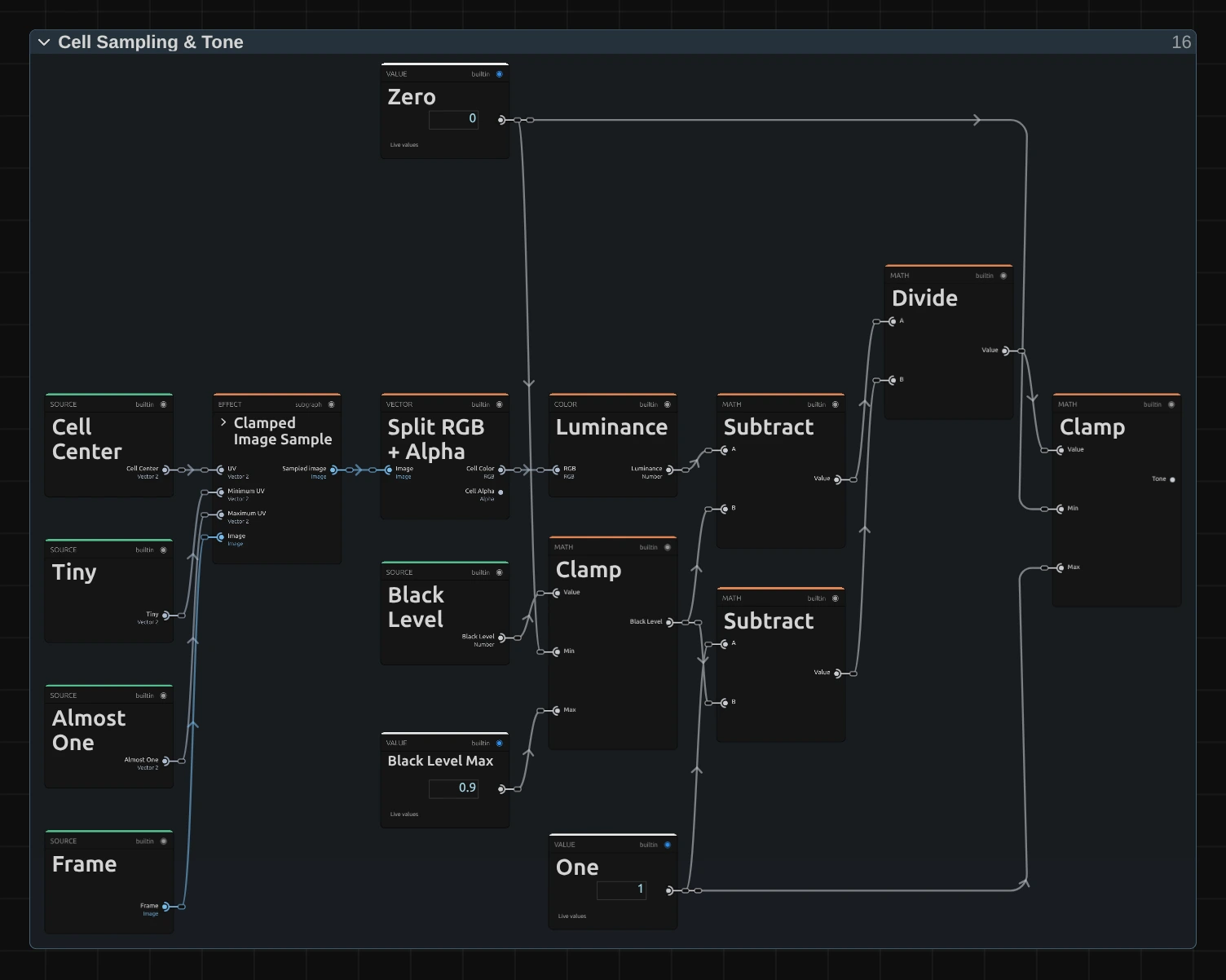
Clamped Image Sample – reads the input picture at the cell centre, never outside the frame.
Split RGB + Alpha – the cell’s colour, which becomes the ink, and its transparency.
Luminance – the brightness of the cell colour, weighted the way the eye sees it (green counts most).
Divide – applies Black Level: the luminance minus Black Level (Subtract), divided by what is left above it (the other Subtract: One minus Black Level). The Clamp next to Black Level keeps it between 0 and Black Level Max 0.9.
Clamp – keeps the result between 0 and 1, so everything darker than Black Level becomes 0: the Tone. It picks the sign.
Tone to Glyph
Section titled “Tone to Glyph”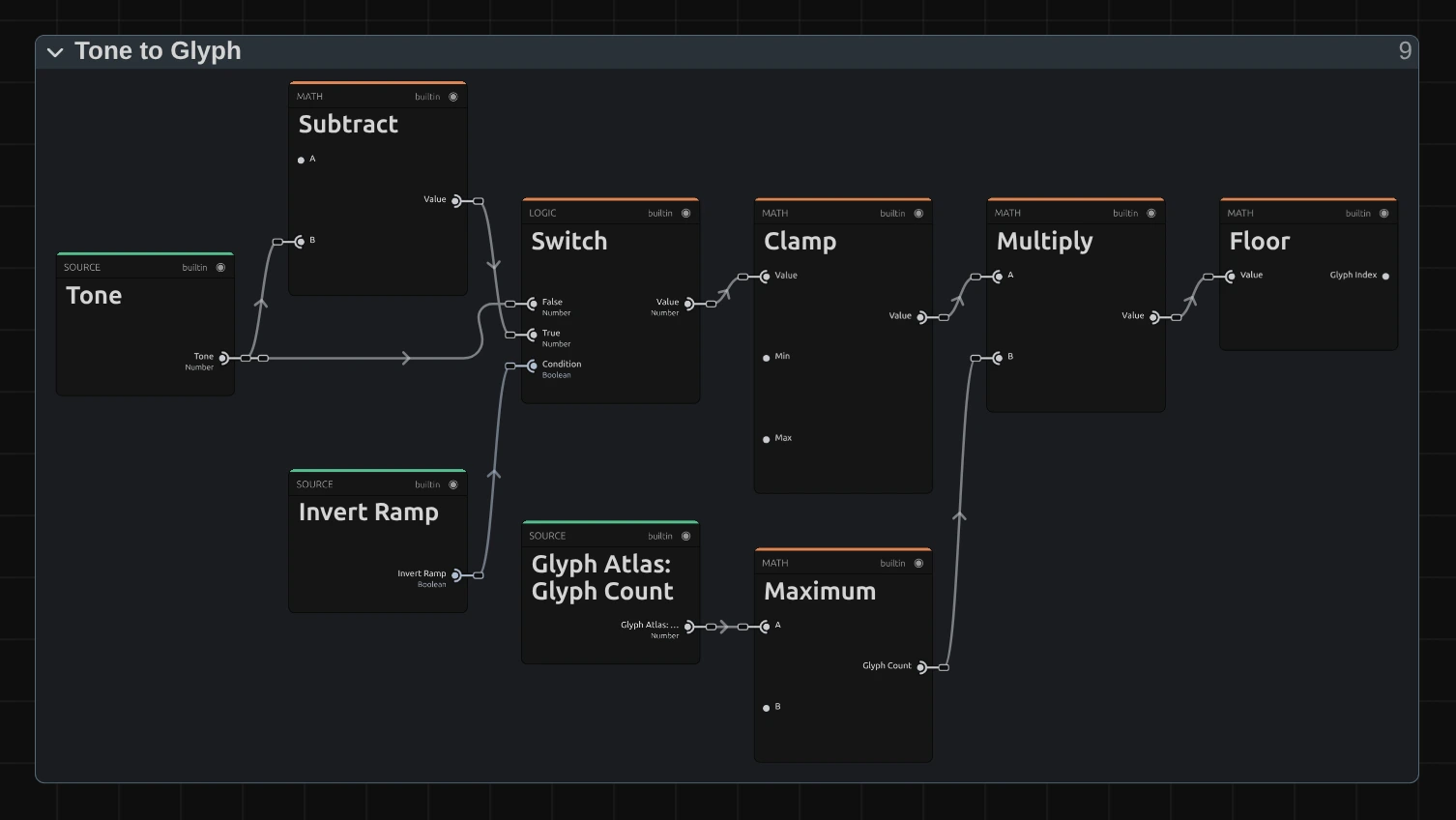
Subtract – one minus the tone, for Invert Ramp.
Switch – the tone as it is, or inverted when Invert Ramp is on.
Clamp – keeps the tone just under 1, so the brightest cells get the last sign and never one past it.
Multiply – spreads the tone over the number of signs in the ramp.
Floor – the number of the cell’s own sign: the Tone Glyph that Roll Window swaps around.
Glyph Offset
Section titled “Glyph Offset”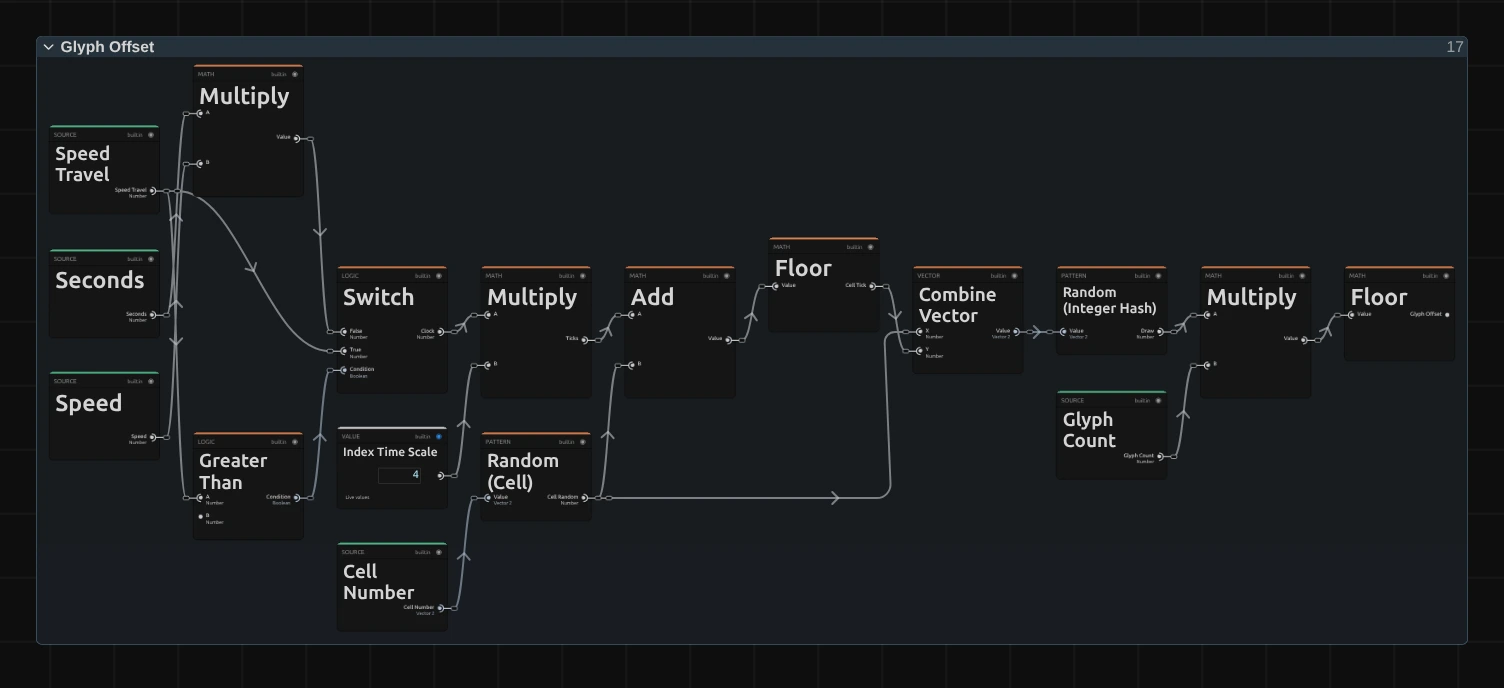
Clock – how far the clock has run: Seconds × Speed (the Multiply above it), or Speed Travel, the distance a keyframed Speed has covered, when Speed has keyframes (Greater Than checks for that). Times Index Time Scale 4 (Multiply) it counts four swaps a second at Speed 1. Pulse breathes with the same clock.
Cell Random – a random number from 0 to 1 for each cell (Random (Cell)), the same in every frame.
Cell Tick – the swaps the clock has counted plus the cell’s random number, rounded down (Add, Floor): every cell counts its swaps on its own, so they fall at different moments and the picture twinkles evenly instead of jumping all at once.
Draw – a new random number for each swap of each cell: Random (Integer Hash) of the cell’s random number and its tick (Combine Vector). Neighbouring cells and successive swaps draw unrelated numbers.
Glyph Offset – the draw times the number of signs, rounded down (Multiply, Floor): how many steps this swap moves the sign. Roll Window folds it into the window around the cell’s own sign.
Roll Window
Section titled “Roll Window”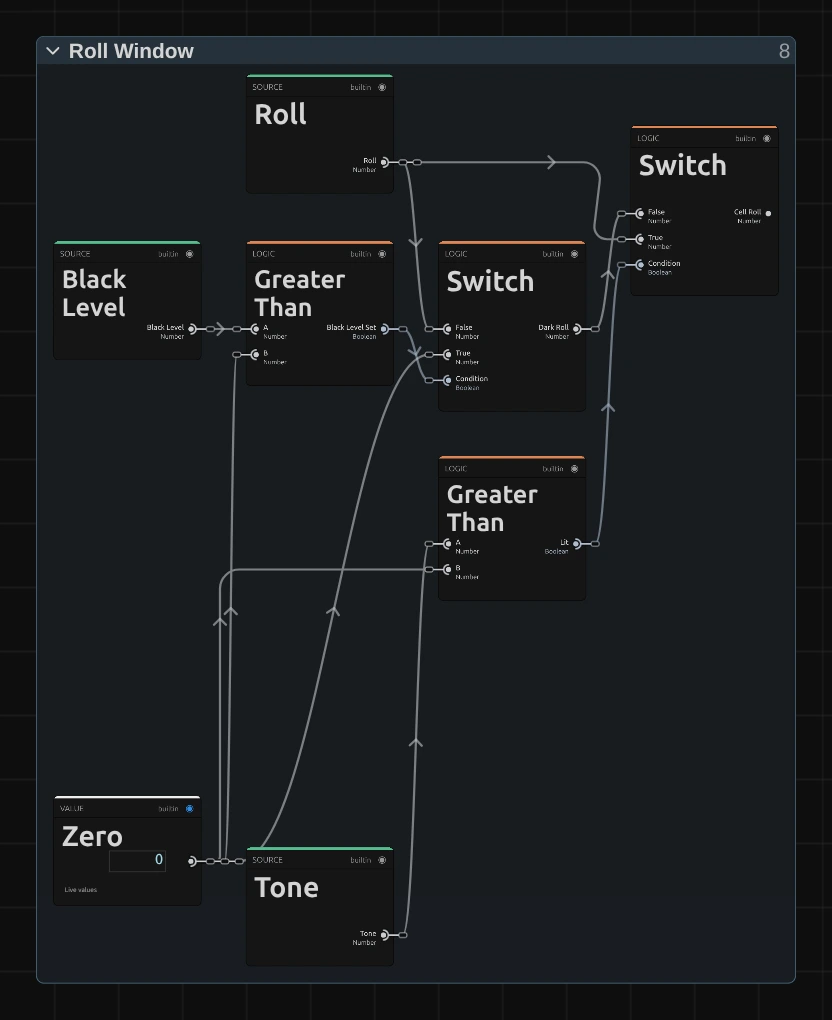
Lit – Greater Than: is the cell’s Tone above 0, so brighter than Black Level? The other Greater Than asks whether Black Level is set at all (above 0).
Dark Roll – a Switch: 0 while Black Level is above 0, otherwise Roll. At Black Level 0, also in effects saved before this hold existed, every cell rolls as before.
Cell Roll – the second Switch: Roll for a lit cell, the Dark Roll for a dark one. The window below is built from it, so with Black Level set a dark cell keeps its sign, even at Roll 1, and the dark stage stays empty.
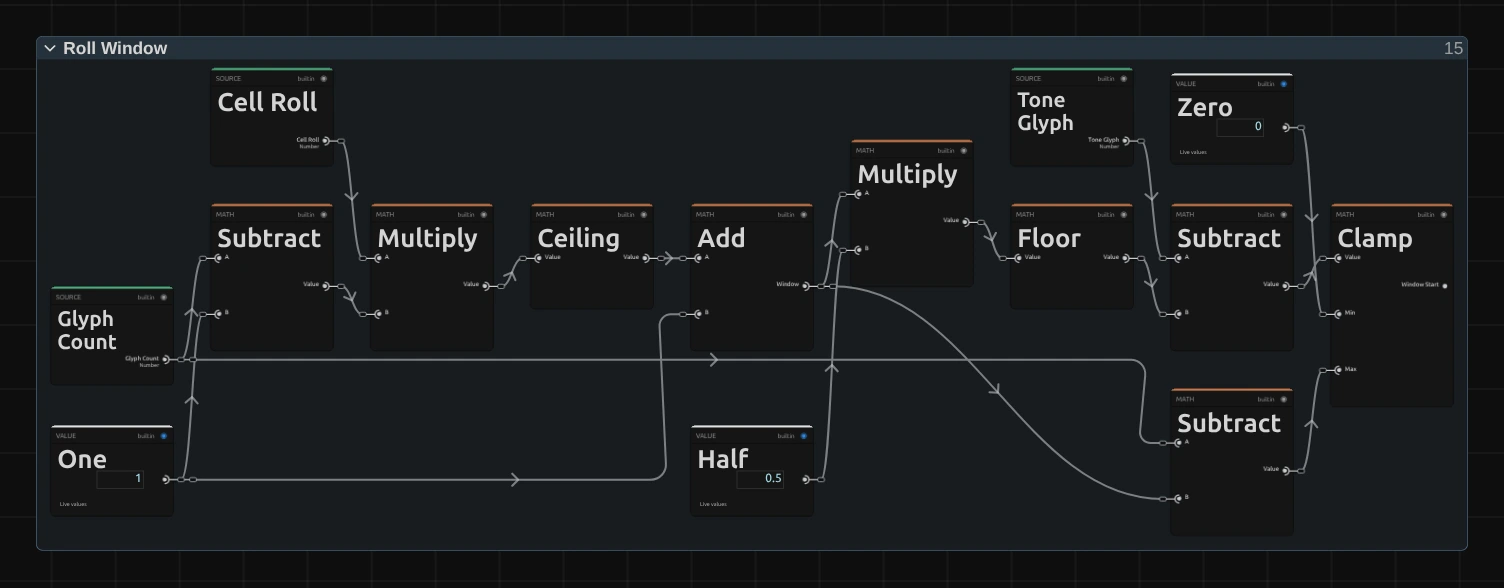
Ceiling – the Cell Roll times the ramp’s length minus one (Subtract, Multiply), rounded up: how many neighbours a cell may swap to. Any Cell Roll above 0 gives at least one.
Window – that number plus the cell’s own sign (Add): from 1 at Roll 0 to the whole ramp at Roll 1.
Floor – half the window, as a whole number (Multiply by Half first): how far the window reaches below the cell’s own sign.
Window Start – the Tone Glyph minus that half, kept between 0 and the ramp’s length minus the window (Clamp). The window never hangs over an end of the ramp: the brightest cells swap among the densest signs and never fall back to empty ones.
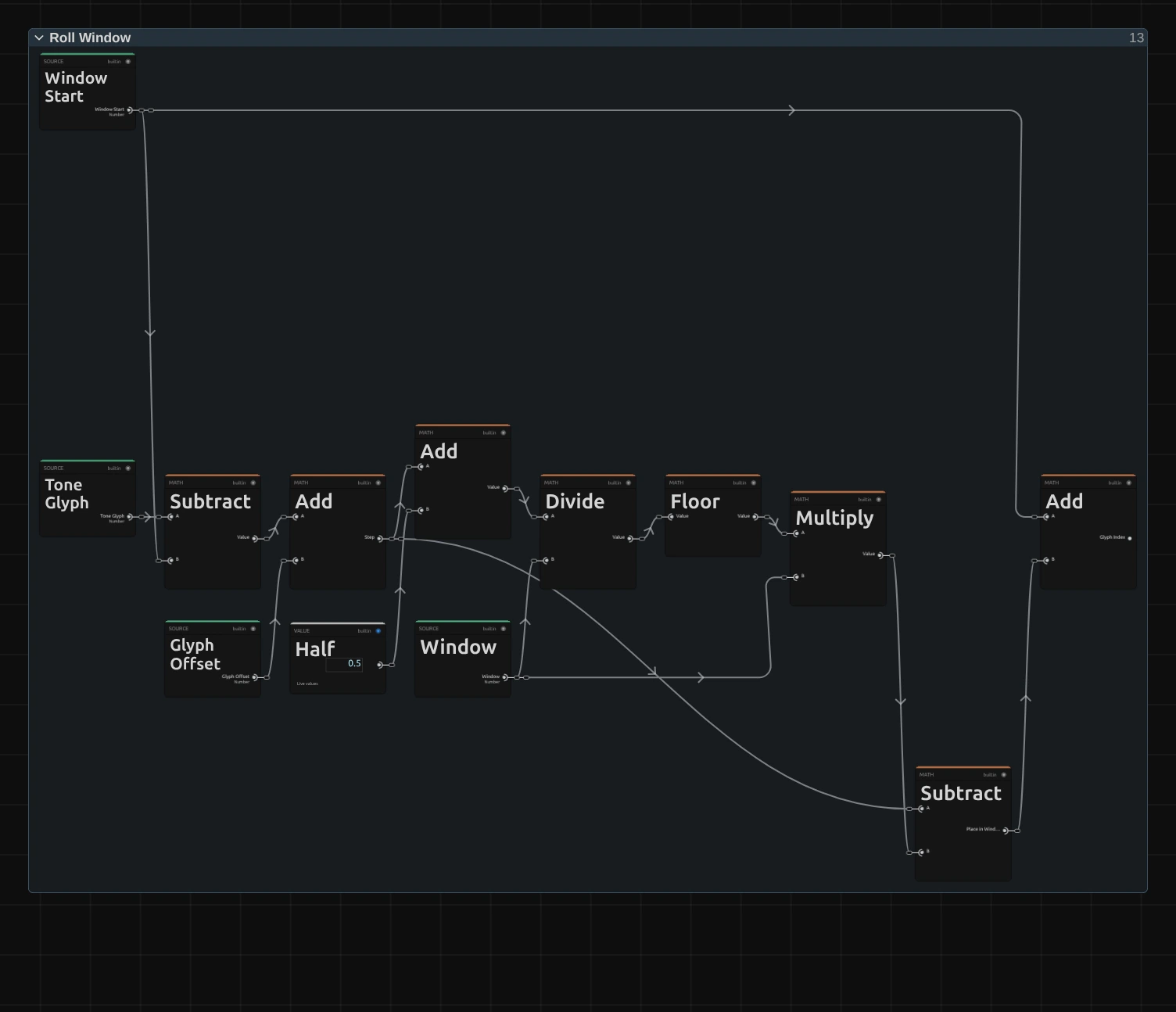
Step – the cell’s own place in its window plus the Glyph Offset (Subtract, then Add).
Divide – the step divided by the window (half a step added first, so the division never lands just below a whole number); Floor counts the whole windows passed.
Place in Window – the step minus those whole windows (Multiply, Subtract): a place in the window, picked by this swap’s draw.
Glyph Index – Window Start plus the place in the window (Add): the sign the cell shows now. At Roll 1 the window is the whole ramp, so any sign can come up.
Atlas Alpha
Section titled “Atlas Alpha”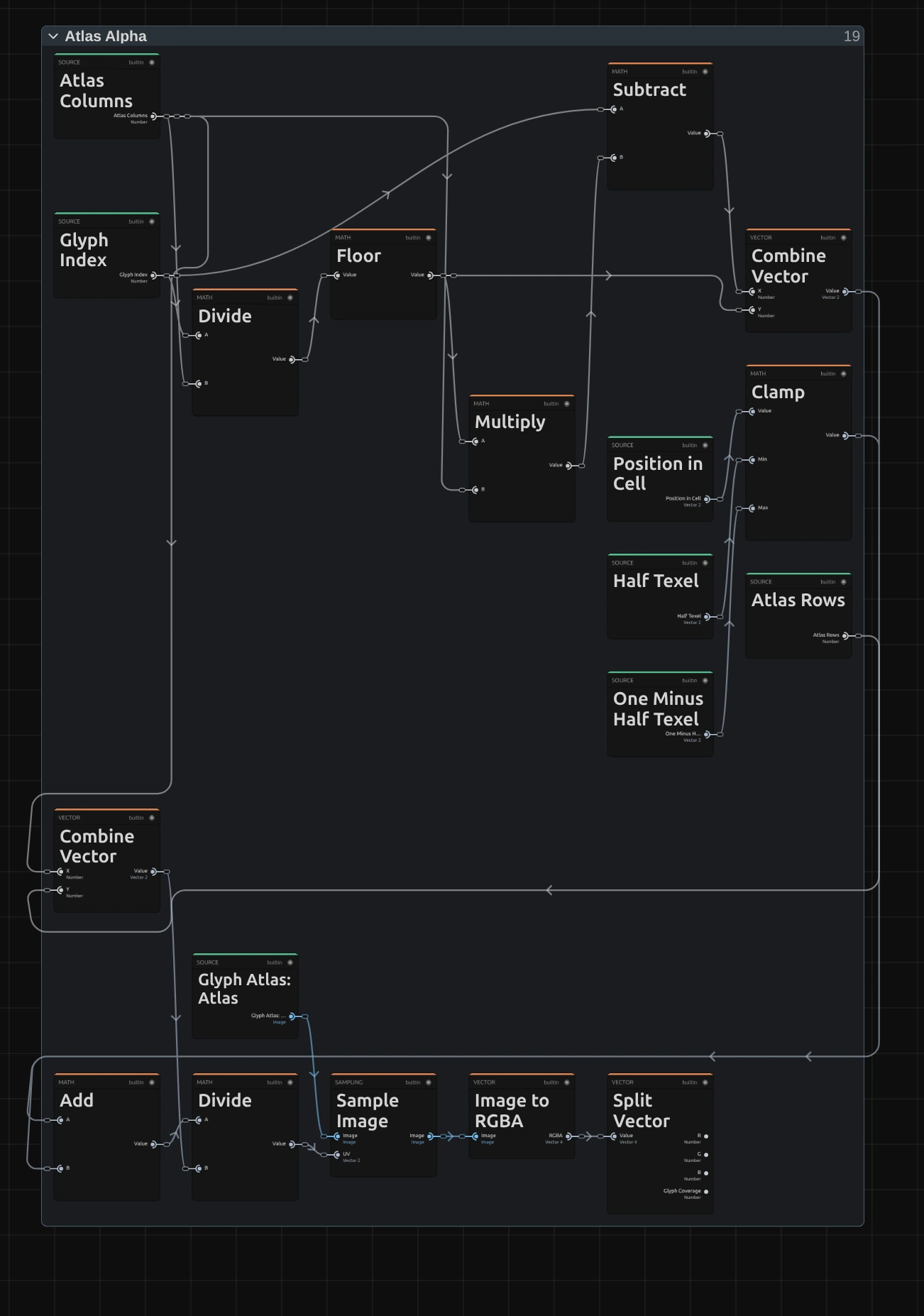
Floor – the row of the sign on the atlas, a sheet of all signs of the ramp drawn in the chosen Font and Weight.
Subtract – its column on the sheet.
Clamp – keeps the place inside the cell half a pixel of the sheet away from the edges of the sign’s square (Half Texel, 0.5 of the 64 pixels of a square, and One Minus Half Texel). The sheet is read with smoothing, so a read any closer would mix in a little of the neighbouring sign: blocks and bars would show thin seams wherever a cell is not a whole number of pixels.
Sample Image – reads the sheet at the sign’s square plus the place inside the cell.
Split Vector – the Glyph Coverage: 1 inside the strokes of the sign, 0 around them.
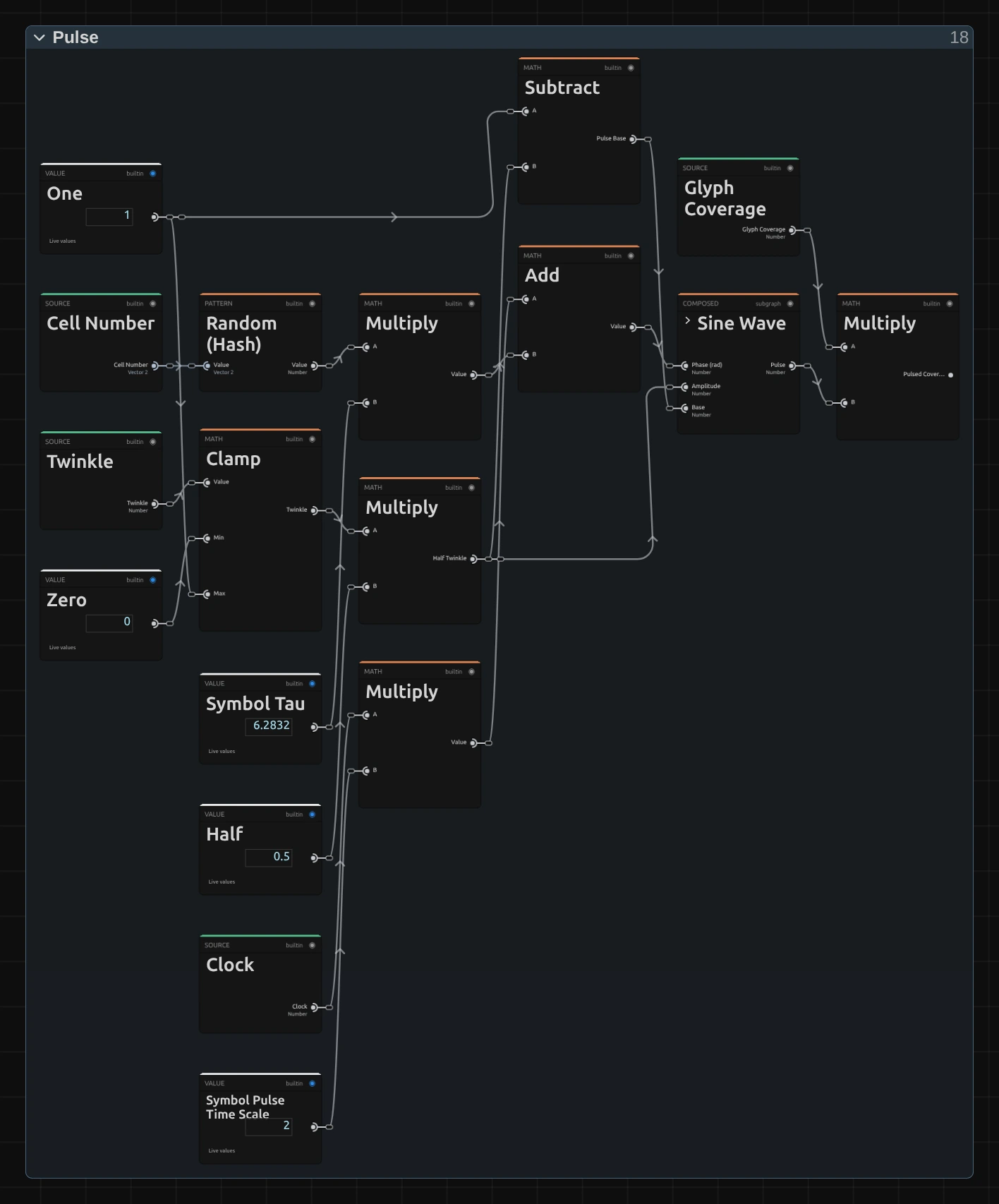
Random (Hash) – a random number for each cell, times a full turn (Symbol Tau 6.2832, the Multiply beside it): where in its breath the cell starts, so neighbours never breathe in step.
Half Twinkle – Twinkle, kept between 0 and 1 (Clamp), times Half: the swing of the breath. One minus it (Subtract) is the Pulse Base, the middle of the breath.
Add – the cell’s start plus the clock from Glyph Offset times Symbol Pulse Time Scale 2 (the Multiply below): where the cell is in its breath right now. At Speed 1 one breath lasts about three seconds.
Sine Wave – the Pulse Base plus Half Twinkle times the sine of that: the pulse, which rises and falls between 1 − Twinkle and 1 (0.65 to 1 at the default).
Pulsed Coverage – the Glyph Coverage from Atlas Alpha times the pulse: the sign fades towards its ground and back. Ink & Appearance draws with it.
Remix: open the Constants folder and set Symbol Pulse Time Scale from 2 to 0.5: the signs breathe four times slower, about once in twelve seconds, while they keep swapping at their own pace.
Ink & Appearance
Section titled “Ink & Appearance”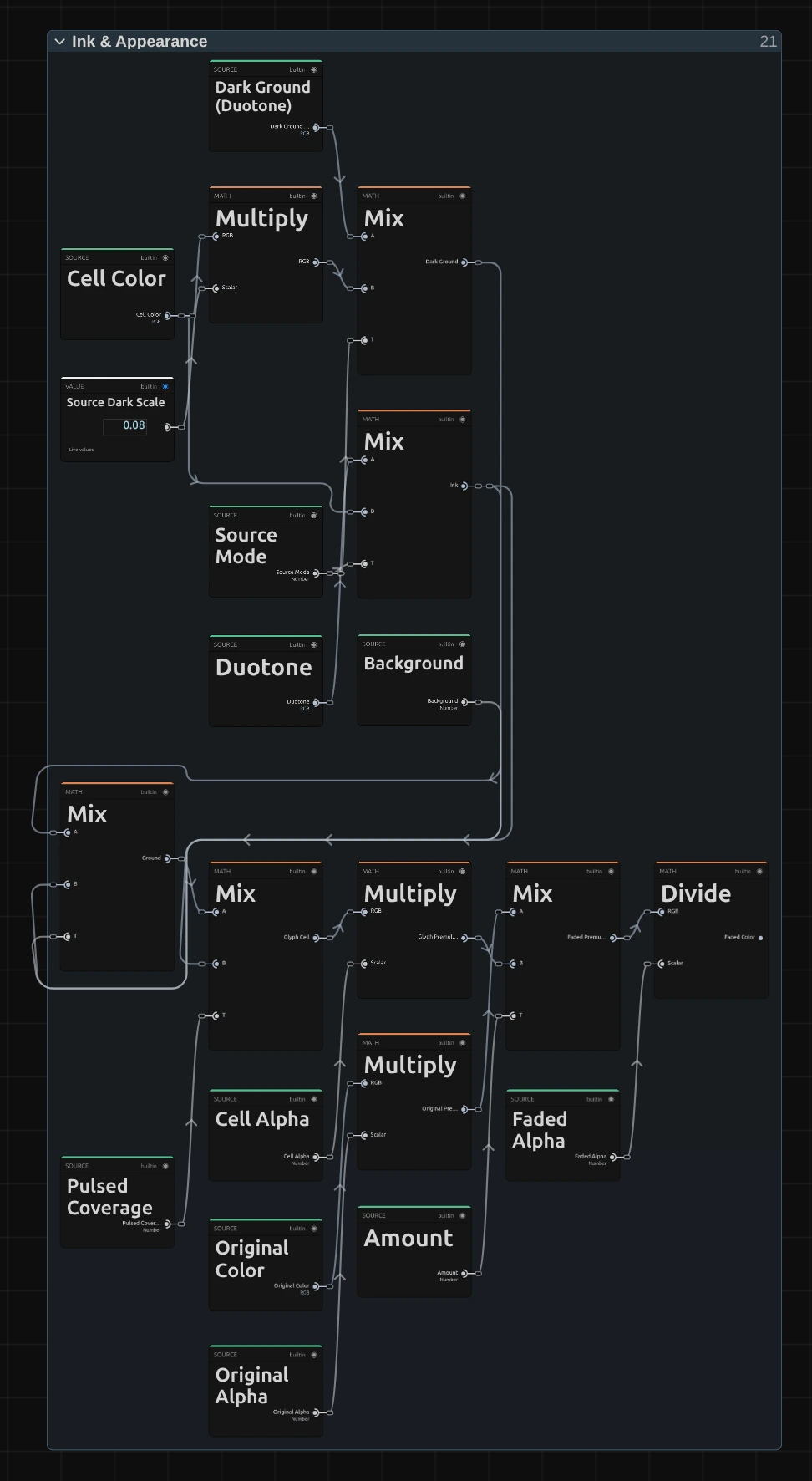
Ink – the colour of the sign: the cell colour with Source, between Dark and Light with Duotone.
Dark Ground – the cell behind it as classic character art has it: the cell colour × 0.08, or Dark × 0.15 with Duotone.
Ground – the dark ground lifted towards the ink by Background.
Glyph Cell – the ink on its ground, by the Pulsed Coverage from Pulse.
Faded Premultiplied – fades the untouched picture, pixel by pixel, towards the glyph cell by Amount. Both are first multiplied by their transparency (Original Alpha, Cell Alpha), and the transparency fades the same way (Faded Alpha).
Faded Color – divides by Faded Alpha (at least a millionth) to get back to plain colour. Mixed this way, the colour a transparent pixel hides never shows as a dark or green fringe around a cut-out figure while Amount fades.
Technical details
Section titled “Technical details”- Size. Cell Size counts pixels of a frame whose shorter side is 1080: a 4K export, a portrait frame, a lower Preview Quality and the thumbnails show the same grid. A cell is never smaller than 2 pixels of the frame; below 2 px Cell Size renders as 2, and the card says so.
- Time. The swaps and the breathing follow the timeline time: scrubbing, playback and export give the same frame for the same moment, and a paused picture needs no extra rendering. With keyframes on Speed both move by the distance Speed has travelled, so they never jump.
- Swaps. Each cell swaps 4 × Speed times a second, shifted by its own random share of a swap, to a random sign of its window: 1 + Roll × (ramp − 1) signs, rounded up, around its own one and kept inside the ramp. Its coverage breathes as (1 − Twinkle / 2) + Twinkle / 2 × sin(2 × clock + its own phase): 0.65 to 1 at the default Twinkle 0.35, and 0.3 to 1 for effects saved before Twinkle existed. A Roll outside 0 to 1 renders as 0 or 1, and the card and the tools say so.
- Characters. The whole ramp is drawn in one font size, so its tallest character spans 88 % of the cell height. Blocks and Bars are exact shapes, read half a pixel inside each character, so they join without seams at any cell size.
- Transparency. Each cell takes the transparency of its centre, so a cut-out figure keeps its outline in whole cells. Amount fades the transparency back to the original’s, pixel by pixel, and mixes the colours weighted by their transparency, so the hidden colour of a transparent pixel never shows as a fringe around a cut-out figure.
- Saved projects. A Symbol Matrix stores its node setup and keeps its look. Effects saved without a stored setup now swap each cell at its own moment; before, every cell swapped on the same frame and the random signs slid diagonally across the frame, a bug. They load with Roll 1, the whole ramp they had, and those saved before Background existed with Background 0. A stored setup keeps its smaller characters, which cover about half of a cell, and the way it read the character sheet, so saved Blocks or Bars can show thin seam lines on frames whose cells are not a whole number of pixels; Black Level is 0 there. A stored setup also keeps the earlier Cell Size in pixels of the output, so its preview at another quality and an export at another size show different grids; add the effect again for the 1080p grid. Presets fully apply only to effects added in this version: on a stored setup from before, the card has no Background, Black Level, Roll or Twinkle row, so a preset leaves those values out.
- More: Effect system · Node Catalog · Styles and presets.