
Pixel Sort
Sorts short runs of pixels by brightness, so bright areas break into fine sideways streaks. A classic glitch-art look, marked Experimental.
Group: Pixel & Mosaic · How to add an effect
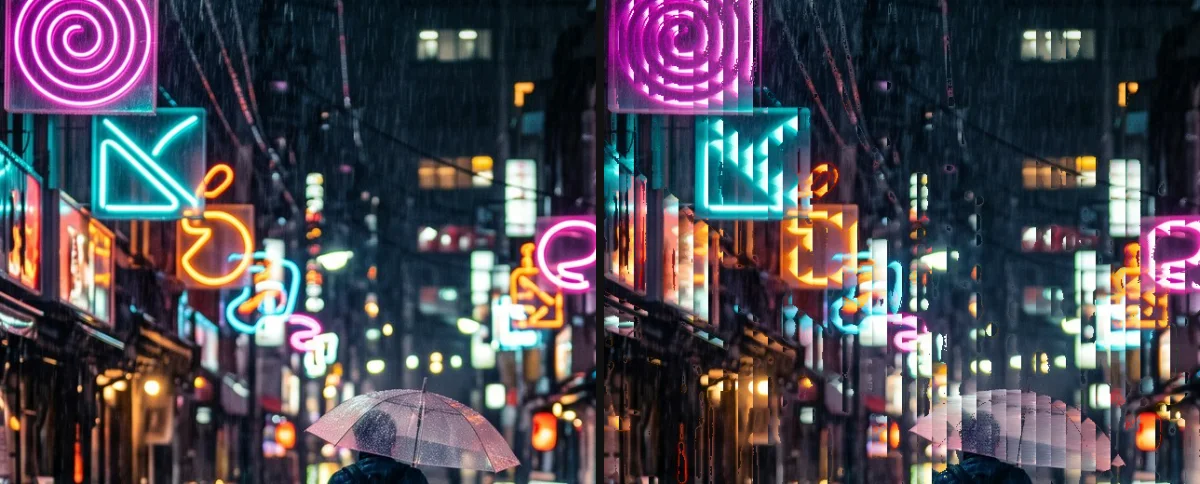
Use it for: glitch art on lights and bright skies · a datamosh-like accent · album-cover stills.
- Threshold – only pixels at least this bright take part. Lower it to sort more of the picture.
- Amount – how much of the sorted colour replaces the original.
- Segment Size – how long each sorted run is (4 to 16 pixels).
Tip: raise Threshold until only the highlights streak; on smooth areas such as a sky keep Amount low, where the run seams show.
Experimental: the effect sorts fixed runs of at most 16 pixels instead of whole bright intervals, so smooth areas such as a sky show a fine pattern of vertical stripes at the run seams instead of long sorted streaks.
Controls
Section titled “Controls”| Control | Range | Default |
|---|---|---|
| Structure | ||
| Segment Size | 4 to 16 | 16 |
| Style | ||
| Amount | 0 to 1 | 0.5 |
| Threshold | 0 to 1 | 0.45 |
Node setup
Section titled “Node setup”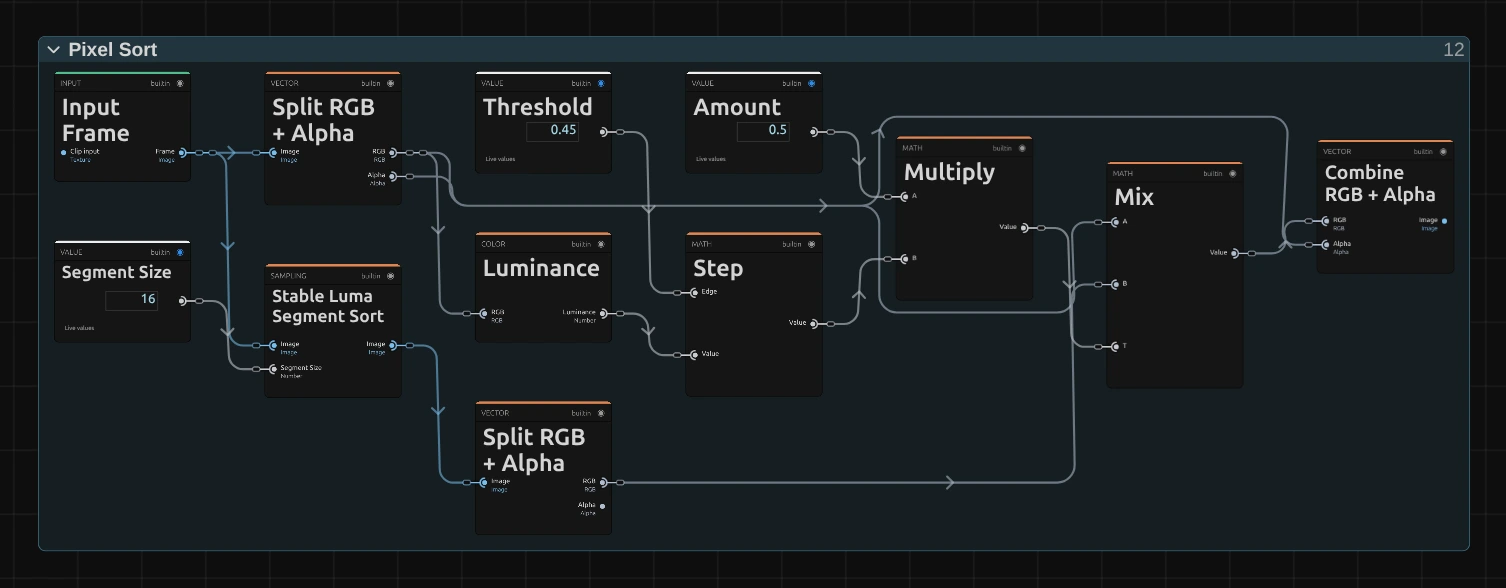
Stable Luma Segment Sort sorts every run of Segment Size pixels by brightness. Step compares the brightness of each pixel with Threshold: 1 where it is at least as bright, else 0. Multiply scales that by Amount, and Mix blends the original colour with the sorted one by the result. How to open it: The node setup.
Remix: to sort the dark pixels instead of the bright ones, swap the two inputs of Step: plug Luminance into Edge and Threshold into Value.
Technical details
Section titled “Technical details”- Units. Runs are horizontal and start every Segment Size pixels of the rendered frame. Brightness is Rec. 709 luma; equal pixels keep their order.
- Transparency. The original alpha is kept; only the colour is sorted.
- Values. Segment Size outside 4 to 16 renders as the nearest of them; Threshold at or above 1 leaves the picture almost unchanged. The inspector and agent tool results say so.
- Experimental. The effect list adds “(Experimental)”; the inspector and agent tool results give the reason above. It runs as a GPU compute effect.
Effect pipelines: Effect system. Nodes: Node Catalog.